Deepvue vs TraderSync: Which Trading Journal Fits Stock Traders in 2026?
A trading journal built into a stock research platform, set beside TraderSync’s plans, AI limits, app ratings and September rebuild.
Deepvue builds its journal into a stock research platform for $99 a month or $990 a year, and this Black Friday the year costs $490. TraderSync is a multi asset trading journal priced at $29.95 to $79.95 a month, rebuilt in September 2026 with a new design and its Cypher AI assistant.
A stock you bought three weeks ago is still an open bet: it could keep rising or drop back to your stop. A good journal should tell you what’s at risk while the trade is open and there’s still time to act on it.
We designed the Deepvue Trading Journal around that. It tracks the stop and the open risk on every position you hold. It also shares a login with the screener and charts where the trade began, so you review it on the same chart you found it on.
TraderSync comes at journaling from the active trader’s side. It’s a standalone journal for stocks, options, futures, forex and crypto, and it was rebuilt in September 2026 with a redesigned dashboard and Cypher, an AI assistant that reads your trade history.
Deepvue is ours, so we’ve taken TraderSync’s side straight from the source: its prices and plans come from its website, and every review quote names where it was posted. So what is TraderSync like after the rebuild, and is it the right journal for a stock trader?
Deepvue vs TraderSync at a Glance
In the Deepvue vs TraderSync matchup, the split shows up as soon as the plans are lined up. Deepvue sells one plan built around stock research, with the journal included, while TraderSync sells three tiers built around multi asset review and replay.
| Deepvue Trading Journal | TraderSync | |
|---|---|---|
| Built for | Stock traders who keep positions open for days, weeks or months | Active traders in stocks, options, futures, forex and crypto |
| Regular price | $99 a month or $990 a year, one plan | Pro $29.95, Premium $49.95 and Elite $79.95 a month, or $269.52, $449.52 and $719.52 billed yearly |
| Black Friday | $490 for the year if you join by December 4, with the same rate on every renewal | No offer listed; a 7 day free trial on each plan |
| Free plan | None | None, and exports are switched off during the trial |
| Getting trades in | Broker sync with Schwab, Fidelity, IBKR, Robinhood, Webull, Questrade and more, or a CSV in any layout | Autosync or file upload; the site claims 700+ brokers and platforms, and its directory lists about 500 |
| Markets covered | Stocks only, in USD or CAD accounts | Stocks, options, futures, forex, crypto, CFDs and indices |
| R and exit stats | R on any trade with a stop, open or closed, plus MFE, MAE, SQN and exit efficiency | R from the first stop or a fixed dollar scale; MFE, MAE and exit efficiency on every plan |
| Reports | Results by playbook, emotion, tag, weekday and symbol, each stat explained on hover | Drill down reports, side by side trade comparisons and a Strategy Checker for plan adherence |
| Open risk | Open Risk and Near Stops apps track heat against each live stop | Risk Exposure Report on every plan |
| AI help | Opt in Journal Agent with no daily message cap, plus the AI Terminal for research | Cypher Assistant at 5, 15 or 60 messages a day; Cypher Coach on Elite only |
| Review charts | Deepvue charts with your buys and sells marked on the bars | Trade charts, with trade replay on Premium and Elite |
| Research tools | Screener, watchlists, alerts, Industry Ranks, Theme Tracker and AI Terminal | Screeners and watchlists inside market replay, on Elite |
| Phone app | Complete journal in native iOS and Android apps, rated 4.7 on the App Store | App on every plan, rated 2.7 on the App Store |
| Sharing | Post screens, watchlists, dashboards and prompts to the Deepvue community | Public trade sharing on every plan |
BLACK FRIDAY
Get Deepvue Core + Journal for $490 a YearTwelve months of the journal, screener, charts and AI for $490 instead of $990, with each renewal held at that rate.
The Biggest Differences Between Deepvue and TraderSync
Deepvue starts from research: the journal runs on the same login as the screener and charts, so the trade you review is the one you found there. TraderSync sells itself as “The Trading Journal That Tells You How to Win.”
The TraderSync trading journal wraps Cypher AI, replay and a backtesting simulator around your trade log, and its top plan is pitched at scalpers who want Level II and tape in their practice sessions.
- •Trading style. Deepvue is designed around stock positions that stay open for days or weeks, where the stop and the open risk matter every day you hold. TraderSync is tuned for frequent trading across asset classes, with tick level replay and a backtester on the upper plans.
- •What one plan covers. Deepvue has one plan with all its journal features plus the screener, charts, alerts and AI Terminal. TraderSync features are split across three tiers, so replay speed, AI coaching and automated backtesting depend on what you buy.
- •AI help. Deepvue’s Journal Agent needs your opt in first, works from anonymized figures and tickers, and has no daily message cap. TraderSync’s Cypher answers 5, 15 or 60 questions a day depending on your plan.
- •Phone access. Both journals come with apps on every plan. Deepvue’s carries the complete journal and is rated 4.7 on the App Store, while TraderSync’s iPhone app is rated 2.7.
Where the Deepvue Trading Journal Pulls Ahead of TraderSync
For stock traders, Deepvue’s edge shows up in the daily work around a trade: getting fills in, reviewing them fast and watching the positions you still hold.
Broker Sync Without Handing Over a Password
Connecting a broker in Deepvue starts on your broker’s site, where you sign in and approve the link. Your broker password is never seen or stored by Deepvue, and the journal never asks for it.
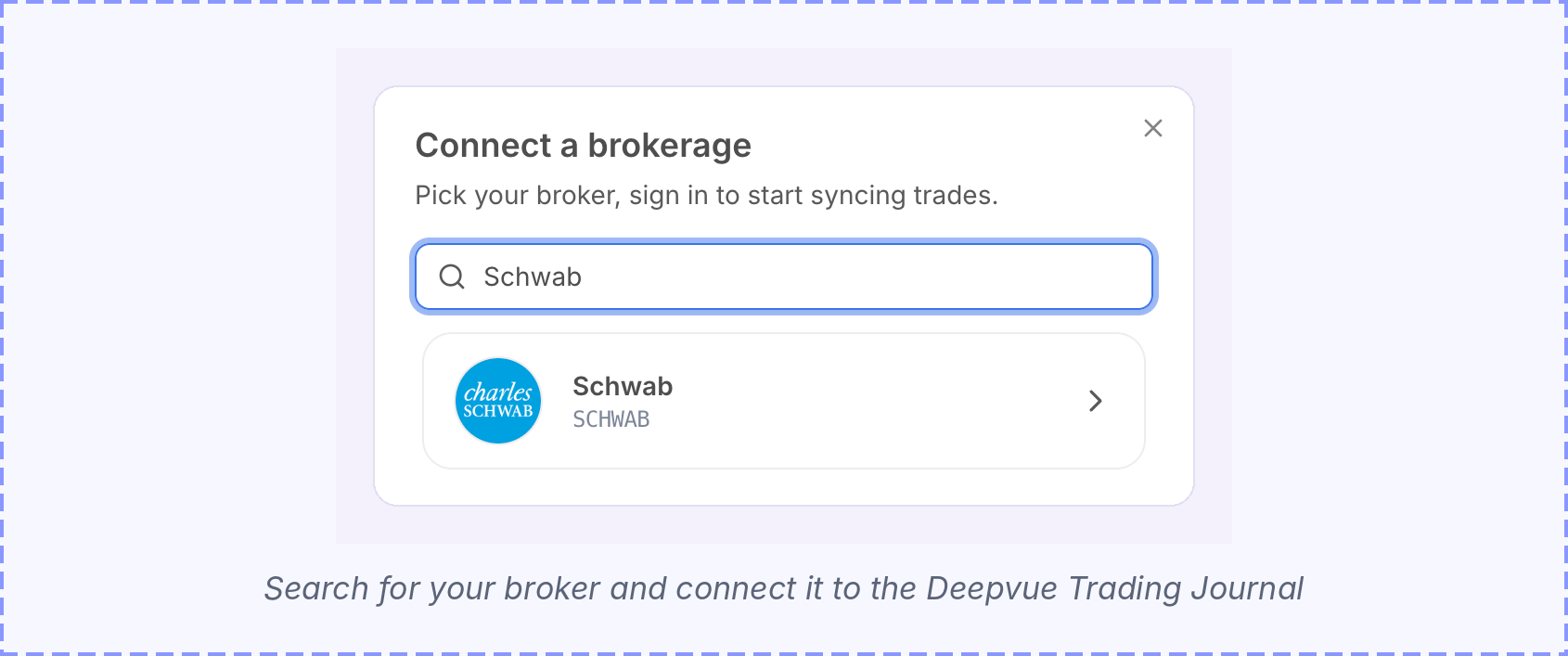
The supported list covers Charles Schwab, Fidelity, Interactive Brokers, Robinhood, E*TRADE, Webull, tastytrade, Questrade and more, and the broker integrations keep growing. Most first syncs pull in your full history inside a day, though IBKR accounts can need 24 to 48 hours.
Any broker outside the list comes in by CSV, in whatever layout your broker exports. Slow syncing is one of the gripes that sends TraderSync users looking around:
“I feel like trades take way longer to sync.”
A trader on r/RealDayTrading
TraderSync’s September release notes promise faster, more reliable syncing, so that complaint may ease with time.
A Review Queue That Takes a Couple of Clicks
Reviews get skipped when they feel like admin. In Deepvue’s Trades tab, filters such as Untagged, Needs Stop and To Review pull up the trades that still need attention, so the queue is ready when you sit down.
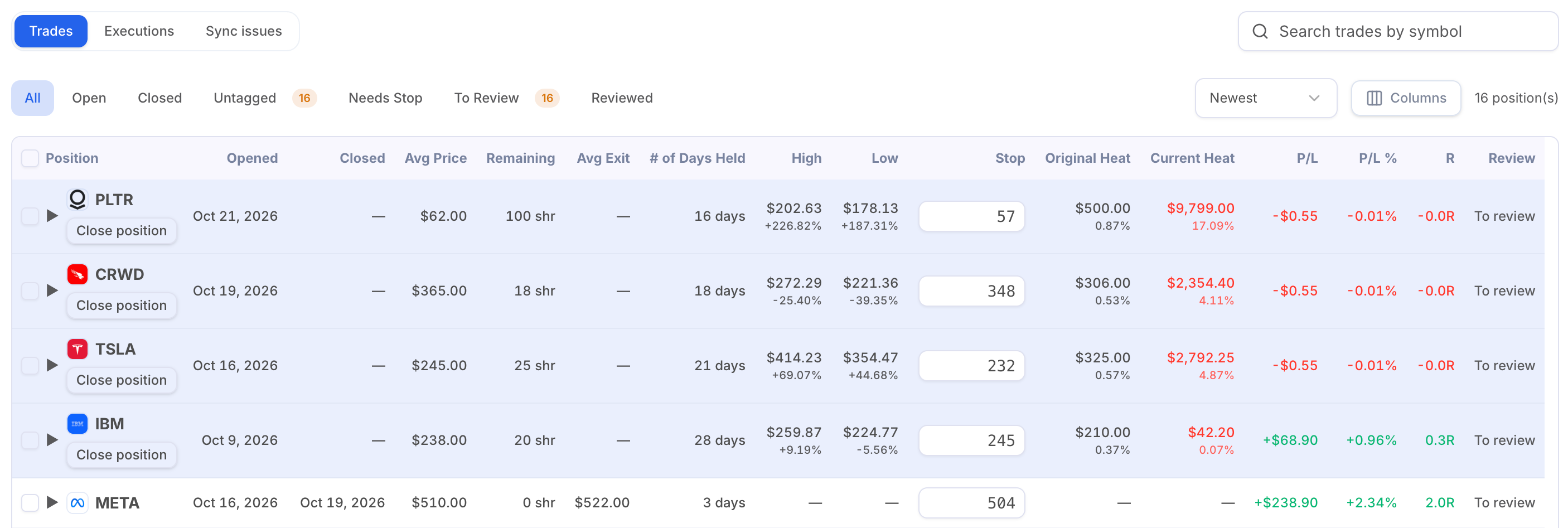
Open a trade and it comes up on Deepvue’s charts, each buy and sell plotted where it happened. Add your notes, emotion and position tags, then press Save & next to mark it reviewed and jump to the following trade.
“If that takes more than a couple of clicks, you’ll stop reviewing.”
A trader on r/RealDayTrading
The habit is worth protecting. A meta analysis of team and individual debriefs found structured debriefs lifted performance by about 25% on average, and that reflect and adjust loop is the heart of any post trade analysis.
Setup Tags and Playbooks You Can Filter On
Deepvue treats tagging as the center of review. Each trade carries a playbook, a tag and an emotion, and the Performance by Playbook, Tag and Emotion apps split your results by each one.
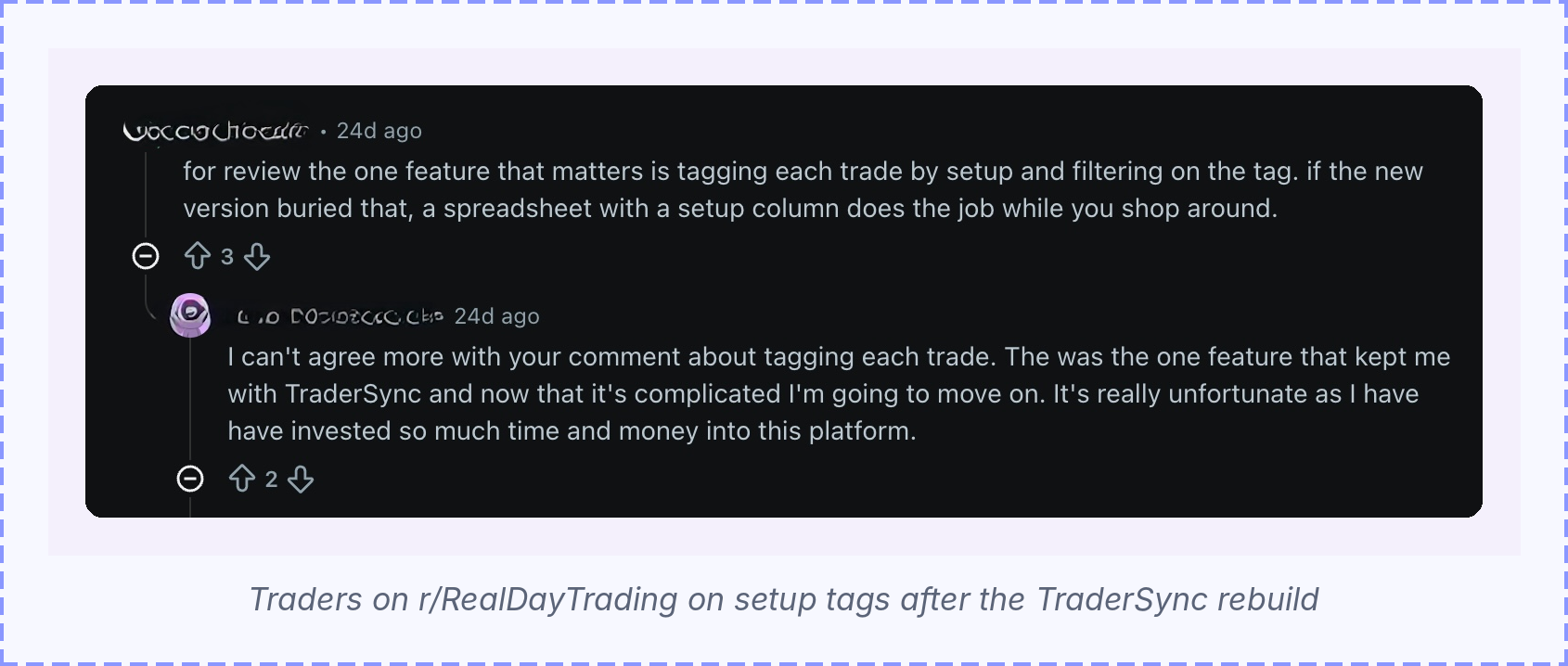
Traders weighing up the new TraderSync rank it just as high. In one r/RealDayTrading thread, a reply cut straight to what keeps people loyal to a journal:
“the one feature that matters is tagging each trade by setup”
A trader on r/RealDayTrading
The original poster agreed, calling it “the one feature that kept me with TraderSync.”
Hover over any stat and Deepvue shows how it’s calculated, so a win rate or average R never becomes a mystery number. For chart examples of each setup, the Model Book is now part of the journal, putting textbook cases and your own trades in one module.
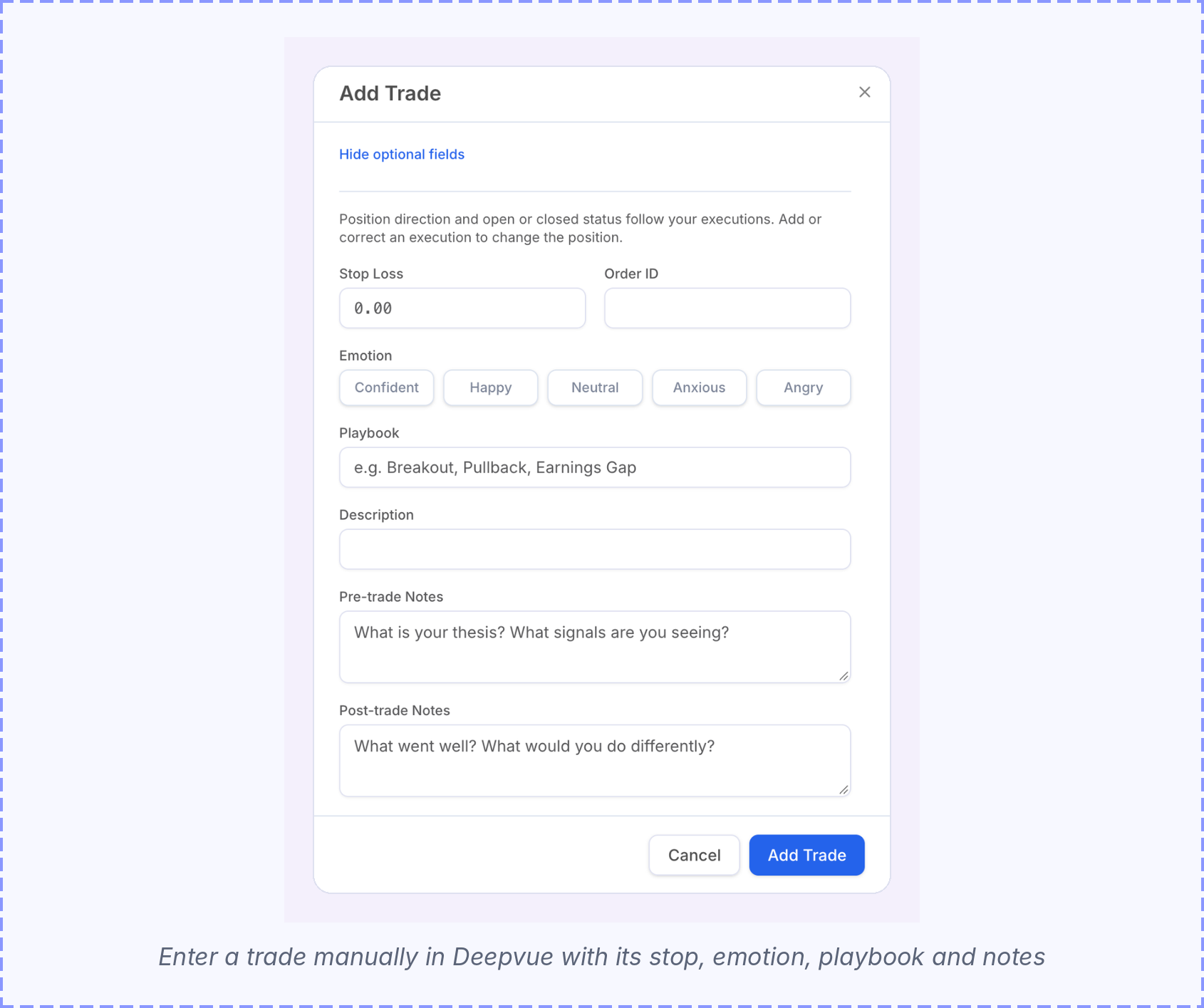
Studying winners matters as much as dissecting losers. In a study of after event reviews during navigation training, soldiers debriefed on both their successes and their failures improved more than those who only reviewed what went wrong.
Open Risk and R on Positions You Hold for Weeks
Once a position has run for a few weeks, the question becomes how much you’d hand back if every stop hit tomorrow. Deepvue’s Open Risk app totals that figure in dollars and as a share of equity, with your starting heat beside the current number.
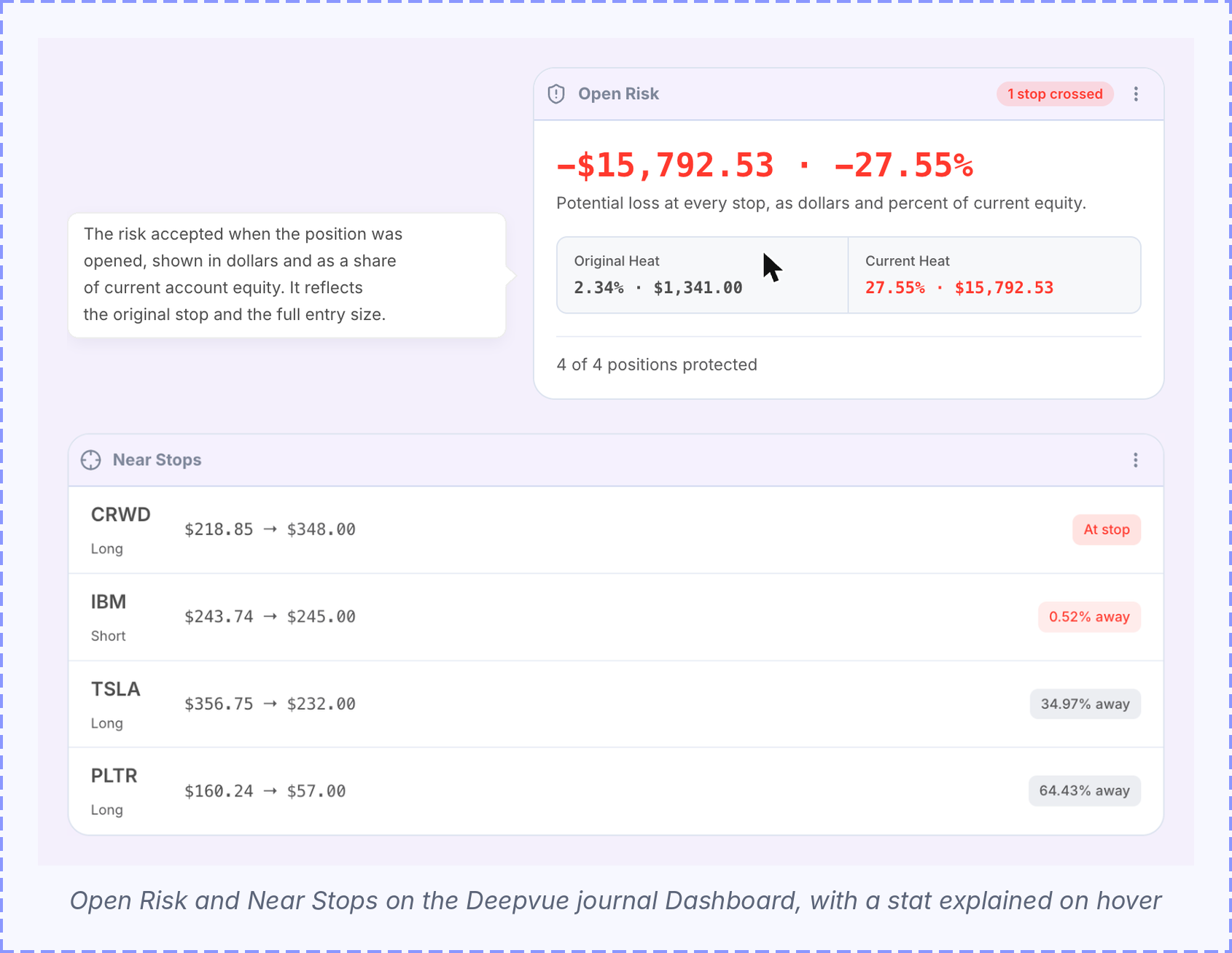
Near Stops orders what you hold by the distance between price and each stop, and flags any position that gets there. Give a trade a stop and it picks up an R value, open or closed, while Advanced Metrics layers on MFE, MAE, SQN and exit efficiency.
TraderSync reports R as well. By default it divides profit by the risk to your first stop, but a setting called PL Display Risk Scale can swap in a fixed dollar amount for every trade, which its help center uses to explain a 5R result on a move of 2.5 times the stop.
Deepvue keeps R tied to the stop you actually set. Plan it before entry with the position size calculator or the risk reward calculator, and the journal checks what each trade delivered after the exit.
A Journal Agent That Explains Your Numbers
The Journal Agent is what makes Deepvue an AI trading journal. It studies your stats and fills, and its reply covers what it noticed, the biggest opportunity it sees and something specific to try.
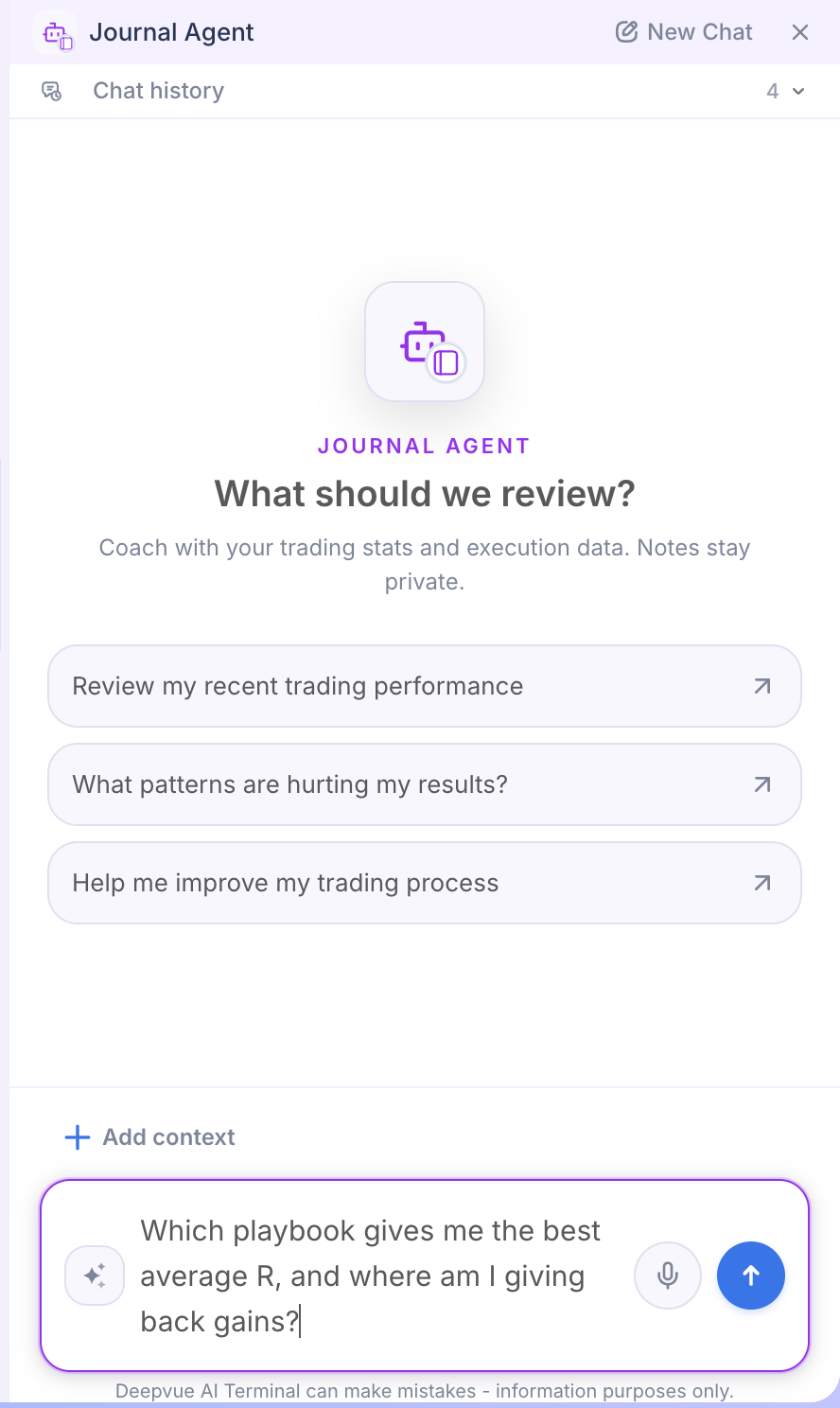
Nothing reaches it until you switch it on. After that it only sees anonymized figures and tickers, never your name or account details, your notes aren’t shared, and the AI provider retains nothing. There’s no daily message cap to ration either.
TraderSync AI features center on Cypher. The Cypher Assistant comes with every plan at 5 messages a day on Pro, 15 on Premium and 60 on Elite, while Cypher Coach is reserved for Elite.
Research Tools Next to Your Journal
Deepvue’s research tools work on the live market and share a login with your journal: the Screener, charts, Industry Ranks, Theme Tracker and AI Terminal. TraderSync’s screeners and watchlists, by comparison, are built for replaying past sessions on Elite.
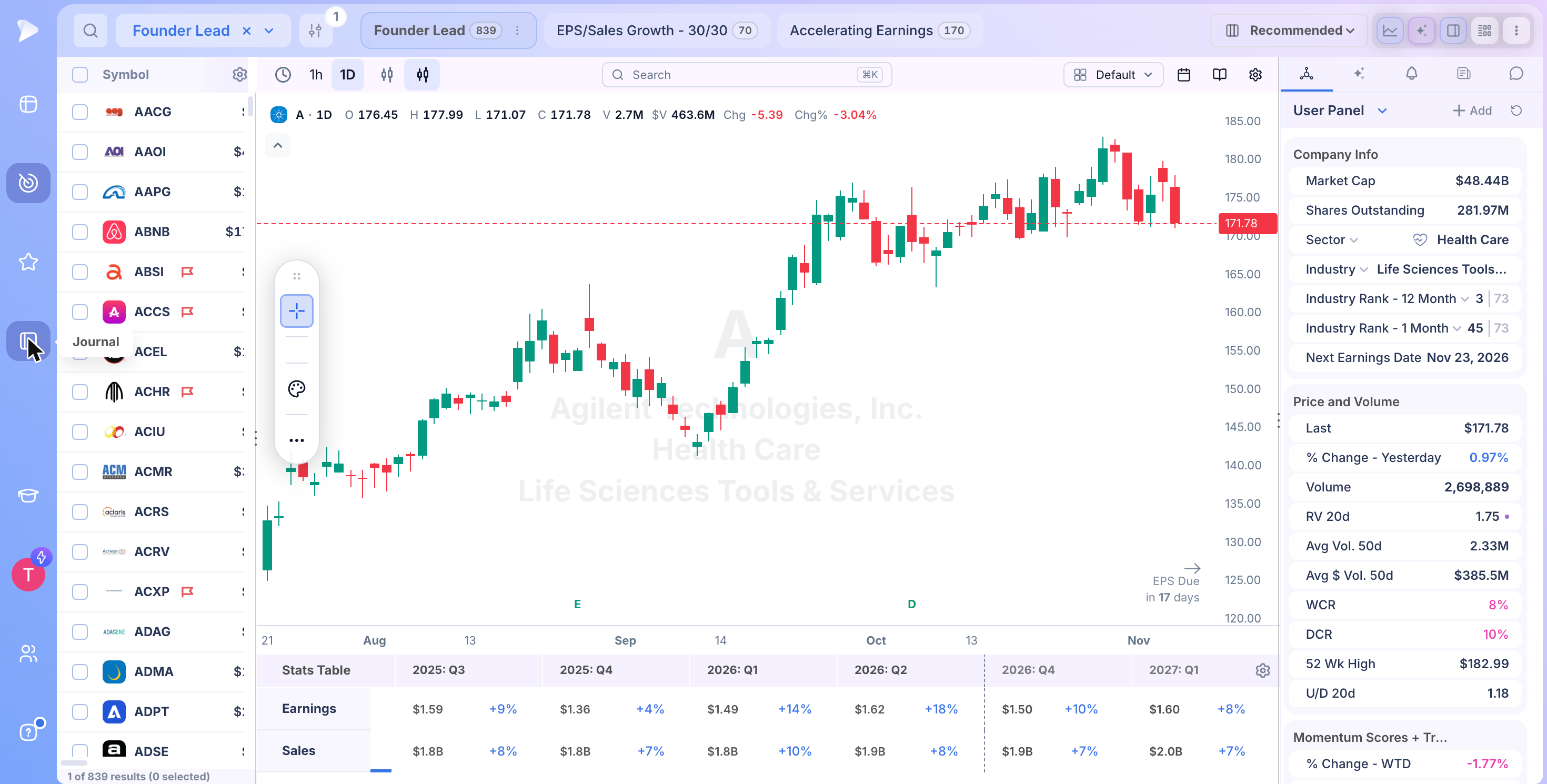
That changes how a trade gets reviewed. The chart where you found the setup is the chart you review it on, and the screen that surfaced it is still saved, so you can tell whether the idea or the execution let you down.
Industry Ranks and the Theme Tracker show which groups were leading when you bought. The AI Terminal can tell you what moved a stock on the day you sold, all without leaving the platform you trade from.
The Whole Journal on iPhone and Android
Notes written right after a trade tend to be the honest ones. Deepvue’s native apps for iOS and Android include the complete journal, so you can log the emotion, playbook and a quick note on your phone minutes after the fill, then finish the review at your desk.
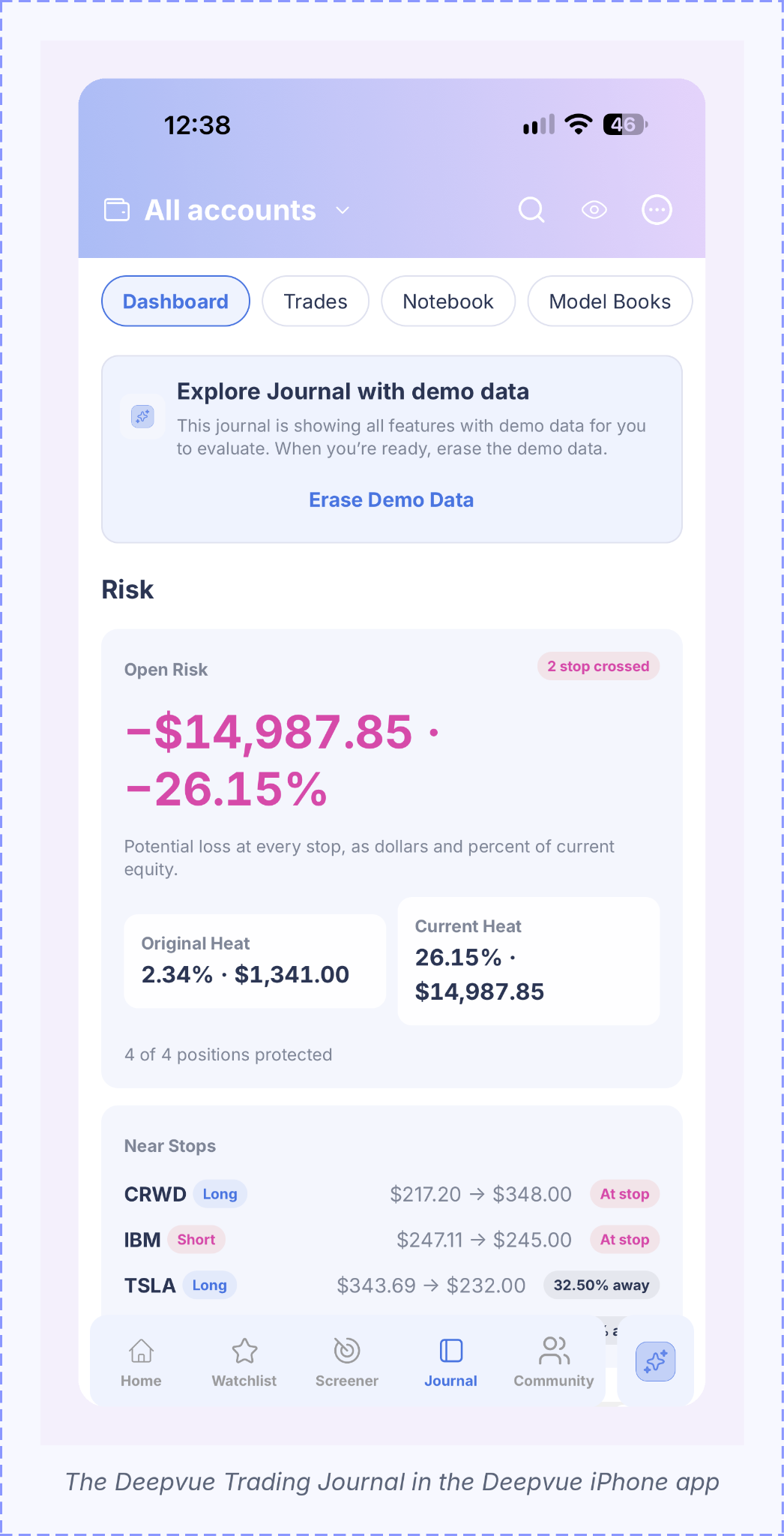
TraderSync’s pricing table lists the TraderSync app on all three plans, so access isn’t where the two differ.
The ratings are another story: Deepvue’s iPhone app holds 4.7 from more than 450 App Store ratings, while TraderSync’s holds 2.7 from 85 and its Android app about 3.0 on Google Play.
BLACK FRIDAY
Lock In Black Friday Pricing From Your PhoneClaim the Black Friday rate in your phone’s browser, $490 for the year where it’s normally $990. Then install the Deepvue app and sign in.
What Deepvue Members Say
Two members put it plainly on the App Store:
“Deepvue takes screening to the next level.”
Alphacharts, review on the App Store
“I use it every week to analyse markets and find the strongest stocks.”
Mr_Stop_Loss, review on the App Store
Every verified Deepvue review we’ve collected is in the member reviews on deepvue.com.
Where TraderSync Comes Out Ahead
Deepvue is built for growth stock traders, so TraderSync is the better fit if you trade more than stocks. It journals options, futures, forex, crypto, CFDs and indices in one place.
Day traders who practice on replay get more from it too. TraderSync market replay goes down to 250 milliseconds on Elite, and automated TraderSync backtesting comes with the same plan.
Neither journal has a free plan. The TraderSync free trial opens most features for 7 days, but exporting trades and executions stays switched off until you pay.
Deepvue Pricing vs TraderSync Pricing
Deepvue pricing is a single plan, Deepvue Core + Journal, at $99 a month or $990 a year, with the journal, the Journal Agent and every research tool included.
TraderSync pricing comes in three plans, Pro, Premium and Elite, at $29.95, $49.95 and $79.95 a month. Pay for a year upfront and you can save up to 25%.
| Plan | Per month | Per year | What’s included |
|---|---|---|---|
| Deepvue Core + Journal | $99 | $990 | Trading Journal, Journal Agent, AI Terminal, screener, charts, watchlists, alerts, community and iOS and Android apps |
| TraderSync Pro | $29.95 | $269.52 | 5 accounts, Cypher at 5 messages a day, market replay at one minute precision |
| TraderSync Premium | $49.95 | $449.52 | Unlimited accounts, trade replay, Cypher at 15 messages a day, replay at one second precision |
| TraderSync Elite | $79.95 | $719.52 | Cypher at 60 messages a day, Cypher Coach, 250 millisecond replay with Level II, automated backtesting |
Neither journal has a free plan. TraderSync’s trial opens most features for 7 days, but exporting trades and executions stays switched off until you pay, and TraderSync’s billing policy says all payments are nonrefundable.
At regular prices, Deepvue’s $99 a month or $990 a year sits above every TraderSync plan, so the TraderSync cost comes in lower. Elite at $79.95 a month adds up to $959.40 a year, or $719.52 billed annually.
What the money buys is the real difference. Deepvue’s plan covers the screener, charts, alerts and AI Terminal a stock trader would otherwise pay for on top of a journal, so the research and the review come in one subscription. Elite’s extra spend goes on replay, Level II and backtesting.
Paying for a journal on its own is a hard sell for plenty of traders:
“I can’t find it in me to pay $20-30/mo for that”
A trader on r/RealDayTrading
BLACK FRIDAY
Pay $490 for Your Whole YearA full year of Deepvue Core + Journal costs $490 rather than $990, research tools included, and each renewal stays locked at that price.
TraderSync Reviews: What Traders Say After the Rebuild
Deepvue’s ratings hold steady wherever you look: a 4.8 average across 220+ verified reviews, with 97% of those reviewers recommending it, and 4.7 from more than 450 App Store ratings.
A TraderSync review reads very differently depending on where it’s posted. On Trustpilot, TraderSync scores 4.2 from 325 reviews, and 88% of them are five stars.
The app stores are tougher on TraderSync. Its iPhone app holds 2.7 from 85 ratings and the Android app 3.0 from more than 220, so check the date on any higher score you see quoted.
What TraderSync Users Like
Support and depth of features earn the most praise. The StockBrokers.com review scores TraderSync 5 out of 5 for features and 4.5 for ease of use, but 2.5 for cost.
“I have to give a HUGE shout out to Betza on the Support team.”
Jay B, 5 star review on Trustpilot, October 2026
Jay has used TraderSync for more than two years and says the support team sends suggestions straight to the developers for review.
What Changed in the September 2026 Rebuild
TraderSync’s store notes describe a rebuilt app with a redesigned dashboard of customizable widgets, new reports and analytics, improved calendar and trade charts, faster syncing and Cypher as an AI trading assistant.
Not everyone welcomed the new look. The trader who started the first r/RealDayTrading thread put it this way:
“Things that used to feel straightforward now take more effort”
The original poster on r/RealDayTrading
“The older design gave me everything I needed and nothing I didn’t.”
A trader on r/RealDayTrading
TraderSync did engage with the feedback. Its team replied in the first thread with “Anything specific about the old version that you like best,” and another trader there said support fixed their issue quickly.
Common TraderSync Complaints
The complaints cluster around support, sync reliability and how accurately fills show up on charts.
“continually tries to blame the user”
The original poster in a second r/RealDayTrading thread
“The platform can’t even print the entry and exits properly”
Nik Gager, 1 star review on Trustpilot, October 2026
“The auto sync of trades from broker does not work.”
Moazzam Khan, review on Google Play, January 2024
That last review predates the rebuild by more than two years, and TraderSync now promises faster, more reliable syncing.
How to Switch From TraderSync Without Losing Your Tags
Bringing your history into Deepvue is easiest while your TraderSync account still works. One reply to a frustrated TraderSync user was blunt:
“I’d export your full history from them now while it still works”
A trader on r/RealDayTrading
- •Export everything first. Download your full trade and execution history from TraderSync as CSV before you cancel, and copy out any notes you want to keep. Trial accounts can’t export, so do this on a paid plan.
- •Save the charts you care about. Screenshot the marked up charts of your best and worst trades, since drawings and levels won’t travel in a CSV.
- •Keep your broker statements. Your broker’s records are the final word on every fill, and FINRA’s guide explains why they’re worth keeping for years.
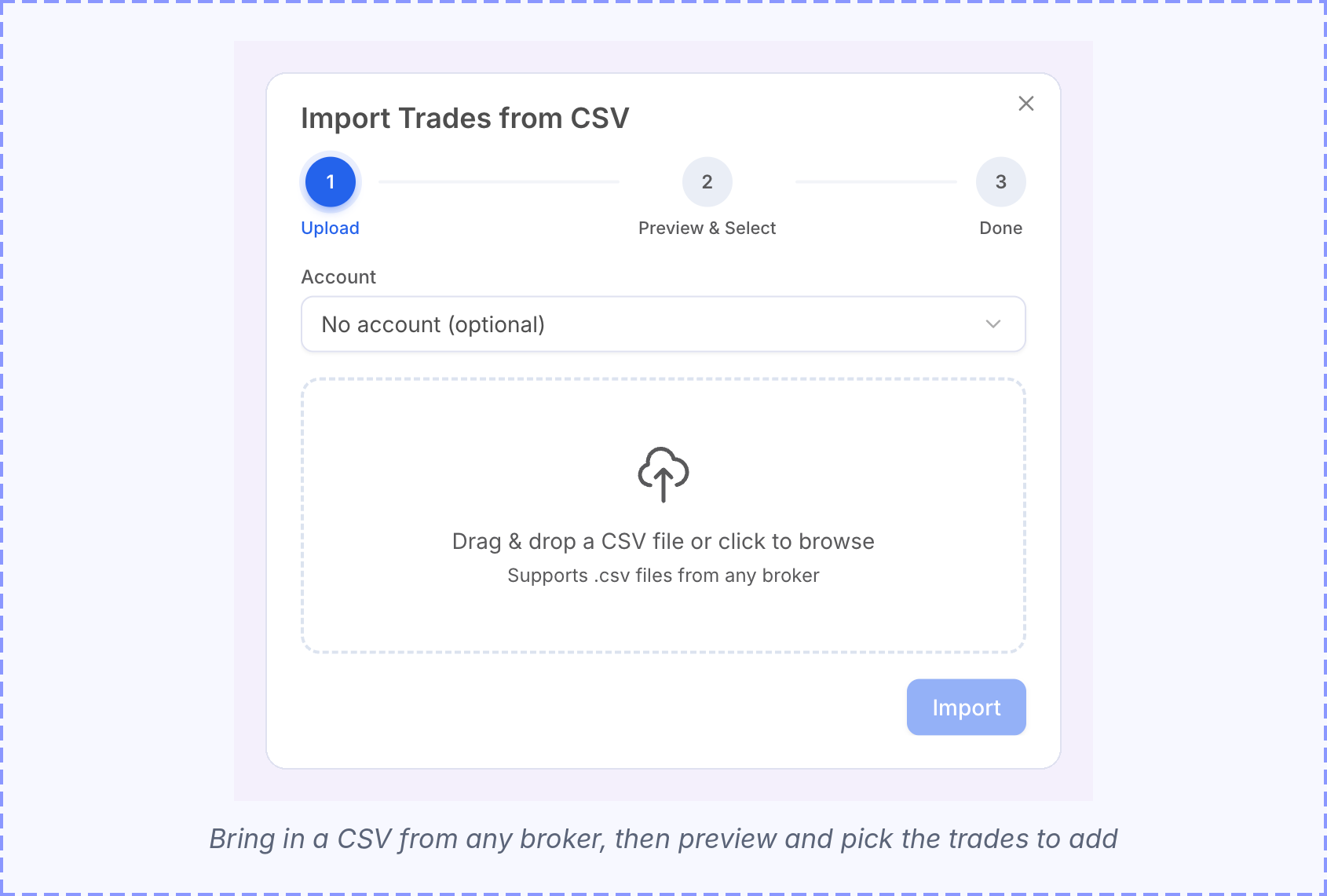
- •Bring your trades into Deepvue. Connect your broker for automatic sync, or pick Import via CSV under All Accounts, which takes a file from any broker and lets you preview the trades before they’re added. The setup guide covers both.
- •Rebuild your playbooks and tags. Recreate your TraderSync setups as Deepvue playbooks and your old labels as tags, so the Performance by Playbook and Tag apps pick them up.
- •Review recent trades first. Start with the last few weeks under the To Review filter, then work backward once the habit sticks.
Build a Review Routine That Takes Fewer Clicks
Extra clicks cost more than time. A trader in the second thread spelled out what happens when logging gets clumsy:
“once entry fights you, the losers are the first trades people stop logging.”
A trader on r/RealDayTrading
A journal missing its losers can’t tell you much, so the fix is making review a fixed, short habit.
Deepvue Routines turn it into a checklist: name the routine, set its cadence, weekdays and start time, then line up guided actions in order. When it’s due, Deepvue walks you through each action and tracks your streak.
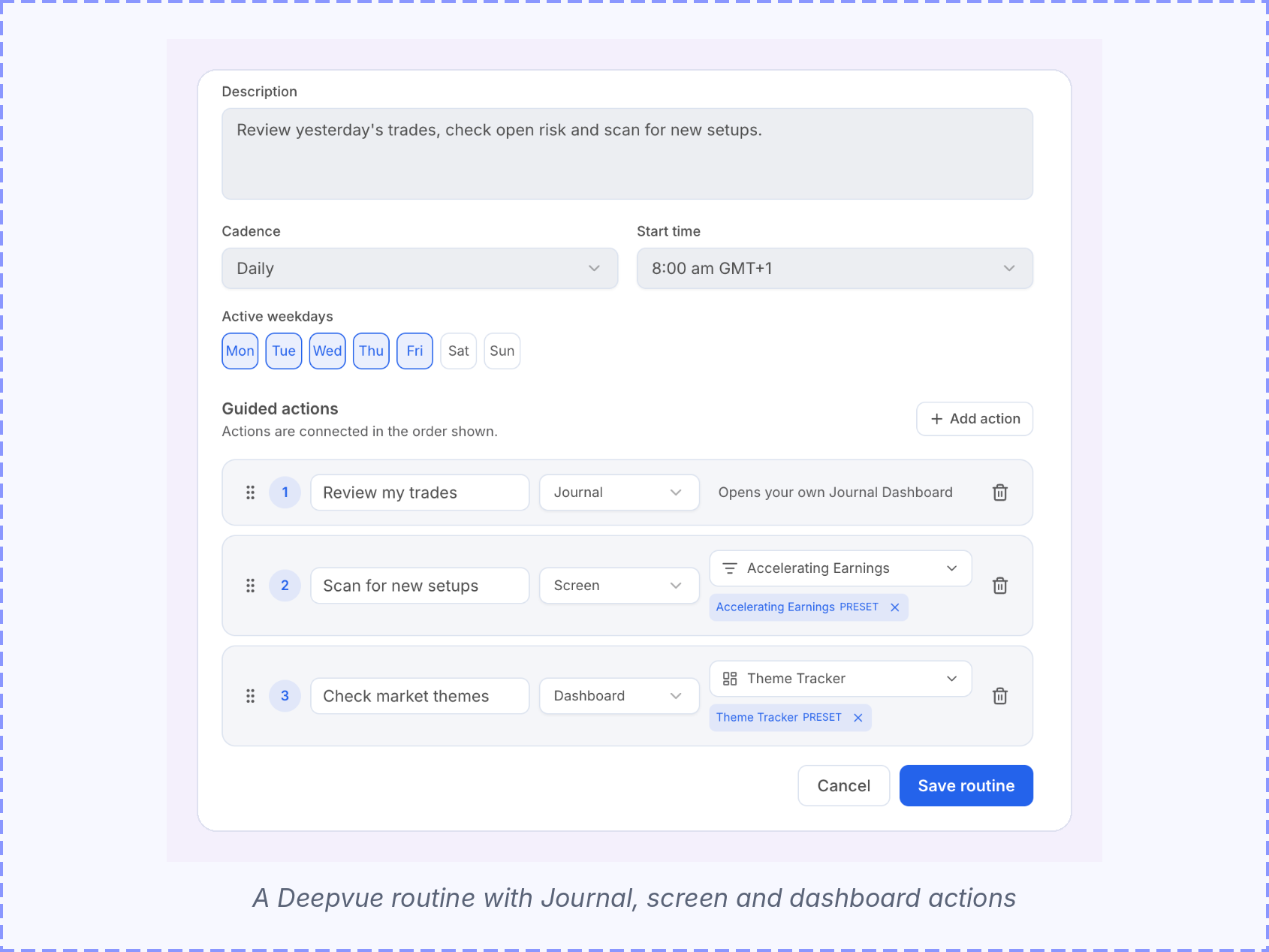
Actions can open your Journal Dashboard, a screener preset, a watchlist or one of your custom dashboards. You can also start from curated presets, such as Kristjan Kullamägi’s nightly scan or Stan Weinstein’s weekend stage analysis, and adjust them to your own process.
Watching a routine run makes the idea click faster than any description. In the clip below, Deepvue’s Richard Moglen opens Routines and shows how each step works.
Watch how Deepvue Routines work here.
The structure does real work. Once a review has a set day and a start time, it stops depending on how busy the week gets. That kind of plan slots straight into a wider trading routine.
Deepvue or TraderSync: Which One Fits Your Trading?
- •Choose Deepvue if your stock positions run for days or weeks and you want the journal, screener, charts and AI on one plan, with open risk tracked against every stop and the full journal on your phone.
- •TraderSync fits if you trade options, futures, forex or crypto, practice with tick level market replay, or want AI coaching built around active day trading.
Our Take
If you trade stocks and give your positions days or weeks to work, Deepvue is the stronger pick in the Deepvue vs TraderSync matchup. Your journal sits next to the tools that found the trade, and it watches every open stop until you exit.
TraderSync suits a different trader, one who journals options, futures or forex and practices on tick replay before the open.
For more head to head looks, see Deepvue vs TradeZella and Deepvue vs Tradervue, or our TraderSync alternatives roundup of eight journals.
Win a Free Year in the Deepvue Community Challenge
Each month, the Deepvue team gives one member a free year for sharing something useful with the community. Open Community in the left navigation to see what other traders post, including watchlists, screens, dashboards, indicators, model books and AI prompts.
Entering takes a few minutes. Choose Create post, give it a title plus a short explanation of how you put it to work, attach the item, and switch on auto sync if you want members to see your updates.
A single post puts you in the running. The team picks each winner on upvotes and on the value, depth and creativity the share brings to other members.
If you’d rather see a post go up before trying it, Deepvue’s announcement clip below runs through the whole process inside Community.
Community access is part of every Deepvue plan, Black Friday included, so your first post counts toward the next monthly pick.
Lock In Deepvue Core + Journal for $490 Before December 4
BLACK FRIDAY DEAL
Deepvue With the Journal Included, Plus 3 Live Bonuses
One annual plan covers the full platform, from screens and charts to the Trading Journal and analytics, plus two VIP Masterclasses and the December Live Bootcamp.
- Deepvue annual planScreener, charts, dashboards, Model Book, Deepvue AI and the Journal with analytics$990/yr
- Momentum Setups Mastery (VIP)3 webinars and a VIP Q&A$297
- Sell Rules Mastery (VIP)3 webinars and a VIP Q&A$297
- December Deepvue Live Bootcamp8 live sessions, December 7 to 14Included
- Total value
$1,584
Your $490 rate stays locked while your subscription is active. Join by December 4, 2026 at 11:59 PM ET.
Key Takeaways
- •Deepvue sells one plan at $99 a month or $990 a year, with the journal, screener, charts, alerts and AI Terminal included.
- •Deepvue comes out ahead on broker sync for stocks, open risk, an uncapped AI agent and research tools, while TraderSync leads on options, futures, forex, crypto, market replay and backtesting.
- •TraderSync is a multi asset trading journal with Pro, Premium and Elite plans at $29.95, $49.95 and $79.95 a month, or $269.52 to $719.52 billed yearly.
- •Its September 2026 rebuild brought a new design, rebuilt reports and the Cypher AI assistant, and user reviews since then have been mixed.
- •Claim $490 a year while the offer runs through December 4, and sign up by November 12 for two live masterclasses on top.
Frequently Asked Questions
Is Deepvue better than TraderSync?
Yes, for stock traders Deepvue is better than TraderSync, because one plan covers the journal, screener, charts and AI, with open risk tracked against every stop. TraderSync is the stronger pick for options, futures and forex traders who want tick replay and backtesting.
Is TraderSync a good platform for trading?
TraderSync is a good platform for reviewing trades, but it’s a journal, not a broker, so you can’t place trades with it. It covers many asset classes and scores 4.2 on Trustpilot, though app ratings and Reddit feedback have been mixed since the 2026 rebuild. Stock traders who also want research tools get more from Deepvue.
Is TraderSync free?
No, TraderSync isn’t free. There’s no free plan, only a 7 day trial with most features open, and exports stay locked until you subscribe. Deepvue has no free tier either, but its one plan includes the journal and every research tool.
Does TraderSync have a mobile app?
Yes, TraderSync has a mobile app for iOS and Android, and its pricing table includes it on all three plans. The iPhone app is rated 2.7 on the App Store, while Deepvue’s app, which carries the complete Deepvue Trading Journal, is rated 4.7.
Does TraderSync work with TradingView?
Yes, TraderSync works with TradingView through a file import. The TraderSync TradingView integration has you export trades from TradingView and upload them, covering stocks, options, futures and crypto. In Deepvue, trades sync from your broker and you review them on Deepvue’s own charts.
Can I move my TraderSync trades to Deepvue?
Yes, TraderSync trades can move to Deepvue in two ways: connect your broker, which pulls in your full history, or upload a CSV export from your broker. Recreate your TraderSync tags as Deepvue playbooks and tags so your setup stats carry over.