Deepvue Theme Tracker: Track Leading Stock Market Themes and Spot Market Rotation Early
The Deepvue Theme Tracker is a stock market theme tracker built into the platform’s dashboard. It ranks 31 curated themes, from AI and semiconductors to gold miners and Bitcoin, by performance across five timeframes: Today, 1W, 1M, 3M and YTD, and you can add custom themes of your own.
It updates in real time during market hours, and clicking any theme opens a ranked list of the stocks inside it, taking you from a market rotation question to a list of leading stocks in about 30 seconds.
and the Theme Tracker loads in under a minute.
The stock theme tracker, by the numbers:
Key Takeaways
Every strong market advance starts somewhere specific. Money flows into a theme first, then into the leading groups inside it, and finally into the individual leaders that make the biggest moves.
The Theme Tracker makes that chain visible on one screen, so you always know where strength is concentrated and where it is fading. That is the difference between trading with the market’s momentum behind you and finding out where it went after the fact.
- ✓31 curated themes across five timeframes, Today through YTD, streaming in real time during market hours.
- ✓Custom themes of your own, shared across every Theme Tracker widget, with Deepvue’s built-in list shown alongside or switched off.
- ✓Leading themes in 30 seconds from the one month view; developing themes surface on the daily view, reviewed after each close.
- ✓Two clicks from rotation to stocks. Clicking any theme opens a ranked list of the roughly 20 to just over 100 stocks inside it.
- ✓Close to half a stock’s move comes from its group, so trading leaders inside leading themes stacks the odds in your favor.
- ✓Included in the one plan. Get started with Deepvue here.
Theme Tracker at a Glance
- Themes
- 31 curated baskets of roughly 20 to just over 100 stocks each, maintained through every market cycle
- Custom themes
- Build your own groups in Manage themes; they appear in every Theme Tracker widget
- Timeframes
- Today, 1W, 1M, 3M and YTD
- Daily modes
- Today, change vs. yesterday’s close, or Since Open, which excludes overnight gaps
- Ranking
- Every theme sorted by performance, gainers in blue and decliners in pink
- Drill down
- Click a theme for every stock inside it, ranked on the selected timeframe, with row checkboxes
- Updates
- Streams live during market hours
- Color group
- A palette in the header links the theme’s stock list to a chart or other app
- Presets
- Richard Moglen Duo Theme Tracker and Theme Tracker with Chart, both customizable after loading
- Cost
- Included in the $49 per month plan
What Is the Deepvue Theme Tracker?
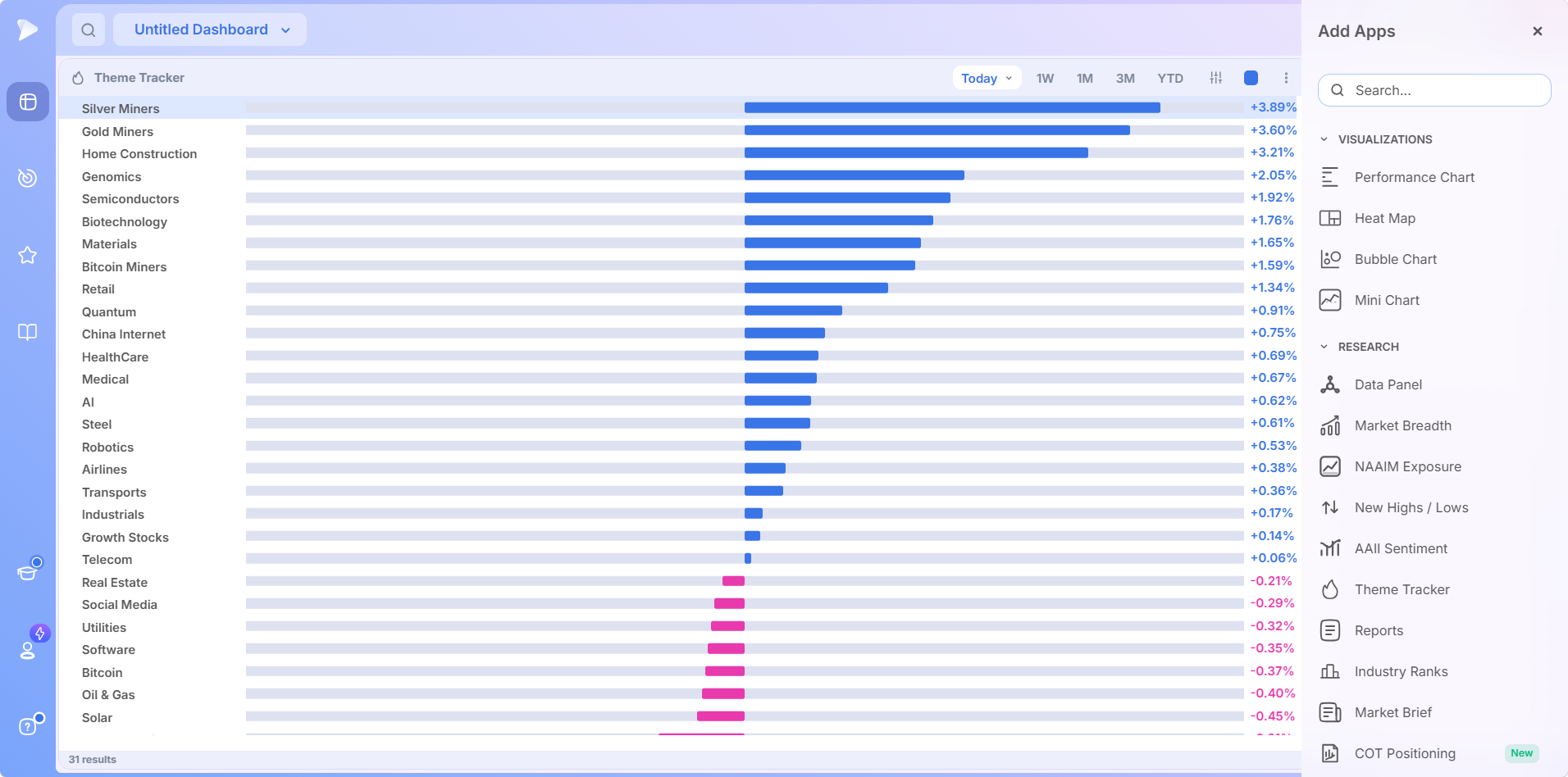
The Theme Tracker is a dashboard app that measures and ranks the performance of 31 curated stock market themes in real time. Each theme is a basket of stocks tied to one area of the market, such as AI, Bitcoin miners, home construction or cybersecurity, and each holds roughly 20 to just over 100 stocks.
The list is not built on GICS sectors, industry groups or subindustries. It is a proprietary list curated by Deepvue’s team of active traders, so a stock theme tracker like this reflects where money is actually moving, and it evolves as new themes emerge.
It was original to Deepvue and is still one of the platform’s most used features, because it compresses a full top down market review into a single ranking. Look for it under Research when you open Add Apps, and the Theme Tracker Knowledge Base article holds the technical reference.
One note on the screenshots: they were captured on a single day, so which themes lead, which stocks rank where, and every percentage shown belong to that session only. The images illustrate the layout and how to read it.
Who Is the Theme Tracker For?
It serves growth stock traders who take a top down approach: market first, theme second, stock last. It also suits traders who work full time, since a review of market leadership takes about 30 seconds rather than an hour of chart flipping.
- ✓Swing traders who want to fish only in the strongest areas of the market.
- ✓Position traders checking whether the theme behind their holdings is still leading.
- ✓Breakout traders hunting for rotation before it becomes obvious to the crowd.
- ✓CANSLIM® traders applying William O’Neil’s principle that the biggest winners come from leading groups.
- ✓Traders with limited screen time who need a fast, visual daily routine.
Every style has a written routine on the Deepvue for hub.
Who the Theme Tracker Is Not For
Deepvue is not a day trading platform, and the tracker is not built for scalping. Its daily view reveals rotation that feeds swing and position trades lasting weeks to months. Nor is it aimed at buy and hold investors who rebalance once a year, since a stock theme tracker exists to follow leadership as it changes.
What Does the Theme Tracker Do?
It ranks 31 themes by performance, switches between five timeframes, lets you add custom themes, opens a ranked stock list for any theme you click, and streams all of it live during market hours.
Ranks 31 Curated Stock Market Themes
The tracker currently covers these 31 themes:
| AI to Gold Miners | Growth Stocks to Retail | Robotics to Utilities |
|---|---|---|
| AI | Growth Stocks | Robotics |
| Aerospace | HealthCare | Semiconductors |
| Airlines | Home Construction | Silver Miners |
| Banks | Industrials | Social Media |
| Biotechnology | Materials | Software |
| Bitcoin | Medical | Solar |
| Bitcoin Miners | Oil & Gas | Steel |
| China Internet | Quantum | Telecom |
| Cybersecurity | Real Estate | Transports |
| Genomics | Retail | Utilities |
| Gold Miners |
Because the list is curated rather than fixed, it isolates areas standard classifications blur together. Bitcoin miners, quantum computing and China internet stocks are their own themes, which matters because these are exactly the groups where momentum concentrates. The lineup shifts as the team retires fading themes and adds emerging ones.
Covers Five Timeframes for Every Trading Horizon
Buttons in the app header switch the ranking between five timeframes, and each answers a different question:
| Timeframe | What it measures | What it answers |
|---|---|---|
| Today | Daily performance in two modes: Today, from the previous close, and Since Open, from the session’s opening price | Where is money rotating right now? |
| 1W | The past week | Is a young move following through? |
| 1M | The past month | What are the current leading themes? |
| 3M | The past three months | Is this trend established or just a bounce? |
| YTD | Since the yearly open | What has led the market all year? |
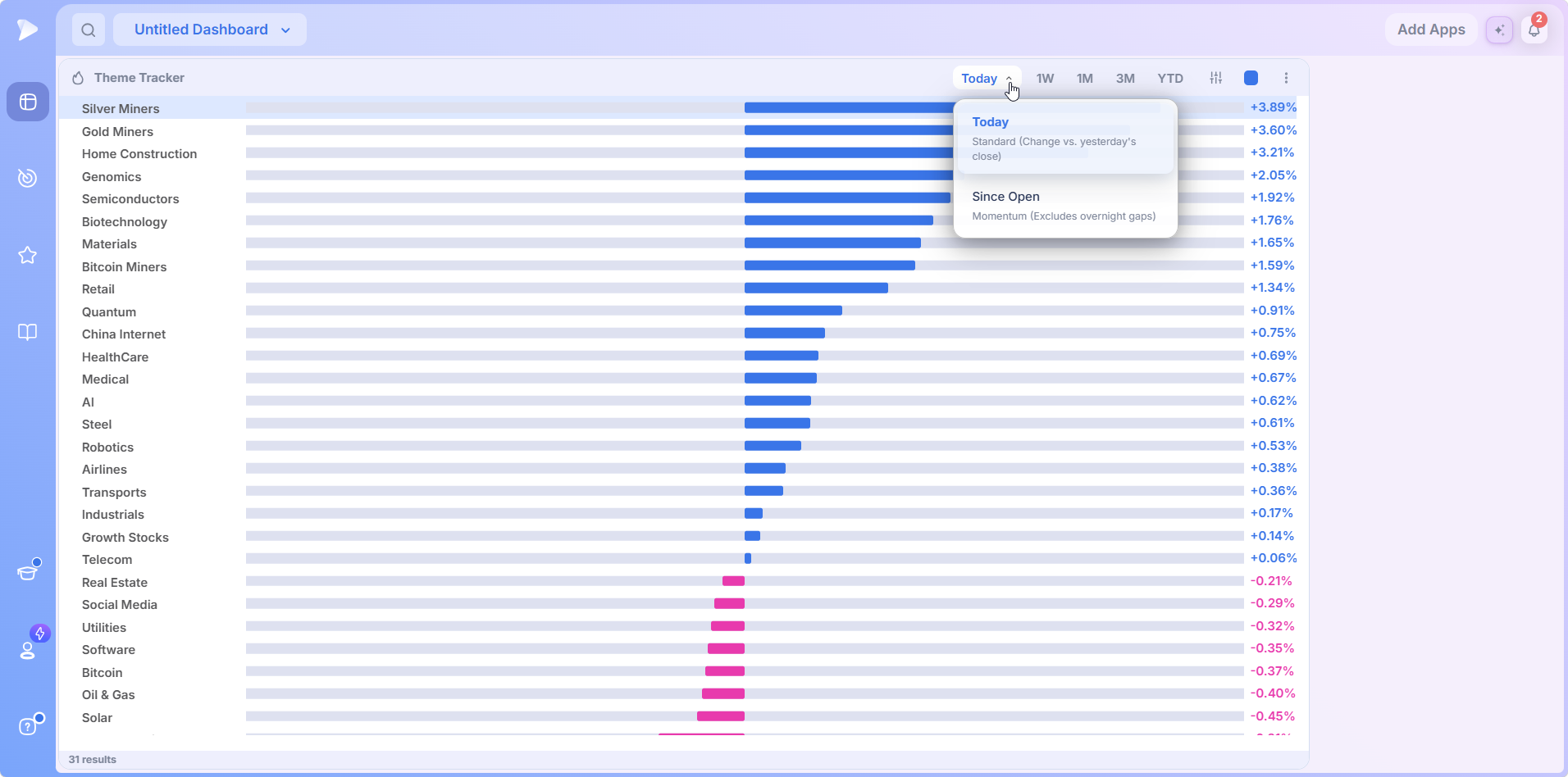
Since Open is worth learning because it strips out gaps. After a big gap down and a strong rally, it shows which themes were genuinely strongest once trading began, a cleaner read on where money moved during the session.
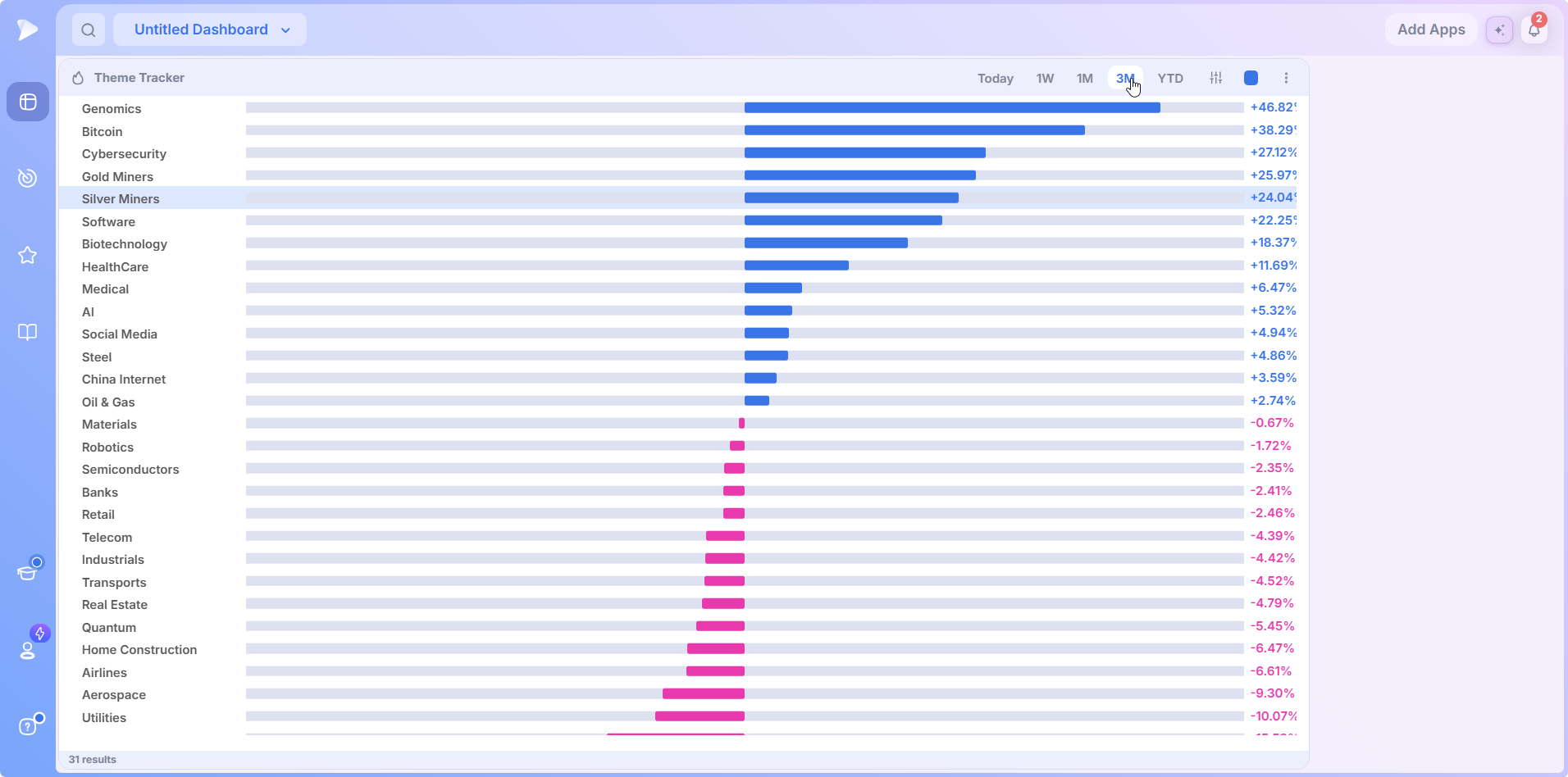
Short timeframes reveal rotation as it happens, longer ones confirm which leaders are established, and comparing the two is how you catch leadership changes early.
Adds Your Own Custom Themes
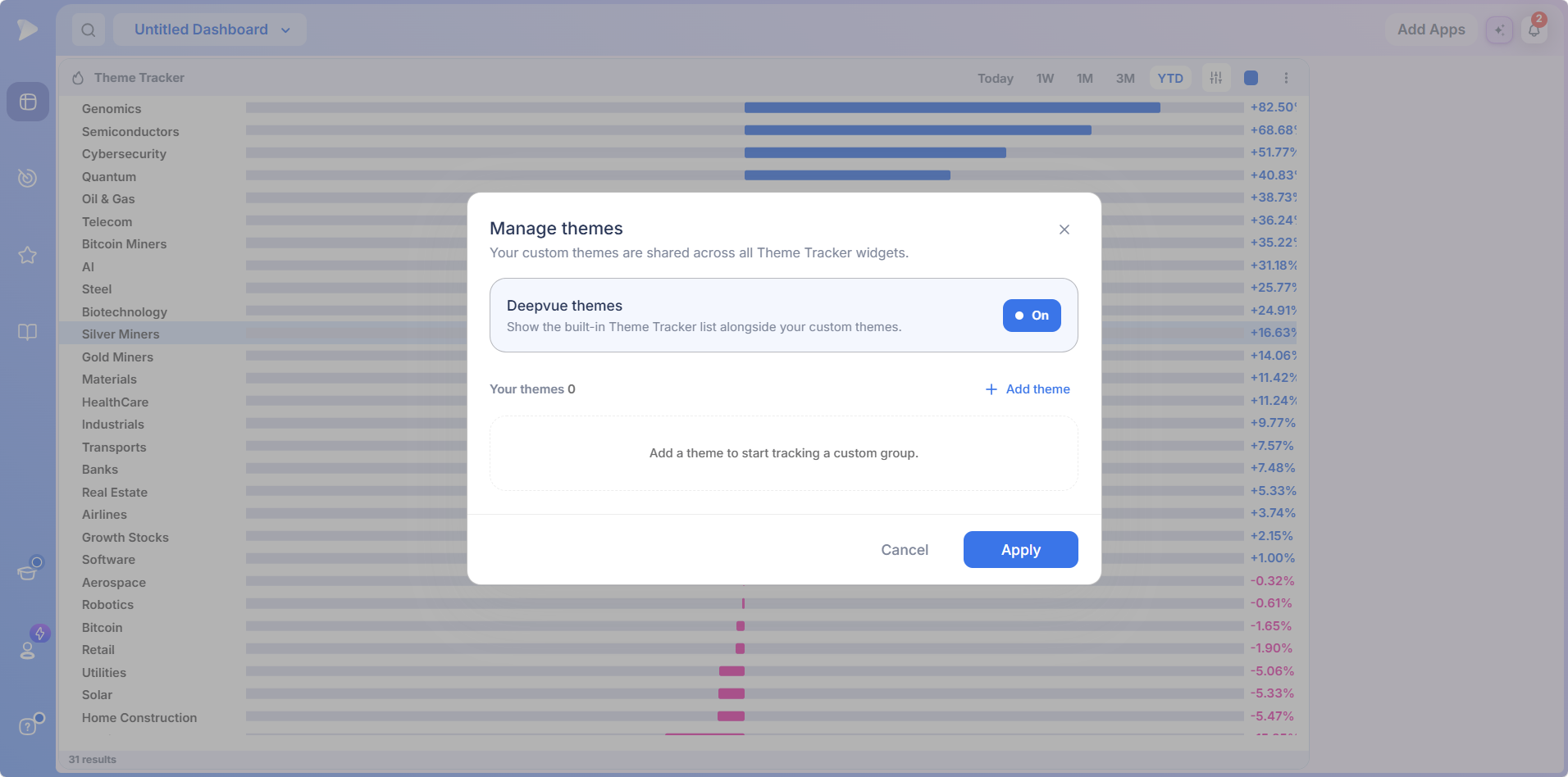
The settings control in the header opens Manage themes. Add theme starts tracking a custom group of your own, and your custom themes are shared across every Theme Tracker widget on your dashboards. A Deepvue themes toggle decides whether the built-in list shows alongside yours, so a tracker can rank the curated 31, your own groups, or both.
Opens a Ranked Stock List Inside Every Theme
Click any theme and the tracker loads every stock in that basket, ranked by performance over the selected timeframe, strongest names at the top. The theme’s own return appears in the header, each row carries a checkbox, and the footer confirms how many stocks the theme holds. Narrow themes like Silver Miners hold around 20 names; broad ones like HealthCare and Banks run to just over 100.
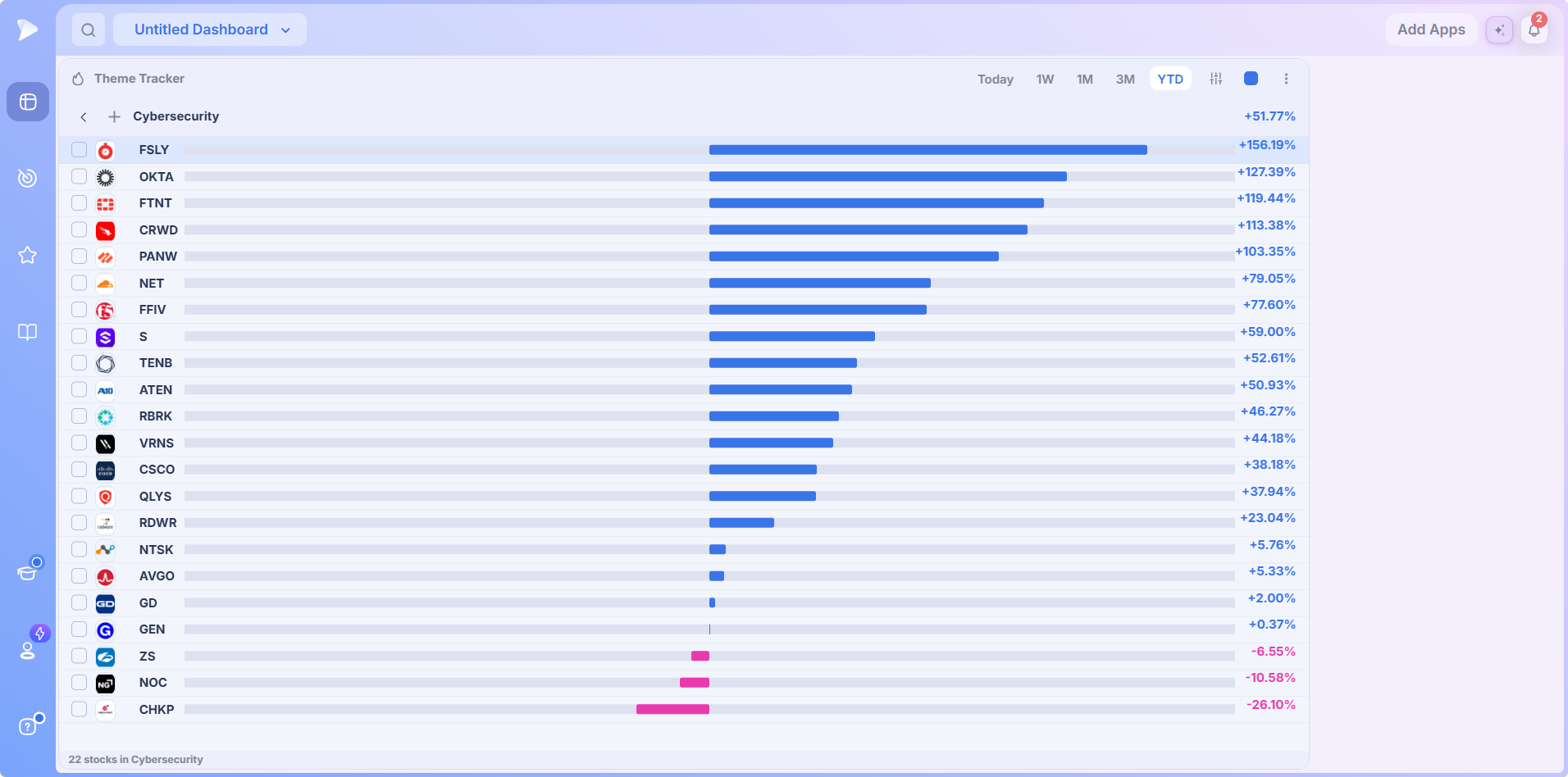
You never build or maintain these lists yourself. Each universe is curated for you, the leaders are sorted to the top, and finding the strongest stock in the strongest group takes two clicks.
Updates in Real Time During Market Hours
Rankings reorder live during market hours as money moves between groups. After the close the app reflects the completed day, when many traders run the daily review covered below.
Open a Deepvue account and see which themes lead the market today.
How Deepvue Themes Differ From Standard Sector Classifications
Traditional sector rotation analysis leans on GICS classifications, which were designed for benchmarking rather than trading. Deepvue’s themes were designed for the opposite job: surfacing where momentum is right now. For the formal GICS view, Industry Ranks ranks the full GICS hierarchy from sectors down to sub industries, and the two tools work best together.
| Deepvue Theme Tracker | Standard GICS classifications | |
|---|---|---|
| Source | Curated by Deepvue’s team of active traders | Fixed taxonomy maintained by index providers |
| Focus | Momentum relevant groups such as AI, Bitcoin Miners and Quantum | 11 broad sectors and standardized industry groups |
| Maintenance | Updated through every market cycle as themes emerge and fade | Revised infrequently on a formal schedule |
| Granularity | Baskets of roughly 20 to just over 100 stocks per theme | Sector level views that blend leaders and laggards |
| Purpose | Built to surface leading and lagging themes for traders | Built for classification and benchmarking |
A sector view can tell you Information Technology is up on the day. A theme tracker for stocks tells you whether that strength is coming from semiconductors, software or cybersecurity, and which stocks are driving it.
Why Following Leading Themes Pays Off
Every major bull market has been carried by a core theme: railroads in the early 1900s, then automobiles and electrification, then computers, the internet, mobile technology, and most recently AI. These were the engines behind each era’s biggest winning stocks.
Group strength is also measurable. Deepvue’s guide to following market rotation cites roughly 37 percent of a stock’s price move as tied to its industry and another 12 percent to its sector, so close to half of any stock’s move comes from the group around it. Trading a leader inside a leading theme puts that force at your back.
This is the same top down logic used by Nicolas Darvas, William O’Neil and Stan Weinstein: find the leading stocks inside the leading groups. The Theme Tracker automates the group discovery half, turning sector rotation from something you reconstruct after the fact into something you watch as it develops.
Start your Deepvue subscription and see today’s leading themes the moment you log in.
How to Set Up the Theme Tracker in Deepvue
Setup takes under a minute. The tracker is one of the apps in Deepvue’s Dashboard module, and you add it the same way as any other: one click in the Add Apps menu.
Open the Dashboard module from the icon at the top of the left sidebar.
Create or open a dashboard using the dashboard dropdown, top left. A fresh dashboard shows a single Add Apps button in the center.
Click Theme Tracker in the Research section of the Add Apps panel to add it to the dashboard.
Resize and arrange it. It loads with all 31 themes ranked. Drag the corners to resize, grab the header to reposition, and add a second one to compare timeframes side by side.
Pick a timeframe and explore. Switch timeframes with the header buttons, click any theme to open its ranked stocks, and use the back arrow to return.
Load a Prebuilt Theme Tracker Dashboard Preset
Deepvue ships dashboard presets with the tracker already configured, two clicks away in the dashboard dropdown. Unlike screener presets, which must be duplicated before editing, dashboard presets can be customized freely after loading.
- •Richard Moglen Duo Theme Tracker. Two Theme Trackers side by side, one on the daily view and one on 1M: the leading versus developing theme setup covered below. Find it under Dashboard Presets, then Top Traders.
- •Theme Tracker with Chart. A Theme Tracker sharing a color group with a full chart, so you can click a theme and spacebar through every stock inside it immediately.
Setup Tips for a Cleaner Theme Dashboard
- •Rename apps and dashboards. Click the app title or the dashboard name to rename them, which helps when you run several Theme Trackers at once, such as Daily Rotation and Monthly Leaders.
- •Bookmark your theme dashboard so it stays pinned at the top of the module list, one click away each morning.
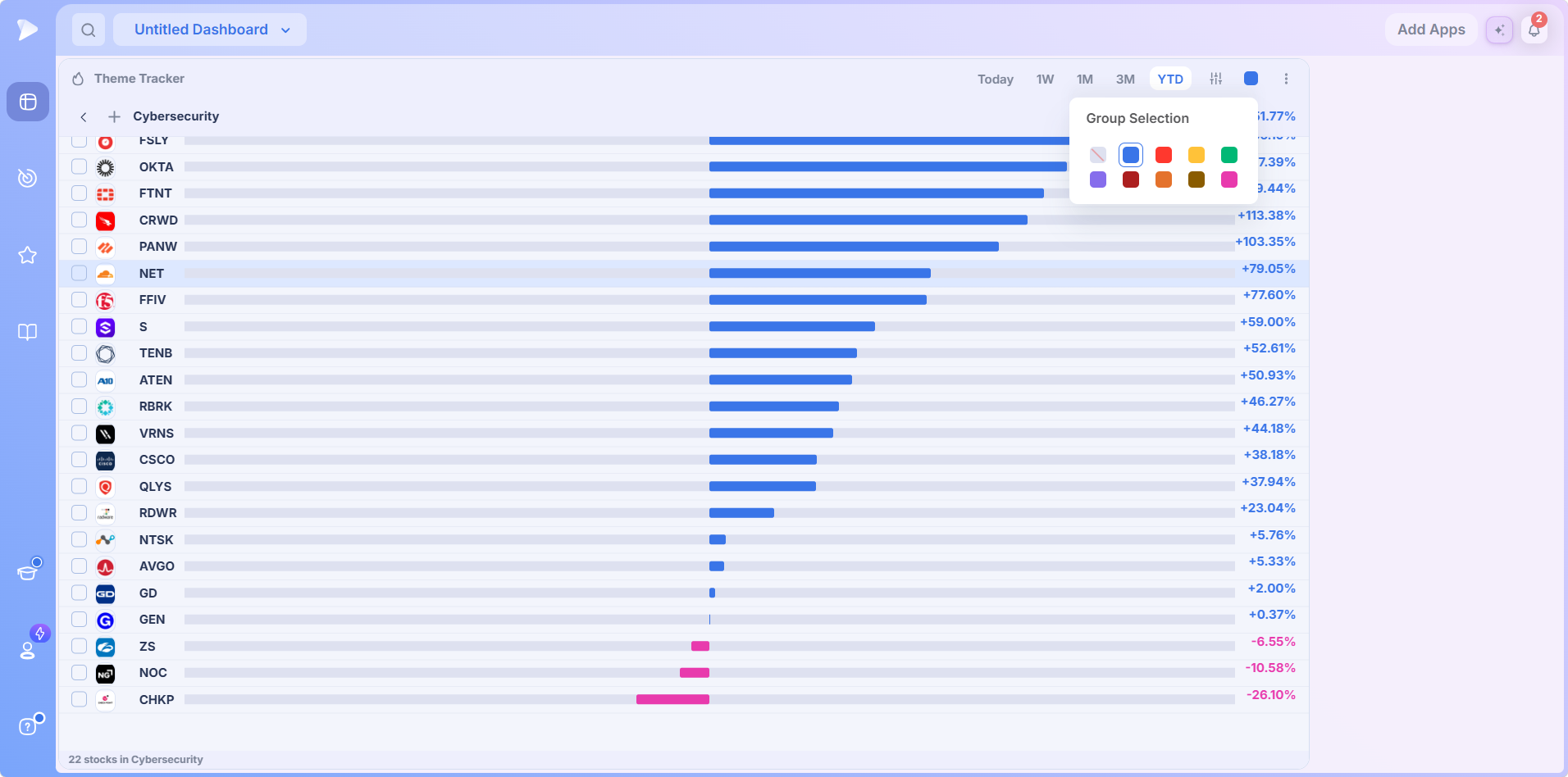
- •Use color groups to link apps. Pick a color from the Group Selection palette in the tracker’s header, give a chart the same color, and the theme’s stock list drives the chart automatically.
- •Leave room to grow for a second Theme Tracker, a Heat Map or the Market Brief as your routine matures.
How to Use the Theme Tracker to Spot Market Rotation
The workflows below come from Deepvue’s own tutorials, recorded by co founder Richard Moglen, an active trader who uses the platform daily. Together they form a complete top down routine: identify the leading themes, watch for developing ones, then drill into the stocks driving each move.
WatchSpot the leading themes in 30 seconds with the Deepvue Theme TrackerFind the Current Leading Themes in Under 30 Seconds
Set the tracker to the 1M view and read the top five or six themes. That is the entire process. Themes take time to establish and time to fade, so the one month ranking consistently surfaces the market’s current leaders rather than groups that popped for a single day. Those top themes are where you want to be fishing for setups in a strong market.
Leadership genuinely rotates. In one Deepvue tutorial the monthly leaders were China internet, social media, Bitcoin and software; months later they were gold miners, silver miners, biotech, healthcare, and oil and gas. A ranking that refreshes itself is why a tracker beats a static watchlist.
Spot Developing Themes Before the Crowd
Leading themes tell you where money is. Developing themes tell you where money is going. To find them, set a Theme Tracker to the daily view and review it after each close:
Note the top five or six themes on the daily view each day.
Watch for repeat appearances. One strong day means little, but a theme in the daily top five for three, four or five sessions in a row is seeing consistent rotation. A standout day followed by a second day of follow through counts too.
Cross check the 1M view. If that repeating theme is not yet in the one month top five, you may be watching a developing theme before it becomes an established leader.
Deepvue’s tutorial shows this footprint in action: genomics kept appearing in the daily top five while steadily climbing the one month ranking, exactly what money rotating into a theme looks like before it tops the leaderboard.
Drill Into a Theme to Find Its Leading Stocks
Once a theme has your attention, click it. Every stock in the basket loads, ranked on your timeframe, leaders at the top. You are no longer asking which of thousands of stocks to look at, but which of the strongest names in the strongest group show constructive action: gapping up on volume, reclaiming key moving averages, moving up the right side of a base, or breaking out.
Review Every Stock in a Theme With a Linked Chart
Pair the tracker with achart app on the same dashboard and give both the same color group. The theme’s stock list then behaves like a watchlist: click a theme, press the spacebar, and flip through a full chart of every stock inside it. Deepvue’s charts carry the RS Line, stage readings, volume signatures and anchored VWAP, so you judge each name’s technical position as you cycle through.
Run Multiple Theme Trackers Side by Side
- •The Duo. A daily view next to a 1M view: developing themes on the left, established leaders on the right. This is the layout behind the Richard Moglen Duo preset.
- •The Trio. Today, 1M and YTD together, or Today, 1W and 1M for tighter spacing, answering what is moving today, what is leading now, and what has led all year.
Save Standout Stocks to a Watchlist
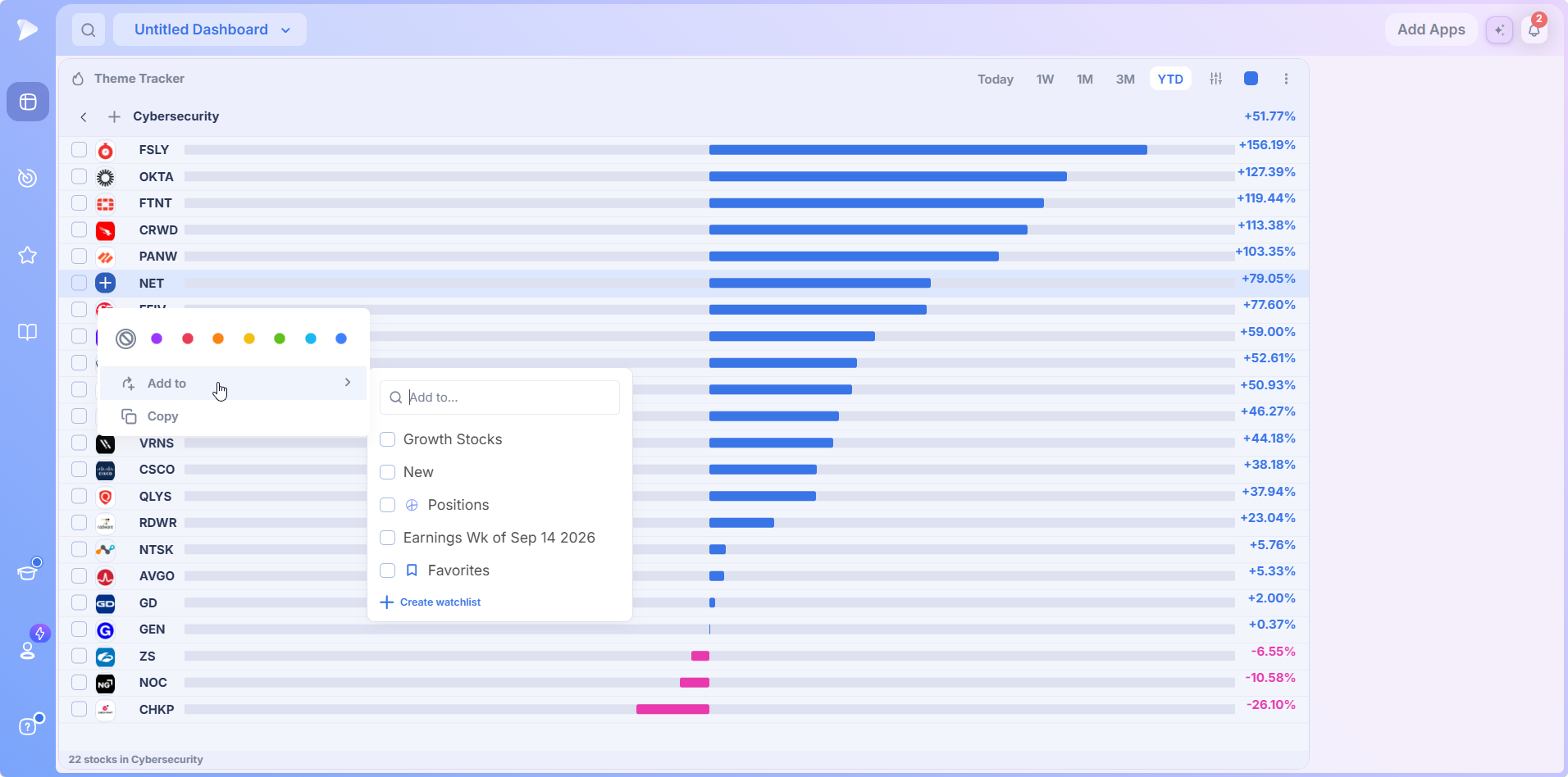
When a stock stands out, hover over its logo and click the plus icon for a quick menu: color tags, Add to and Copy. Add to lets you file the name into any of yourwatchlists, or start a new one, so flagged names are then available everywhere on the platform.
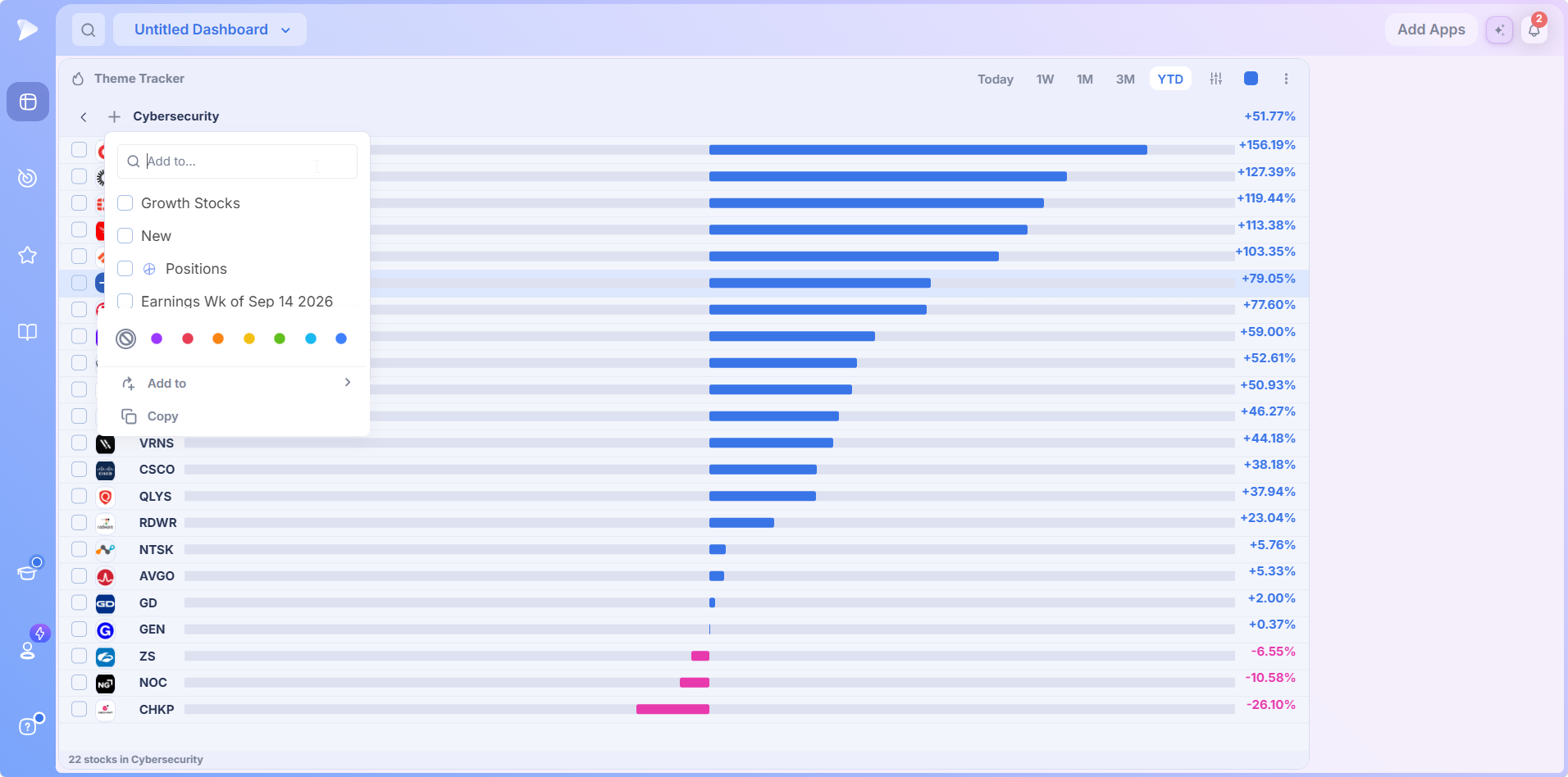
A second plus, beside the theme’s name at the top of the list, opens the same Add to picker at the theme level, and the row checkboxes let you pick out several names at once.
Research Theme Moves With Deepvue AI
When a theme or one of its stocks moves suddenly, right click the stock to ask Deepvue AI why, or take a watchlist built from a leading theme into the AI Terminal for deeper analysis. Usage is unbounded, so there is no cap on theme questions.
Join Deepvue and run the developing theme check after tonight’s close.
A Daily Stock Theme Tracker Routine You Can Run in Five Minutes
Here is how the workflows fit into a single routine. Run it after the close each day; the whole thing takes about five minutes.
Check market conditions first. Glance at the Market Brief, Market Breadth or a Heat Map on your dashboard. A leading theme in a weak market deserves more caution than the same theme in a strong one.
Read the 1M view. Note the top five or six themes: the current leading themes and your primary fishing grounds.
Read the daily view. Note the top five or six themes since the open, and log any theme that keeps reappearing. Repeat offenders that are not yet monthly leaders are your developing themes.
Drill into one or two themes. Open the ranked stock list, spacebar through the charts via a linked chart app, and look for leaders in constructive setups.
Flag and size. Add standouts to a watchlist, use Deepvue AI to explain moves you cannot, and size prospective positions with the Position Size Calculator before the next open.
Consistency is the whole trick. The traders who catch rotation early run the same five minute review every day, so a theme showing up three sessions in a row never slips past them.
A Deeper Weekly Review
Once a week, compare the 1W, 3M and YTD views against the 1M ranking and ask three questions:
- •Are this month’s leaders also strong on the 3M view, which suggests an established trend?
- •Are any monthly leaders fading on the weekly view, an early sign a theme is getting tired?
- •Is anything climbing the YTD ranks that you have not looked at in a while?
How to Interpret What the Theme Tracker Is Telling You
When Growth Themes Are Leading
When growth themes such as AI, semiconductors, software, Bitcoin and genomics dominate the top, risk appetite is broad. This is when leaders inside leading themes make their biggest moves, so extra time on the drill down pays off.
When Defensive Themes Are Leading
When utilities, healthcare and medical rise while growth themes sink, money is rotating toward safety. Be more selective, lean on the Market Brief and breadth tools before pressing, and let the daily view tell you when growth leadership reasserts itself.
Using Theme Rank to Manage Open Positions
If you hold a position, the rank of its theme tells you whether the group tailwind is intact. A holding whose theme slides from the top five toward the bottom half of the monthly ranking has lost part of its edge, useful when deciding how much room to give the trade.
Five Theme Tracker Mistakes to Avoid
Chasing a single strong day. Wait for repeat appearances or second day follow through before treating a theme as developing.
Fishing at the bottom of the list. Trend trading means buying strength; the bottom ranked themes are where trends end, not where they usually begin.
Ignoring the broader market. A leading theme in a weak tape produces more failed breakouts.
Mixing up the two daily modes on gap days. Since Open shows what happened during trading, while Today includes the gap.
Buying the theme instead of the leader. Focus on the strongest names in constructive setups, not the laggards playing catch up.
From Leading Themes to Trade Ideas With the Deepvue Screener
The Theme Tracker tells you where to look. The screener tells you what qualifies. Identify the leading themes first, then run screens and weight candidates that belong to those themes. A qualifying setup inside a leading theme is a very different trade from the same setup inside a lagging one.
The screener’s 169 presets, spread over nine categories, include screens from traders like Mark Minervini, Oliver Kell and Mike Webster. Presets are read only until you duplicate them, and the drag and drop filter builder turns any theme insight into a custom screen. Pattern screens cover growth setups like the VCP, cup and handle and double bottom, while indicator screens cover relative strength, moving average and MACD scans; run any of them, then prioritize the results inside your leading themes.
Create your Deepvue account and run your first theme filtered screen today.
What Makes Deepvue the Best Stock Market Theme Tracker?
For growth traders, Deepvue makes the strongest case as the best theme tracker for stocks, and the reasons are specific rather than promotional:
- ✓It was first, and competing platforms have since built copies.
- ✓Curated by active traders, through every market cycle rather than frozen into a taxonomy.
- ✓Yours to extend, with custom themes alongside the curated list.
- ✓Granular where it counts, with Bitcoin miners, quantum and China internet standing on their own.
- ✓Theme to stock in two clicks, so rotation connects directly to trade ideas.
- ✓Wired into a full platform, beside the screener’s 1,152 data points, charts, watchlists and the AI Terminal.
No platform is right for everyone, and the honest way to decide is a proper comparison. Our Deepvue comparisons hub sets Deepvue against MarketSurge, TradingView, TC2000, TrendSpider, and Finviz feature by feature.
What Traders Say About Deepvue
Reading the market with Deepvue, in reviewers’ words.
Deepvue’s dashboards are “a lot more helpful than the market overview pages” found elsewhere.
Dave at Day Trade Review, which rates the platform 4.7. Full review
“Deepvue feels extremely well tailored to momentum trading and CANSLIM investing.”
A verified five star G2 review from April 2026. On G2
“It’s really the best screener I’ve ever used.”
u/Trading_Intern987, in an r/CANSLIM subscriber update. Read the post
“Deepvue is a great tool for traders.”
From an April 2026 review on the App Store. App Store listing
Deepvue’s reviews page lists over 220 verified reviews with a 4.8 average and a 97 percent recommendation rate.
What the Theme Tracker Costs
The Theme Tracker is included in Deepvue’s single plan at $49 per month, with monthly and annual options, custom themes included, and nothing sold separately.
That one plan covers:
- •The screener and its 1,152 data points.
- •Charts, watchlists, and alerts, all of them unrestricted.
- •Fully customizable dashboards, with every app in the catalog.
- •The Theme Tracker, Market Brief, and AI Terminal, the last with unbounded usage.
Deepvue has one plan, so there are no tiers to compare. For reference, MarketSurge, the legacy platform in this niche, runs $149 per month.
New subscribers also get a one on one onboarding session with a Deepvue team member, an onboarding email series covering platform features and use cases, and weekly live webinars that each go deep on one part of the platform.
Start Tracking Market Themes With Deepvue
Market rotation never stops, and the traders who catch it early are the ones watching the right scoreboard.
The Theme Tracker gives you that scoreboard: 31 curated stock market themes plus your own, five timeframes, ranked stock lists inside every theme, and real time updates during market hours, set up in under a minute and reviewed in five minutes a day.
Get started with Deepvue today and make the Theme Tracker the first screen you check every morning.
↑ Back to contentsFrequently Asked Questions
The questions that come up before the tracker becomes a daily habit.
What is the Theme Tracker in Deepvue?
The Theme Tracker is Deepvue’s stock market theme tracker: a dashboard app that ranks 31 curated themes, plus any custom themes you add, by performance in real time. Each theme is a basket of stocks tied to one market area, and clicking a theme opens a ranked list of every stock inside it.
What is thematic investing?
Thematic investing groups stocks by a shared trend, such as AI, Bitcoin or robotics, rather than by broad GICS sector, because those trends cut across sectors and often drive the biggest moves. Leadership among themes rotates, and the Deepvue Theme Tracker makes following it systematic by ranking themes live and opening the leaders inside each.
What is sector rotation in the stock market?
Sector rotation in the stock market is money moving from one group of stocks to another as economic conditions, interest rates or investor appetite for risk shift. Leadership rotates rather than the whole market moving together, and the Deepvue Theme Tracker shows that rotation as a live ranking rather than something you reconstruct after the fact.
How do you identify which sectors are leading the market?
You identify which sectors are leading the market by comparing relative performance across a consistent set of groups over more than one timeframe. In Deepvue, the Theme Tracker’s 1M view surfaces established leaders at a glance, while the daily view reviewed after each close catches groups climbing toward the top.
How do I find trending or momentum stocks with the Theme Tracker?
You find trending or momentum stocks with the Theme Tracker by working top down: set it to 1M, read the leading themes, then click one to open its ranked stock list with the strongest names on top. Confirm each candidate on a linked Deepvue chart for volume and a constructive setup before acting.
What is the difference between a theme and a sector?
The difference between a theme and a sector is scope and purpose. A sector is a broad GICS classification, such as Information Technology, designed for benchmarking; a theme is a narrower, momentum relevant basket such as semiconductors or Bitcoin miners, curated for trading. Deepvue tracks 31 themes because momentum concentrates at the theme level.
Is following market rotation a good trading strategy?
Following market rotation is a sound trading strategy as context for stock selection, and it is the foundation of the top down approach used by Darvas, O’Neil and Weinstein. Close to half of a stock’s move is tied to its industry and sector, so buying leaders inside leading themes in the Deepvue Theme Tracker puts that force behind a trade.
What is the best theme tracker for stocks?
The best theme tracker for stocks, for growth traders, is Deepvue’s: it originated the concept, its 31 themes are curated by active traders, you can add custom themes, every theme opens into a ranked stock list, and it connects to a full screener, charts and AI research in one $49 per month platform.
How many themes does the Theme Tracker cover?
The Theme Tracker covers 31 curated themes, including AI, semiconductors, Bitcoin, gold miners, genomics, software, cybersecurity and home construction. Deepvue’s team evolves the list as market cycles change, and you can add custom themes of your own alongside it.
What timeframes does the Theme Tracker support?
The Theme Tracker supports five timeframes: Today, 1W, 1M, 3M and YTD. In Deepvue the daily view has two modes, Today, measured from the previous close, and Since Open, measured from the session’s opening price, which strips out gaps for a purer read on intraday rotation.
What is the difference between Today and Since Open?
The difference between Today and Since Open is the starting point. Today measures each theme’s change against yesterday’s close, while Since Open measures from the session’s opening price and excludes overnight gaps, giving the Deepvue Theme Tracker a purer momentum read on gap days.
Can I create my own themes in the Theme Tracker?
Yes, you can create your own themes in the Theme Tracker. Open Manage themes from the tracker’s header and choose Add theme to start tracking a custom group. Custom themes are shared across all your Deepvue Theme Tracker widgets, and a toggle controls whether the built-in list shows alongside them.
How do I find developing themes before they become leaders?
You find developing themes before they become leaders by reviewing the Deepvue Theme Tracker’s daily view after each close. A theme that keeps appearing in the daily top five over three to five sessions, but has not yet reached the top of the one month view, is showing the footprint of money rotating in.
Does the Theme Tracker update in real time?
Yes, the Theme Tracker updates in real time. The rankings reorder live during market hours as money moves between groups, and after the close the Deepvue app reflects the completed day, which is why many traders run their theme review right after the bell.
Why follow stock market themes instead of individual stocks?
You should follow stock market themes before individual stocks because roughly 37 percent of a stock’s move is tied to its industry and another 12 percent to its sector. Starting with the Deepvue Theme Tracker means every stock you consider already has group strength behind it.
Does the Theme Tracker work in down markets?
Yes, the Theme Tracker works in down markets. Its rankings are relative, so it shows defensive rotation as clearly as bull market leadership, and many Deepvue traders use the daily view in weak markets to watch for the first signs of new leadership.
How long does it take to set up and learn the Theme Tracker?
Setting up the Theme Tracker takes under a minute: open the Deepvue Dashboard module, click Add Apps and click Theme Tracker to add it. Learning it takes one session, and the daily routine built around it takes about five minutes after the close.
Is the Theme Tracker included in the standard Deepvue plan?
Yes, the Theme Tracker is included in the standard Deepvue plan. Deepvue has a single plan at $49 per month that covers the Theme Tracker along with the screener, charts, watchlists, alerts, dashboards, the Market Brief, and the AI Terminal.
CAN SLIM® is a registered trademark of O’Neil Capital Management, Inc. (U.S. Reg. No. 3,081,940). Deepvue is not affiliated with, sponsored by, endorsed by, or licensed by O’Neil Capital Management, Inc., Investor’s Business Daily, MarketSurge, or their affiliates. Any reference to CAN SLIM® is for descriptive purposes only. Deepvue’s scores, ratings, and screeners are independently calculated by Deepvue and are not the proprietary ratings of MarketSurge or IBD.