Trading Plan
Last Updated:
November 19, 2026


How to Build a Trading Plan Your Journal Can Hold You To
Write the rules for what you trade, when you buy, how much you risk and when you sell, then grade every trade against them.
A trading plan is the written set of rules for what you trade, when you enter, how much you risk and when you sell. A trading journal shows if you followed those rules on every trade, which is how the plan gets better instead of drifting.
When did you last check a closed trade against your written plan? For most stock traders, the plan gets written once and the trades drift from it a little at a time: a stop set wider, an entry taken late, a setup that was never on the list.
Never miss a Deepvue blog post.
By the end of the quarter, the plan describes a trader you stopped being weeks ago. This guide shows how to write rules clear enough to grade, then check every trade against them in the Deepvue Trading Journal.
Key Takeaways
- •A complete plan has eight parts. Goals, market conditions, stock criteria, setups, entry rules, risk and size, sell rules and a review schedule, each written as a rule.
- •Write rules a trade can pass or fail. “Buy within 3% of the breakout level” can be graded a month later, while “buy strong stocks” can’t.
- •Start from a worked example. A plan built for stocks held for weeks to months, with round numbers to swap for your own, is faster to adapt than a blank page.
- •Setups become playbooks and rules become tags. In the Deepvue Trading Journal, Performance by Playbook grades your setups and Performance by Tag grades your rules.
- •Review on a schedule and change one rule at a time. Daily tagging, a weekly pass through the Trades tab filters and a monthly rules check keep the plan current.
What Is a Trading Plan?
A trading plan is a written set of rules that decides which stocks you trade, when you buy, how much you risk and when you sell, all fixed before the market opens. It moves the hard decisions to your desk, where nothing is at stake yet.
A trade plan is the same idea applied to one position: the entry, stop and target for a single trade, written before you buy. The trading plan holds the rules every trade plan has to follow.
Decisions made in the middle of a selloff carry a cost you can measure. Vanguard modeled three investors holding the same mix of 60% stocks and 40% bonds through the April 2025 selloff. By June 24, the one who held was up about 2%. The one who sold on April 8 and bought back a week later was down about 3%, and the one who sold and stayed in cash was down about 8%.
All three owned the same portfolio, and what separated them was one decision made on a bad day. A single growth stock swings far harder than a stock and bond mix, which makes rules set in advance worth even more.
Trading Plan vs Trading Journal
The plan says what you’ll do. The trading journal records what you did on each trade: the setup, the stop, the result and your notes on how it went.
Each one leaves a gap on its own. A plan with no journal can’t show which rules you broke, and a journal with no plan has nothing to grade the trades against.
The Deepvue Trading Journal puts both in one place. Every closed trade carries its setup and the rules it kept, so the plan ends up with a score you can read.
What to Include in a Trading Plan
Every complete plan answers the same eight questions. Write each answer as a rule a trade can pass or fail, since those are the only trading rules you can check later:
| Part of the plan | What to write | Example for a stock trader |
|---|---|---|
| Goals | Process targets you control, each with a number | Stop set before every entry, every closed trade tagged the same day |
| Market conditions | When to trade full size, small or not at all | Full size with the index above its 50 day line and new highs beating new lows |
| Stock criteria | The screen a stock must pass to reach your list | Within 25% of a 52 week high, with earnings and sales growing 20% or more |
| Setups | The two or three patterns you trade | Base breakout, pullback to the 21 day EMA, earnings gap |
| Entry rules | The exact trigger and how far past it you’ll pay | Buy within 3% of the trigger on volume 40% above average |
| Risk and size | The loss allowed per trade and how shares are counted | 1% of the account, with shares set by the distance to the stop |
| Sell rules | Where you exit a failed trade and how you take profits | Full exit at the stop, a third off at 2R, the rest on a close below the 21 day EMA |
| Review schedule | When the trades get checked against the plan | Tag daily, review weekly, change rules monthly |
Trading goals go first because they decide what the review measures. Sell rules and the review schedule are the parts most plans leave vague, and they’re the ones a journal needs most.
How to Create a Trading Plan Step by Step
Here’s how to make a trading plan one part at a time. Each step builds on the one before it, so you can draft all eight in one sitting and sharpen the wording over your first month of trades.
1. Set Goals You Can Measure
A goal like “make $50,000 this year” depends on the market as much as on you. Process goals depend only on you, such as a stop set before every entry or a review every Saturday.
Pick two or three and give each a number you can check, like a stop on 100% of trades. Profit follows from keeping them, and the journal can tell you if you did.
2. Decide When the Market Is Worth Trading
Breakouts work far better in a healthy market than in a falling one, so the plan needs rules for trading full size, trading small and staying in cash.
Early April 2025 showed why. On April 8, the S&P 500 closed almost 19% below its February record. Not one of its stocks set a new 52 week high that day, while 109 set new lows, according to Reuters.
A rule tied to market breadth and the index’s moving averages settles a day like that in advance. New buying stops until new highs return and the index gets back above its key lines.
3. Define the Stocks You’ll Trade
Write down what a stock needs before it can reach your list, such as price and volume floors, an uptrend, earnings growth and relative strength. Save those filters in the Deepvue screener so the same screen runs every night.
Then cut the results down to a focus list of the five to ten names closest to a valid entry. Building it before the open keeps you from hunting for trades once prices start moving.
4. Name Your Setups
Choose two or three setups you know well and describe each one in a sentence: the pattern, where the entry trigger sits and where the setup fails. Fewer setups mean more trades in each, which makes the results easier to read later.
Keep a reference chart for every setup in a Model Book. The plan then points to a picture of a valid setup, and every new trade can be held up against it.
5. Write Entry Rules You Can Check
An entry rule is specific enough when someone else could read your trade and say yes or no. “Buy strong breakouts” fails that test.
“Buy within 3% of the breakout level, on volume at least 40% above the 50 day average, with no earnings report due for two weeks” passes it.
Add the things you won’t do as well, like buying an open that gaps past your limit. Written down, a chased entry stands out the moment you review the trade.
6. Set Risk per Trade and Size Every Position
Pick a fixed share of the account to lose if a trade hits its stop, often 0.5% to 1% for stock traders. The gap between your entry and your stop then decides the share count:
POSITION SIZE
Shares to buy = account risk in dollars ÷ risk per share Risk per share is your entry price less the stop. Deepvue’s Position Size Calculator runs this for you from the entry and stop.
Set the profit target against that same stop. The risk reward ratio guide explains how far a target should sit before a trade is worth taking.
7. Write Your Sell Rules
A plan needs two kinds of sell rules. The first is the stop, placed where the setup is proven wrong, such as under the breakout day’s low. The second covers winners: when to take partial profits and how to trail what’s left.
One common version sells a third of the position at 2R, raises the stop to breakeven and trails the rest with a moving average. Our sell rules guide shows how to trail a position with moving averages.
8. Schedule Your Reviews
The review schedule is what ties the plan to your journal. Tag each trade the day it closes, while your reason for selling is still clear.
Once a week, clear every trade the journal flags as untagged, missing a stop or waiting for review. Once a month, read your results by setup and by rule, then decide if anything in the plan should change.
A Trading Plan Example for Stock Traders
Here’s a complete one page plan for a $100,000 account that holds positions for weeks to months. The numbers are round on purpose and the setups are generic, so copy it and swap in your own:
| Part of the plan | Rule |
|---|---|
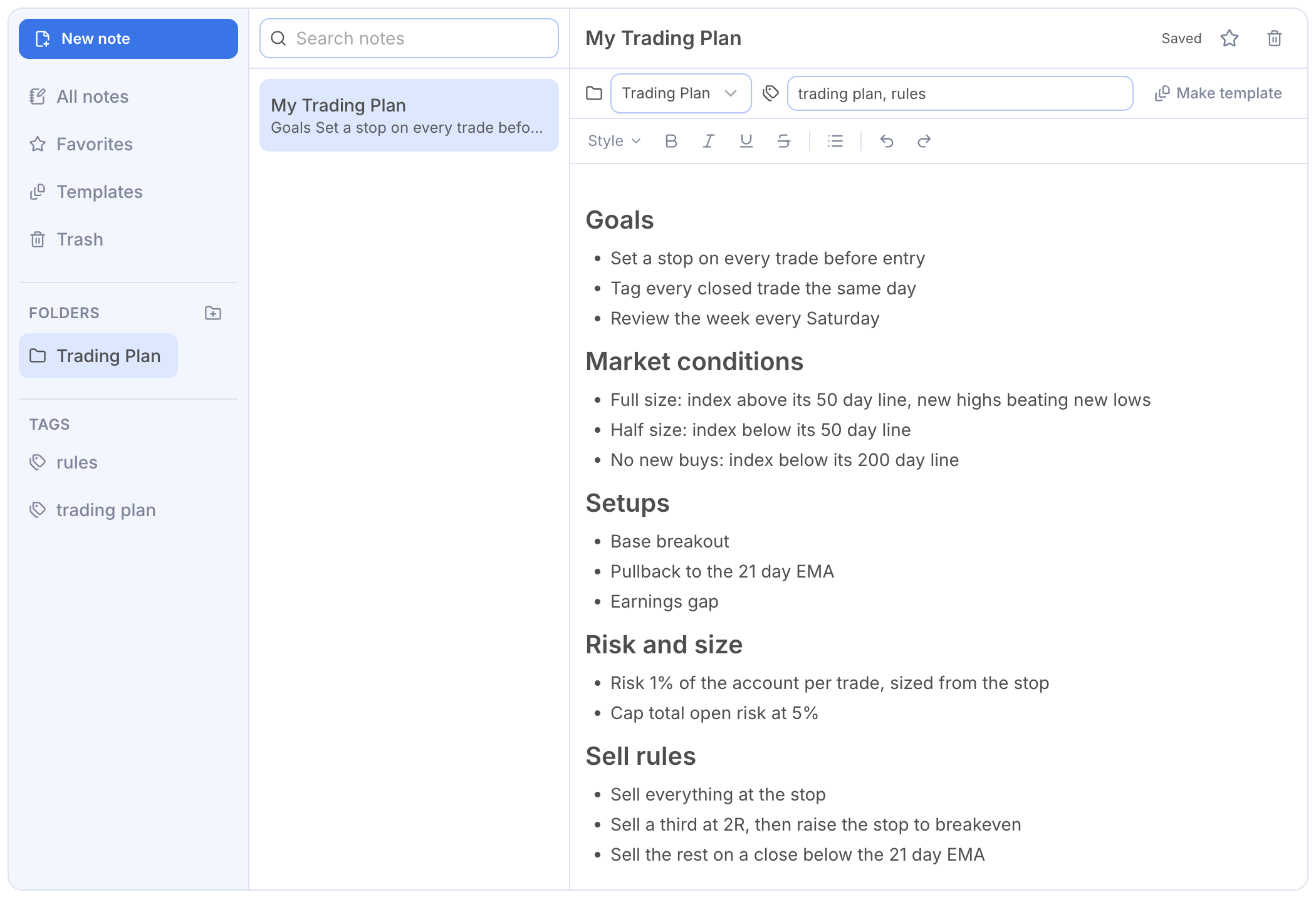
| Goals | Stop set before every entry. Every closed trade tagged the same day. Weekly review every Saturday. |
| Market conditions | Full size with the S&P 500 above its 50 day line and new highs beating new lows. Half size below the 50 day line. No new buys below the 200 day line. |
| Stock criteria | Price above $15, average volume above 500,000 shares, within 25% of a 52 week high, latest quarter’s earnings and sales up 20% or more. |
| Setups | Base breakout. Pullback to the 21 day EMA. Earnings gap. |
| Entry rules | Buy within 3% of the trigger on volume 40% above average. No buys in the two weeks before an earnings report. No more than two new positions a day. |
| Risk and size | Risk 1% of the account, or $1,000, per trade. Shares = $1,000 ÷ (entry minus stop). Stop no more than 8% below entry. Total open risk capped at 5%. |
| Sell rules | Sell everything at the stop. Sell a third at 2R and raise the stop to breakeven. Sell the rest on a close below the 21 day EMA. |
| Review | Daily: tag new trades and write the lesson. Weekly: clear the To Review, Untagged and Needs Stop filters. Monthly: read results by playbook and tag, then change one rule at most. |
Here’s the risk rule on one trade. A base breakout triggers at $80 with the stop at $74, so each share risks $6 and the plan buys 166 shares, a position of $13,280 that loses about $1,000 if the stop hits.
No two trading plan examples will look alike. A trader who buys earnings gaps writes tighter entries and faster sells than one who buys pullbacks in long uptrends, yet both plans answer the same eight questions.
How to Hold Yourself to Your Plan in the Deepvue Trading Journal
Once a plan is written, something has to check each trade against it. Inside the Deepvue Trading Journal, every part of the plan has a place to go, and our journal features overview lists everything else you can track:
| Part of the plan | Where it goes in the journal |
|---|---|
| The written plan and checklists | A Notebook folder, with templates for repeat reviews |
| Setups | The playbook on each trade, graded in Performance by Playbook |
| Entry, risk and sell rules | Position tags such as Followed plan or Moved stop, graded in Performance by Tag |
| The plan for one trade | Pre-trade Notes, written before you buy |
| What actually happened | Post-trade Notes, written after you sell |
| The review schedule | The Trades tab filters, plus a Routine that runs on a set cadence |
Keep the Written Plan in the Notebook
The Notebook keeps your plan one click away from your trades. The sidebar lists All notes, Favorites and Templates above any folders you create, so the plan can go in its own Trading Plan folder with your weekly reviews beside it.
The Make template button saves any note as a layout you can reuse. A premarket checklist or weekly review saved as a template asks the same questions in the same order every time.
Turn Each Setup Into a Playbook and Each Rule Into a Tag
Each setup in your plan becomes a playbook, the name of the setup a trade was taken on, such as Base Breakout or Earnings Gap. Giving every trade its playbook is what lets the journal grade setups against each other.
Your rules go into position tags, which take any mix of setup and process tags you create. Tags such as Followed plan, Moved stop or Chased record which rules a trade kept, and you can tag each trade straight from its review.
Write the Plan Before Entry and the Lesson After
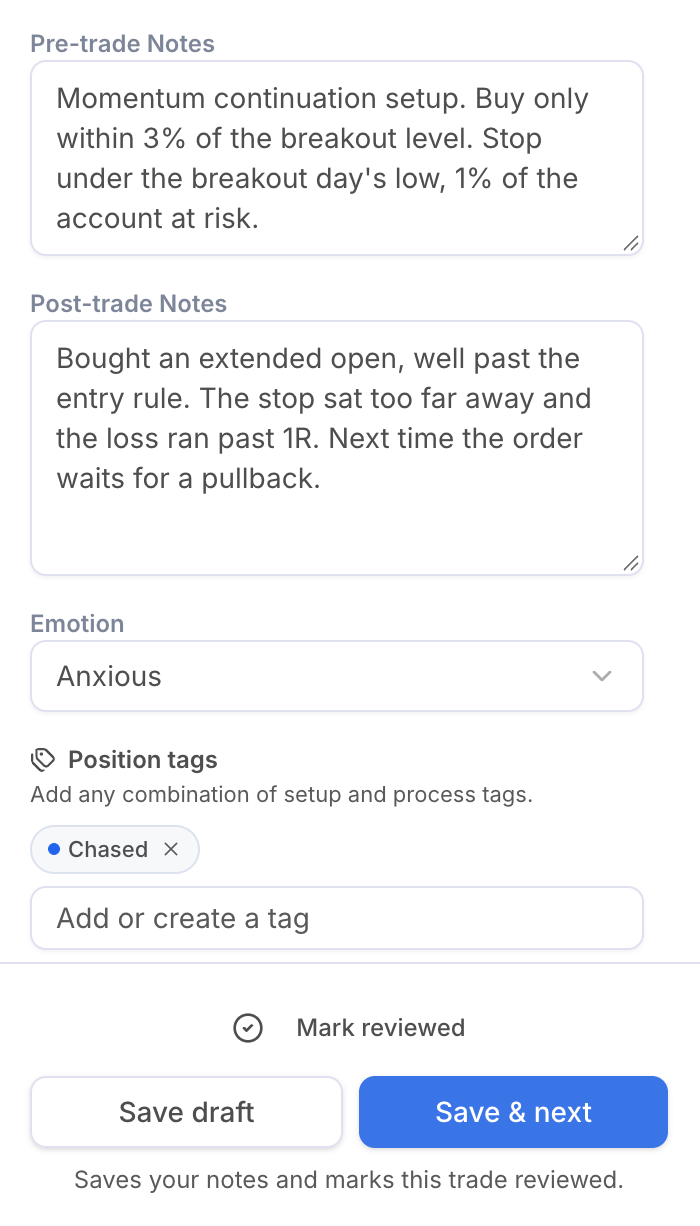
Use Pre-trade Notes for the trade plan of one position: the setup, the trigger, the stop and the size, written before you buy. Post-trade Notes ask what changed after the trade and what you’ll carry forward.
One plain sentence on which rule held and which slipped is enough. A month later, those notes explain the numbers in your stats.
Catch Plan Gaps With the Trades Tab Filters
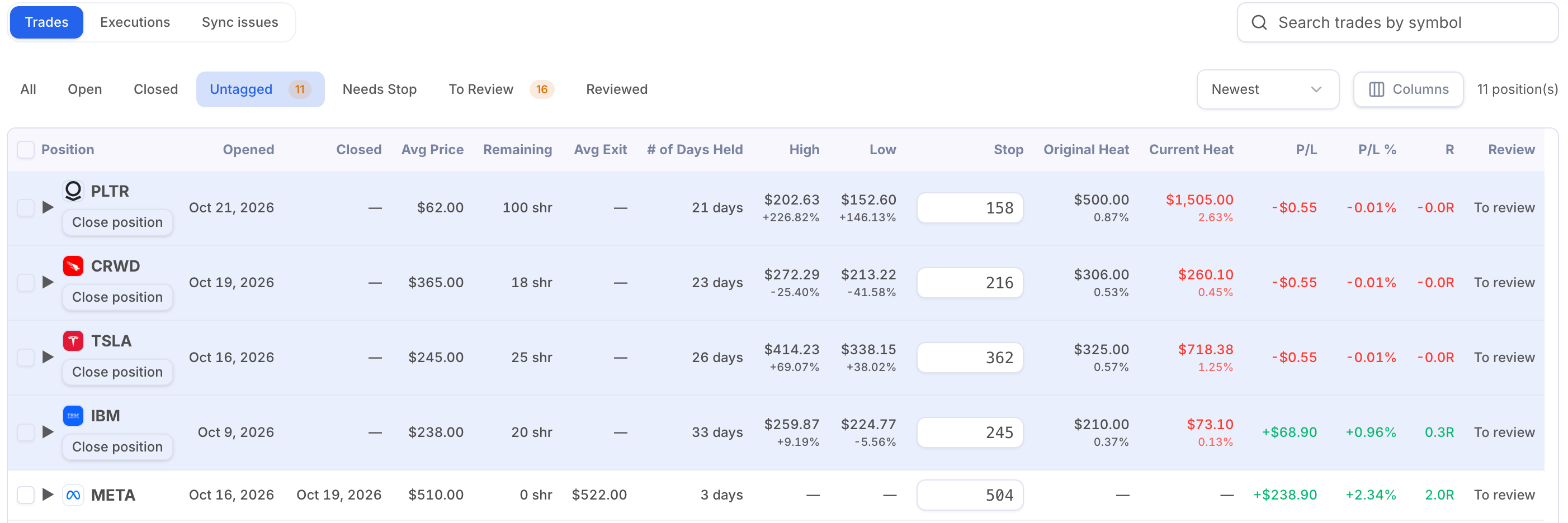
Seven filters run across the top of the Trades tab, and three of them map straight onto plan rules:
- •Untagged: trades with no tags yet, so none of them skips the rule check.
- •Needs Stop: open positions without a stop, a direct break of the risk rule.
- •To Review: closed trades still waiting for review. Saving a review marks the trade Reviewed.
Clear all three every week and the plan gets checked on every trade, losers included.
Grade Your Rules With Performance by Playbook
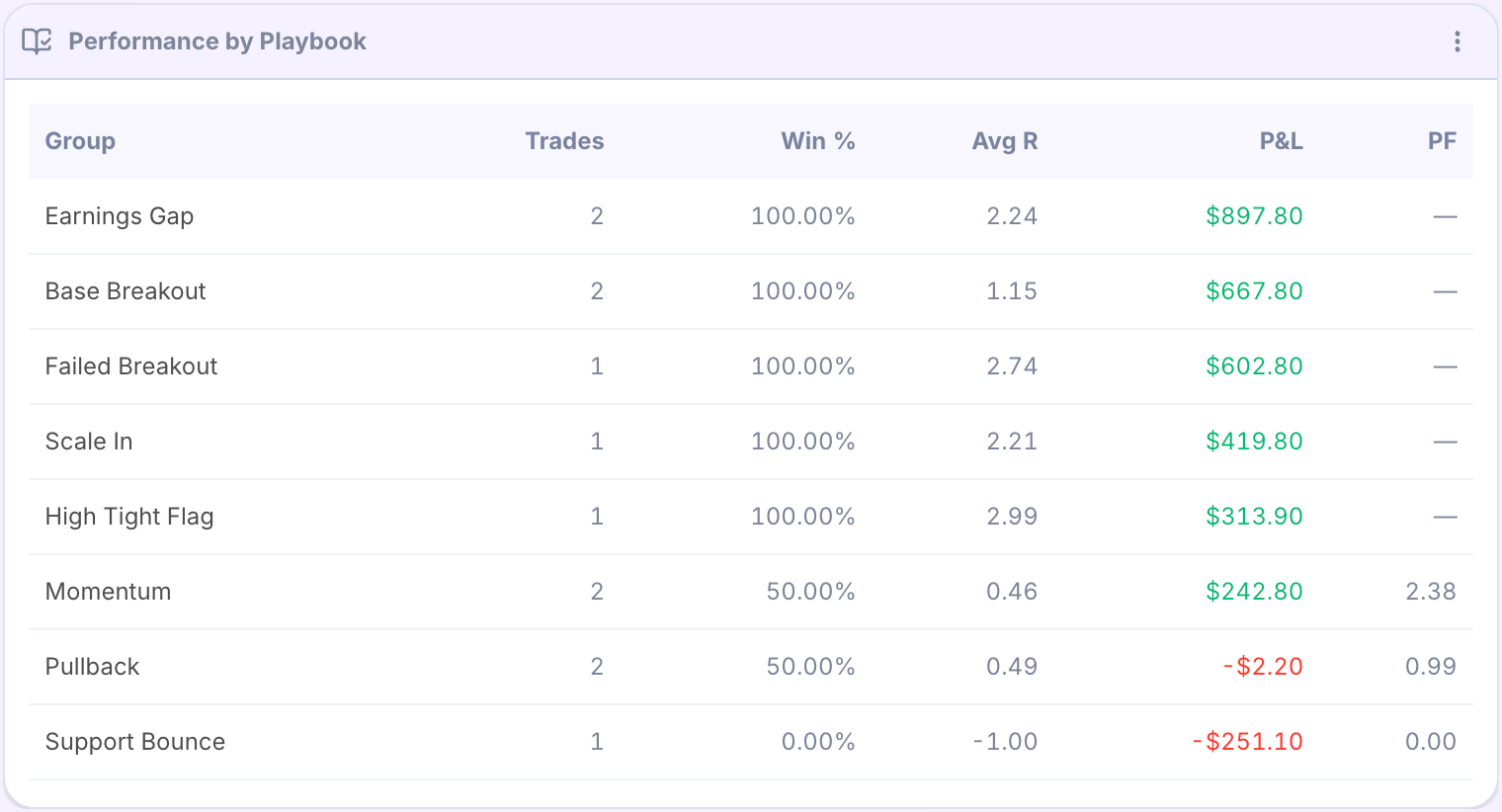
Performance by Playbook lists each setup with its trade count, win rate, average R, profit and loss and profit factor. Once a setup has 20 or more trades, the table starts to show which parts of the plan earn their place.
Performance by Tag does the same for your rules, so trades tagged Followed plan can be set against trades tagged Moved stop. When a setup keeps losing money over a fair sample, cut it from the plan or tighten its entry rules.
BLACK FRIDAY
Grade Every Trade Against Your PlanDeepvue plus the Deepvue Trading Journal costs $490 a year through December 4, compared with $990 a year or $99 a month at regular prices.
Turn the Plan Into a Daily Process With Deepvue Routines
A review schedule holds up better when it runs on its own. Routines turn that schedule into a checklist Deepvue walks you through, one action at a time.
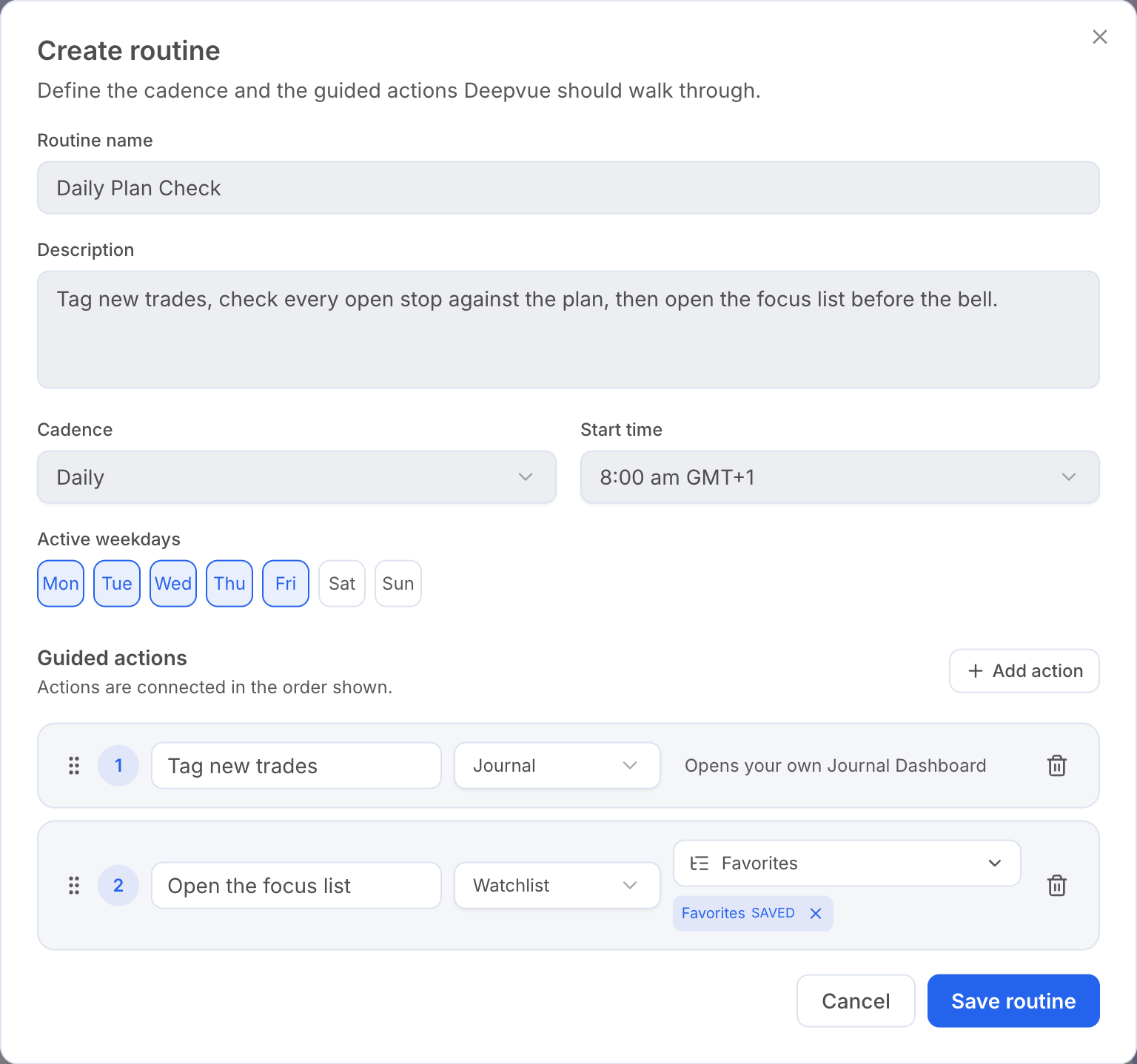
Name the routine, choose a cadence such as daily or weekly, pick the active weekdays and a start time, then line up guided actions in order. An action can open a screen, a watchlist like your focus list, a dashboard or your Journal Dashboard.
Running a routine on schedule keeps your streak going, and curated routine presets from experienced traders give you a starting point. For a fuller schedule around the open and close, our stock trading routine guide splits the session into blocks.
A routine is only as useful as the screens and focus lists it opens. In the clip below, we show how screens, focus lists and Routines fit together into one daily process in Deepvue.
Watch how to find top growth stocks with focus lists, Routines and screens here.
How to Stick to Your Trading Plan
Knowing how to stick to a trading plan comes down to two habits that move decisions out of market hours.
Keep It to One Page
A plan you can read in two minutes before the open is a plan you’ll read. Cut anything that doesn’t change a buy or sell decision, and move the background material into your setup charts.
Set Alerts Before the Open
Set price alerts at each entry trigger and each stop the night before. When one fires, the decision was already made at your desk, and the only job left is to act on it.
FINRA’s investor tips for turbulent markets make the same case: tie your moves to a plan set ahead of time so volatile days don’t push you into impulsive ones.
How Often to Update Your Trading Plan
Review the plan once a month and change one rule at a time. Change three at once and you can’t tell which one helped.
Give each rule enough trades before you judge it, since a handful of results is mostly noise. Twenty trades in a setup is a sensible floor before you cut it.
Keep a short changelog note in the same Notebook folder, so each version of the plan lines up with the trades taken under it. A monthly post-trade analysis shows which rule to look at first.
Write the Plan, Then Let Deepvue Keep Score
Write the eight parts, keep them on one page in the Notebook, give every trade its playbook and tags, and clear the Trades tab filters each week. The Deepvue Trading Journal then shows which rules make you money, on desktop and mobile.
On your phone, open Deepvue in the browser and claim the Black Friday rate there, then install the Deepvue app so your plan and your Trades tab come with you.
BLACK FRIDAY DEAL
Deepvue With the Journal Included, Plus 3 Live Bonuses
One annual plan covers the full platform, from screens and charts to the Trading Journal and analytics, plus two VIP Masterclasses and the December Live Bootcamp.
- Deepvue annual planScreener, charts, dashboards, Model Book, Deepvue AI and the Journal with analytics$990/yr
- Momentum Setups Mastery (VIP)3 webinars and a VIP Q&A$297
- Sell Rules Mastery (VIP)3 webinars and a VIP Q&A$297
- December Deepvue Live Bootcamp8 live sessions, December 7 to 14Included
- Total value
$1,584
Your $490 rate stays locked while your subscription is active. Join by December 4, 2026 at 11:59 PM ET.
Frequently Asked Questions About Trading Plans
Is a trading plan the same as a trading strategy?
No, a trading plan isn’t the same as a trading strategy. A strategy is one way of trading, such as buying base breakouts. The plan wraps goals, market rules, risk limits and a review schedule around your strategies. Each strategy then becomes a playbook you can grade in the Deepvue Trading Journal.
How long should a trading plan be?
A trading plan should be about one page, short enough to read before the open. Longer plans tend to get skimmed right when they matter. Keep the one page version in a Deepvue Notebook folder and save setup examples in Model Books instead.
Should you test a trading plan before using it?
Yes, you should test a trading plan before real money goes in. Walk the rules through past charts and note every trade they’d have taken and how it ended. Deepvue’s chart Replay lets you step through past price action and practice entries first.
Can you change your trading plan during a trade?
You can change your trading plan during a trade only in ways the plan already allows, such as raising a stop as the stock climbs. Widening a stop or adding to a loser breaks the plan. Tagging those trades Moved stop in Deepvue shows what the habit costs.
What should you do after breaking your trading plan?
After breaking your trading plan, tag the trade with the rule you broke, write why in its Post-trade Notes and review it before your next entry. One break is a data point. Performance by Tag in Deepvue shows if the same break keeps coming back.
Do you need a written trading plan if you only trade a few times a month?
Yes, you need a written trading plan even if you only trade a few times a month. Fewer trades make each one count more, and weeks between entries are long enough to blur the rules. A Deepvue Routine can open your focus list and Journal Dashboard on a set schedule.
Sources
- •Vanguard: Staying the course wins again!, Investment Advisory Research Center, June 30, 2025
- •Reuters, via SRN News: S&P 500 hits lowest close in almost a year as hopes wane for tariff concessions