The Growth Stock Screener Built for Active Traders
A growth stock screener filters the market for companies with fast growing earnings and sales, leading relative strength and rising institutional sponsorship, then shows which of them are already acting like leaders on the chart. Deepvue covers all seven criteria that define a market leader with its own RS Rating, EPS Rating, AS Rating and Composite Rating, 227 earnings fields, 126 sales fields and 84 institutional fields in one visual builder, and its Seven Criteria Growth preset runs the whole checklist in one click. $99 a month.
Key Takeaways
Most platforms claim to support growth stock screening but cover three or four of the seven criteria that define a market leader and leave you to assemble the rest by hand. Deepvue is different.
It ships Deepvue’s own RS Rating, EPS Rating, AS Rating, and Composite Rating built in, plus 227 earnings fields, 126 sales fields, 84 institutional and insider conditions, and 145 price and volume filters. The full growth data set, filterable inside a visual builder, backed by an AI terminal that turns plain English into a working screen.
If you trade growth stocks using the CAN SLIM® methodology developed by William J. O’Neil, holding leaders for weeks to months as they advance higher, this is the growth stocks screener built around your routine. It’s part of the full Deepvue Screener, where rating filters sit alongside earnings, sales, and price action conditions in one named scan.
CAN SLIM® is a registered trademark of O’Neil Capital Management Inc. Deepvue is not affiliated with, sponsored by, or endorsed by O’Neil Capital Management Inc. References to the CAN SLIM® methodology on this page are descriptive only.
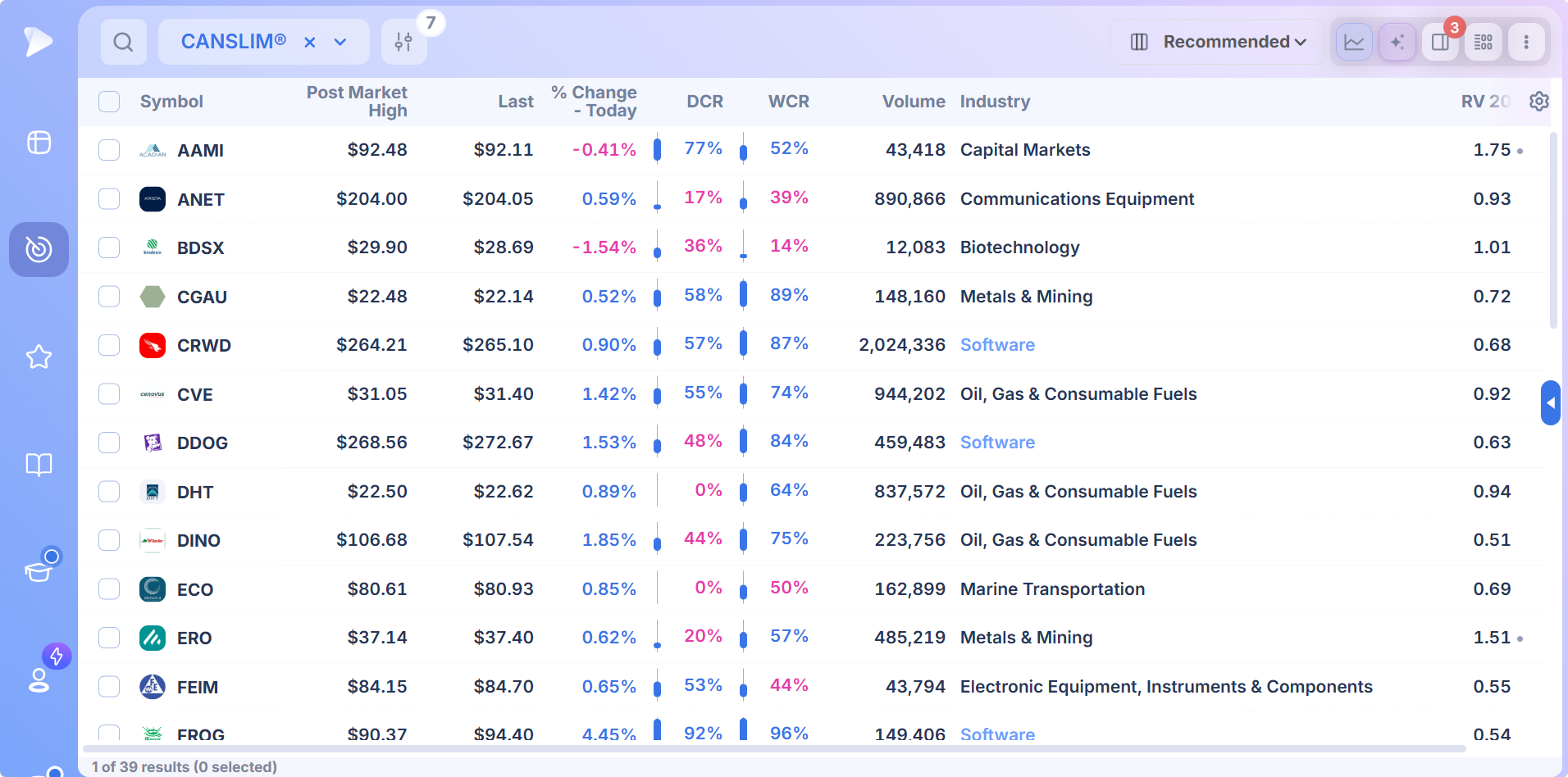
- ✓Each of the seven criteria that define a market leader, from current earnings to market direction, is a filterable condition in Deepvue
- ✓Deepvue’s own RS Rating, EPS Rating, AS Rating and Composite Rating are built in and filterable at any threshold
- ✓The Seven Criteria Growth preset applies all seven conditions in one saved screen, and a saved copy opens every threshold
- ✓Earnings, sales, institutional and price conditions stack in one builder with ANY/ALL logic between groups
- ✓Click any result to see its chart and quarterly numbers, then push it to a watchlist or attach an alert in one step
- ✓One $99 a month plan includes every rating, preset and field
What Is a Growth Stock Screener?
A growth stock screener scans for companies whose earnings and sales are growing fast enough to draw institutional buyers, and whose stock is already outperforming. The checklist most growth traders work from comes from William J. O’Neil’s study of the biggest stock market winners, which found the same seven traits in nearly all of them before their largest advances.
What’s Inside the Growth Stock Screener
The screener covers every one of the seven CAN SLIM® criteria with the data points the methodology actually needs. Here’s the breakdown of conditions available across the platform:
- •Current and Annual EPS Growth (C and A). EPS history, quarterly growth rates, annual growth, EPS acceleration, surprise data, and estimates across 227 dedicated earnings fields, all available as filterable conditions and sortable columns.
- •New Highs, Products, and Catalysts (N). 52 week high filters, all time high filters, base breakout conditions, gap context, and earnings catalyst flags. Build a screen for the freshest leadership names making new ground on rising volume.
- •Supply and Demand Indicators (S). RVOL, dollar volume, ranges, ATR, gap context, and float conditions across the 145 price and volume fields. The volume side of the methodology surfaced as filterable inputs.
- •Leader Versus Laggard Filters (L). RS Rating, RS Line filters, and relative strength versus the broader index. The metrics that separate true leadership names from the rest, feeding the Deepvue Leaders preset directly.
- •Institutional Sponsorship (I). Fund ownership levels, quarter over quarter sponsorship change, count of funds holding a name, recent additions, recent reductions, and insider transaction data. 84 fields built around institutional sponsorship.
- •Market Direction Context (M). The 56 proprietary composite ratings that blend technical structure, fundamental quality, and relative strength into single scores, useful for reading the market backdrop alongside individual names.
What a Growth Stock Screener Should Actually Do
Putting any growth stock screener side by side surfaces three differences that decide which one stays open on your screen every morning. A stock screener growth traders rely on should refresh as filings hit, expose every one of the seven criteria as a filterable condition, and let you stack ratings on top of price action inside the same saved scan.
Live Updates When Earnings Drop and Volume Hits
The moment a leader prints a 60% EPS surprise or breaks out on heavy volume, your screen should reflect it. Not at the close. Not the next morning. Deepvue carries 227 earnings filters covering EPS history, surprises, growth, estimates, and time of day reporting, and streams 568 fields over WebSocket during market hours. The screen you opened at 9:35 keeps refreshing as the new prints land.
Coverage Across All Seven Criteria
Current quarterly earnings. Annual earnings growth. New highs, products, or catalysts. Supply and demand reflected in volume. Leader versus laggard sorted by RS. Institutional sponsorship. Market direction. A screener built for the CAN SLIM® methodology exposes every one of these as a filterable condition. Deepvue ships its own proprietary ratings (RS, EPS, AS, Composite) plus 596 fundamental side fields covering earnings, sales, margins, and institutional activity.
A Filter Builder Built for Multi Criteria Screens
A real seven criteria screen stacks five or six conditions in one scan. Three quarters of EPS acceleration. RS Rating above 90. Sales growth above 25 percent. Institutional sponsorship rising. Price breaking out of a base. Deepvue’s filter modal uses named groups with ANY/ALL logic between them, so the entire growth thesis fits inside one saved screen without a single line of code.
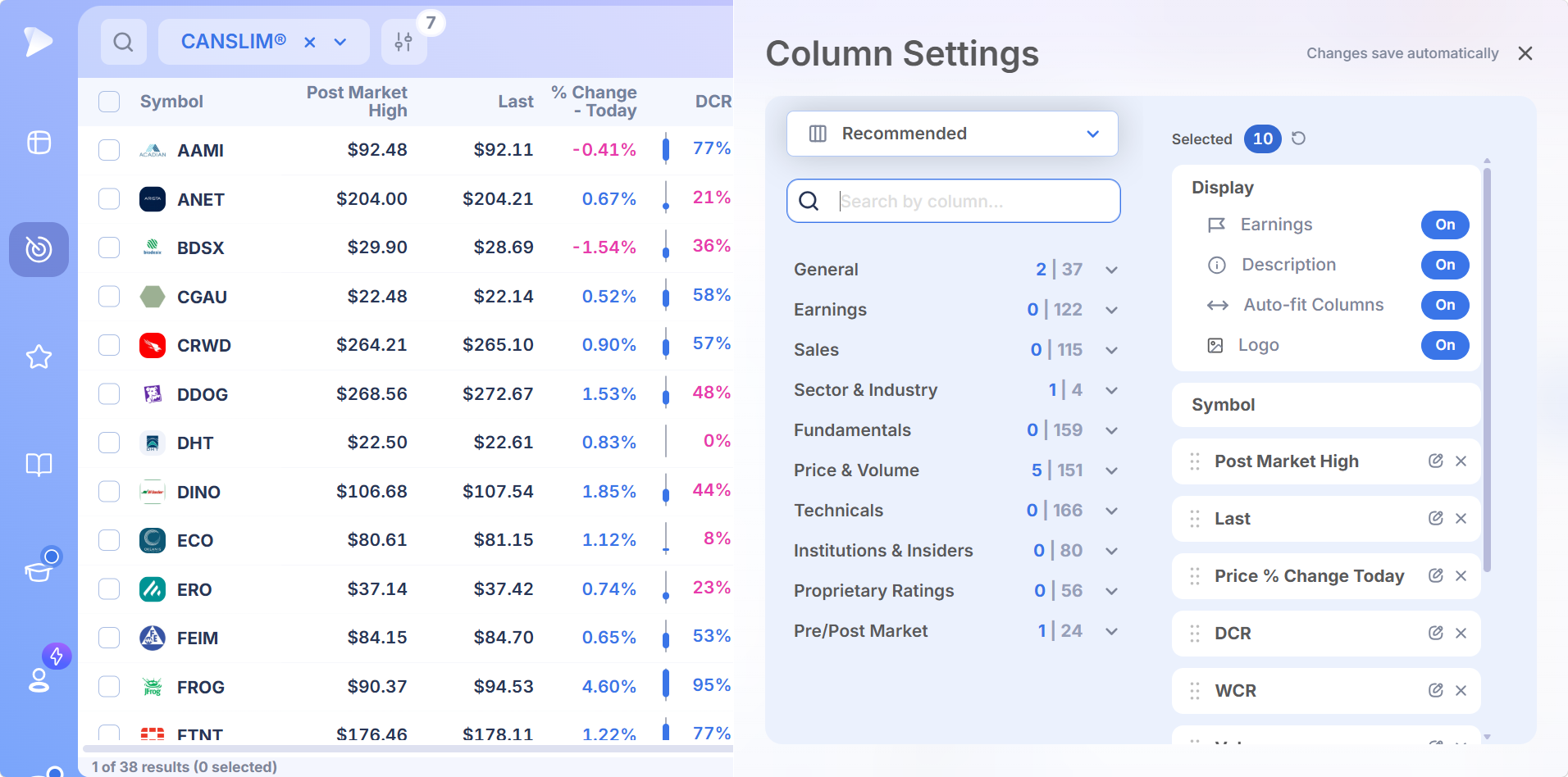
Why Deepvue Is the Best Growth Stock Screener for Active Traders
| What growth traders need | How Deepvue delivers |
|---|---|
| All four Deepvue ratings included by default | RS Rating, EPS Rating, AS Rating, and Composite Rating filterable at any threshold |
| Earnings data covered across the lifecycle of a report | 227 earnings filters covering surprises, growth, estimates, time of day reporting (BMO/AMC), and earnings status |
| Visibility into institutional sponsorship change | 84 fields tracking fund ownership, sponsorship shifts, and insider transactions |
| Speed from a growth thesis to a running scan | The AI Terminal turns plain English into a filter set in seconds |
Start With the Seven Criteria Growth Preset
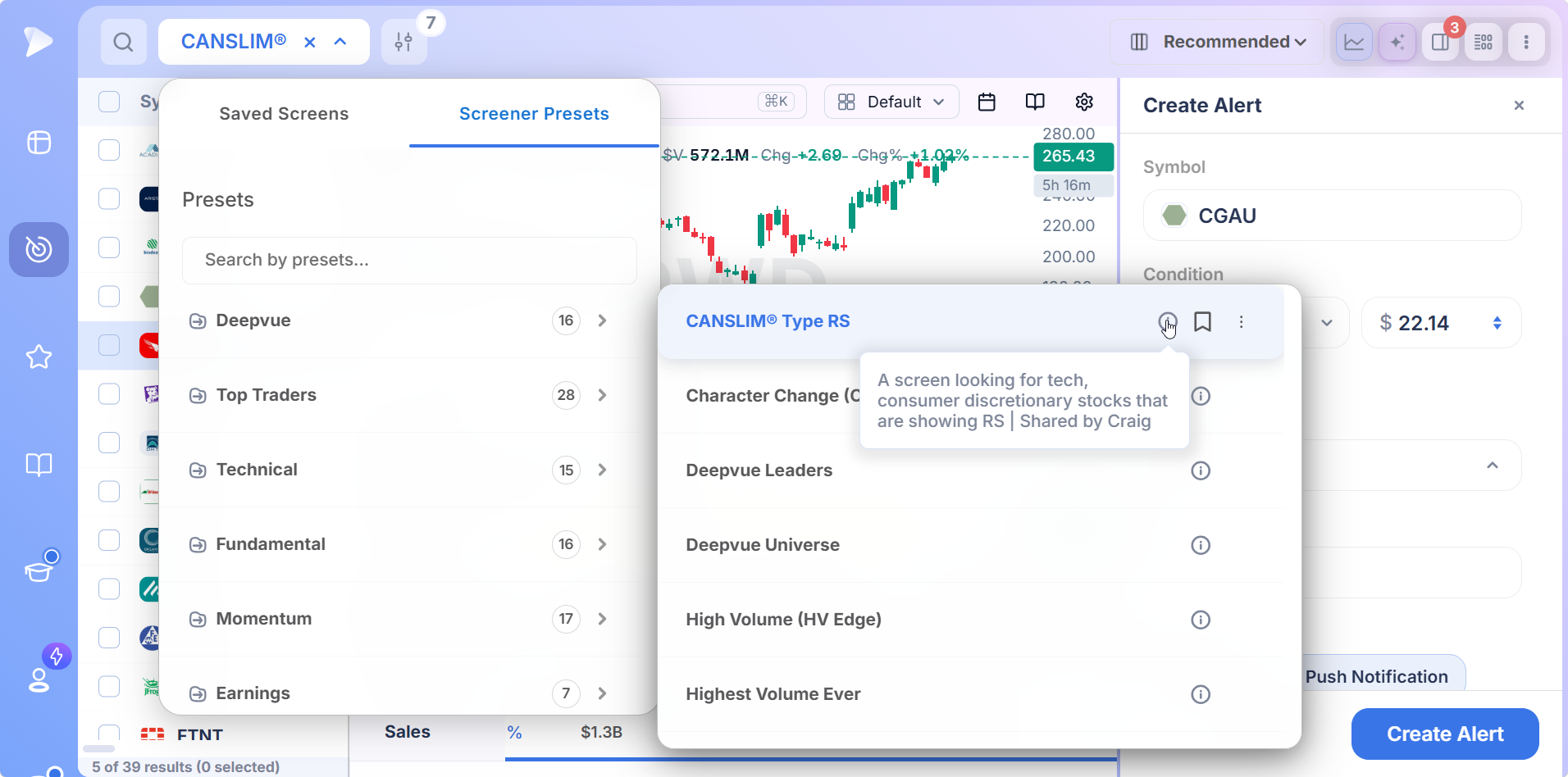
Open the Screener Presets tab and you’ll find Seven Criteria Growth, a Deepvue preset that applies all seven conditions from the CAN SLIM® methodology in one saved screen. It spots stocks with strong earnings growth, accelerating sales, leading industry groups, and rising institutional support, the core traits of true market leaders.
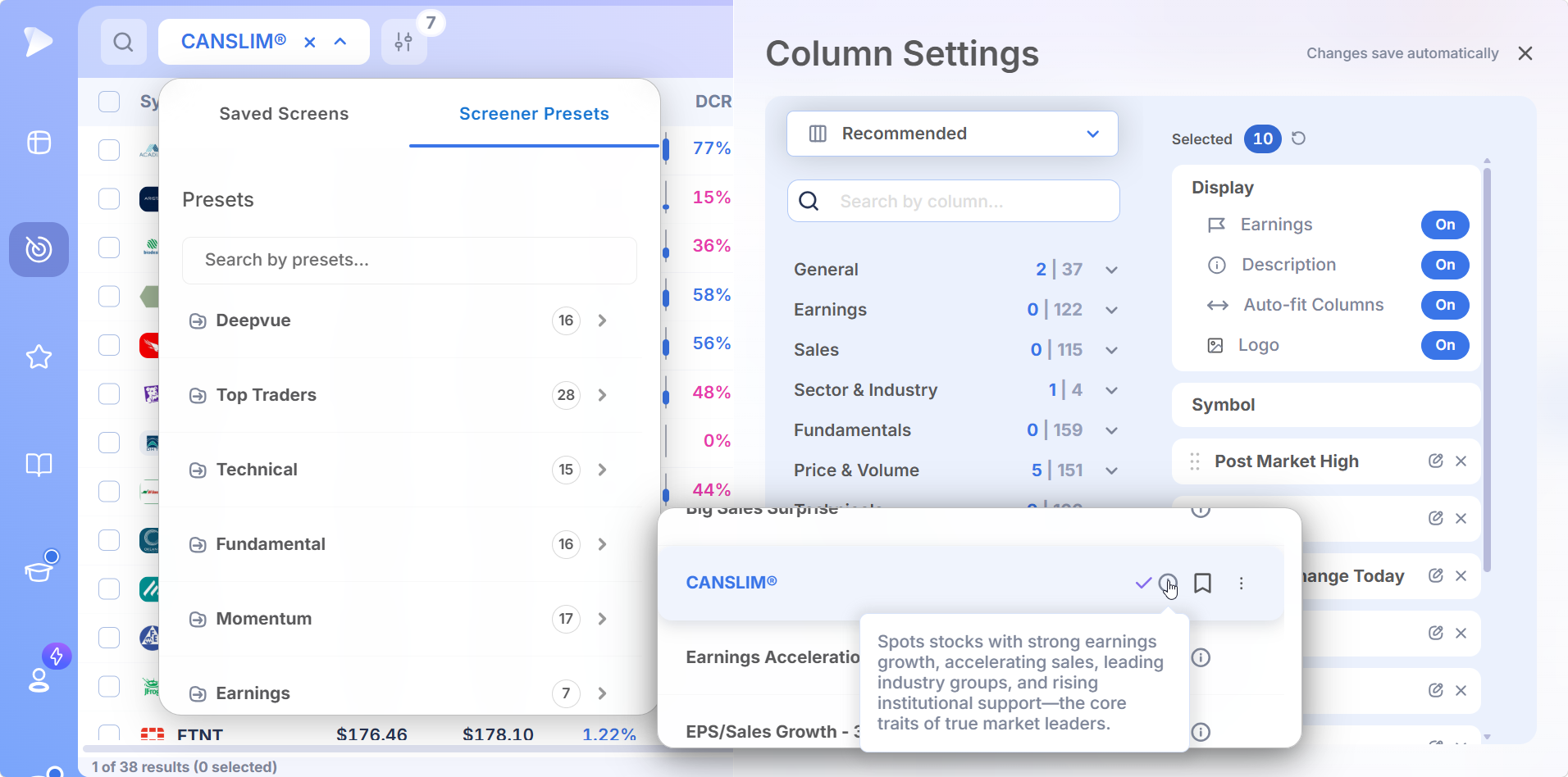
Run it as is, or fork it into your own saved screen and tighten the thresholds. Every condition inside it, from EPS acceleration to fund sponsorship change, is a filter you can adjust in the visual builder.
Real Time Growth Stock Screener Capabilities
Deepvue runs as a live growth stock screener at the architecture level, not as a marketing label slapped on delayed data.
| Capability | What It Delivers |
|---|---|
| 227 Earnings Filters | EPS history, surprises, growth, estimates, time of day reporting (BMO/AMC), and earnings status all available as filterable inputs and sortable columns alongside the price and volume side of the scan. |
| Live Streaming Across 568 Fields | Price, volume, RVOL, intraday range, gap context, and the technicals derived from them refresh during market hours via WebSocket. The virtualized table holds 1,000+ rows of growth candidates without lag. |
| 84 Institutional and Insider Fields | Fund ownership, sponsorship shifts, count of funds holding a name, recent additions, recent reductions, and insider transaction data. Institutional sponsorship expressed as filterable conditions across 84 dedicated fields. |
From Scan to Setup in One Window
A growth stock screener is the start of a daily routine, not the destination. Deepvue connects scanning to charting, watchlist management, and alerts inside a single layout.
WatchWatch how to set up a seven criteria growth screen in Deepvue here.Scan. Run a preset or build a custom growth screen in the visual filter modal. Ratings, earnings, sales, and price action all live in the same builder.
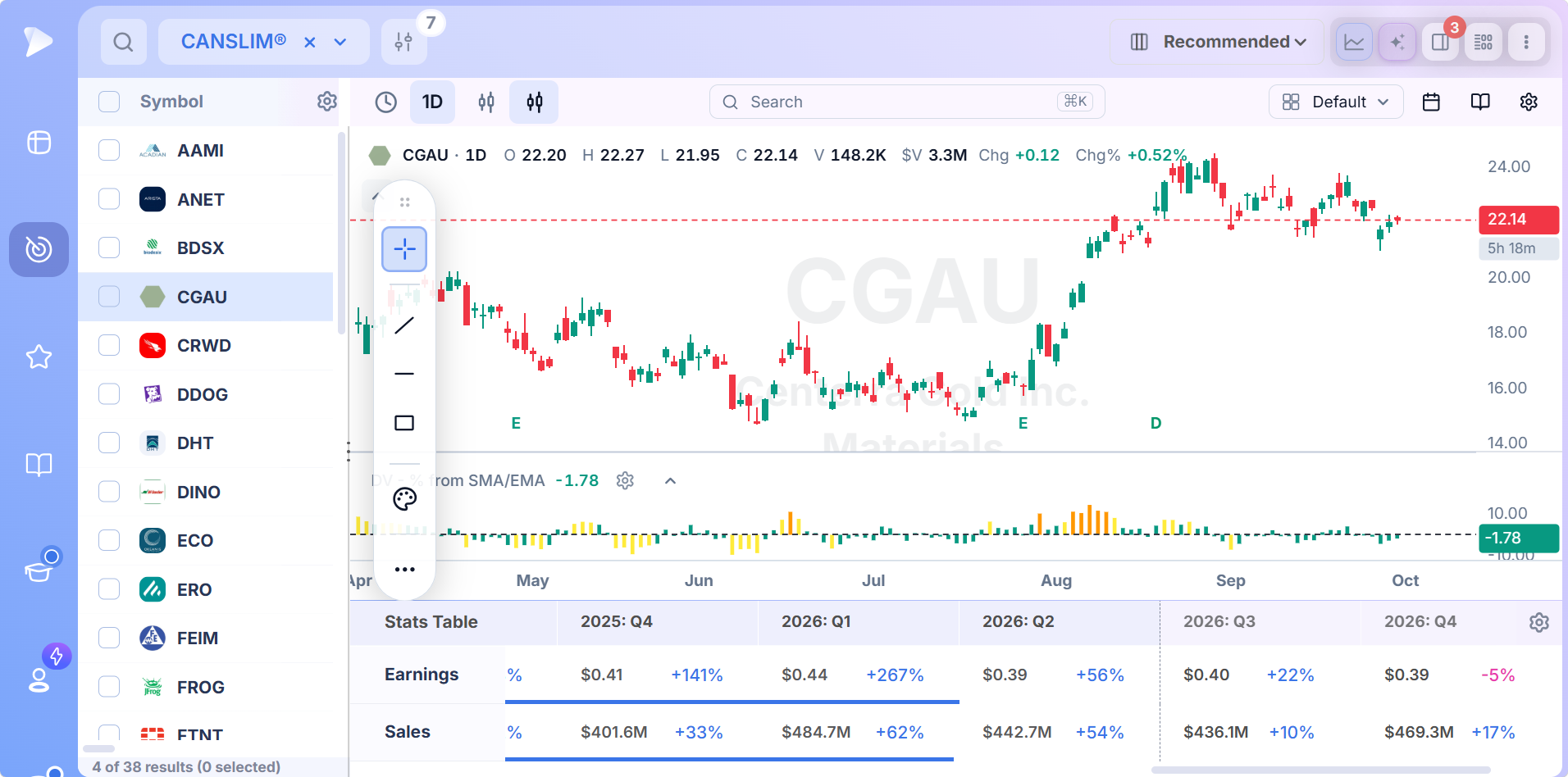
Chart. Click any row and the chart pane opens beside it. Confirm base structure, moving average position, and RS Line behavior without switching tabs.
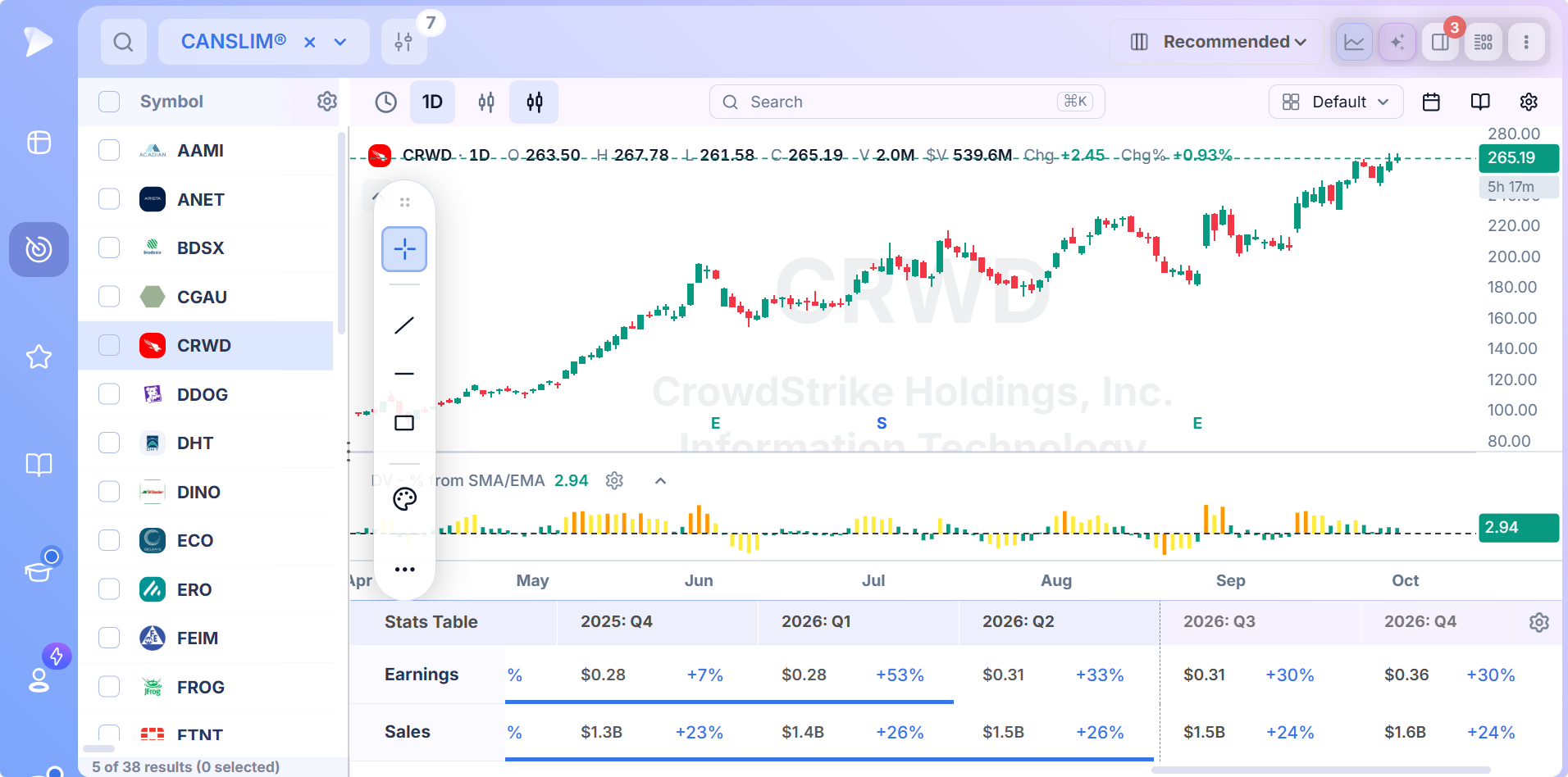
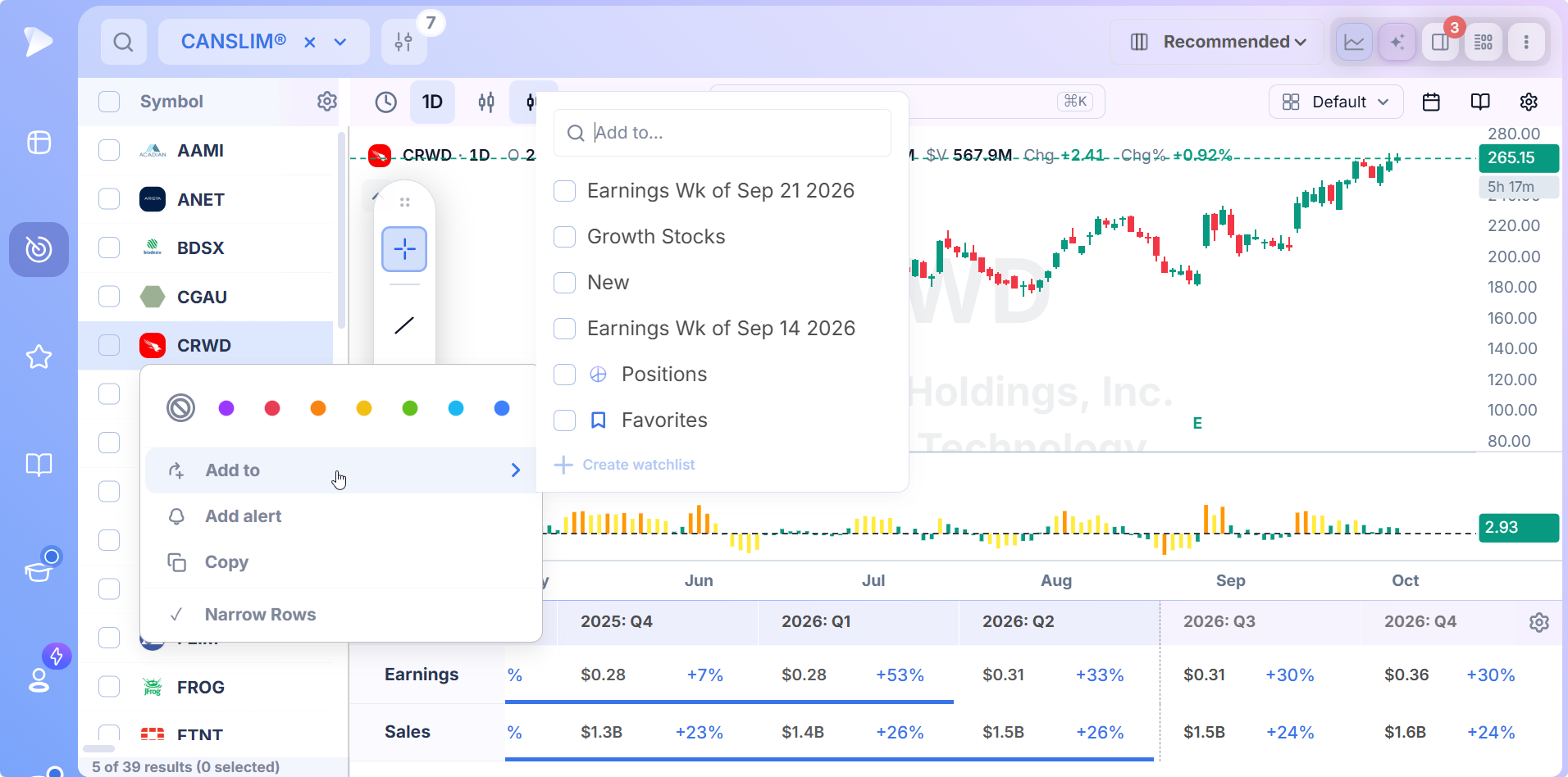
Watch. Bulk select rows and push them into a named watchlist. Your RS leaders, your earnings acceleration list, your high Composite Rating candidates, each one organized and tracked from one place.
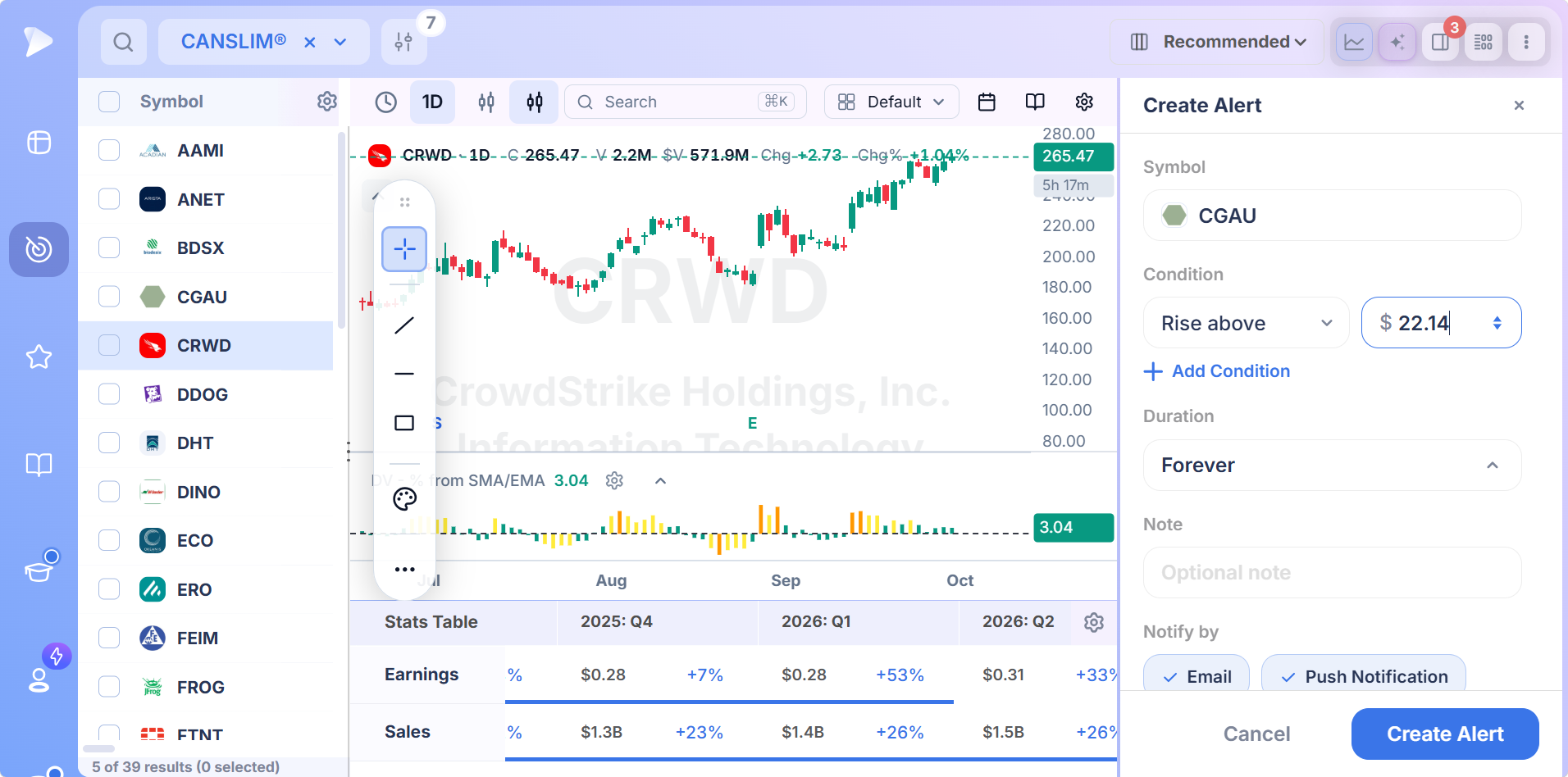
Alert. Set price, volume, technical condition, or earnings release alerts on any selection. Triggered alerts surface in the alerts panel for the next session.
Preset Screens From the Best in the Business
The fastest way to use the screener is to start with screens built by traders whose track records were built on the same growth playbook.
Deepvue ships 83 presets from 28 named traders, 16 in a dedicated Fundamental category, 15 in the Technical category, 16 internal Deepvue strategies, plus Momentum, Earnings, Day Traders, Pre/Post Market and Markets screens. 169 curated screens inside the Deepvue Screener, every one running on live data.
Mark Minervini: Trend Criteria
The SEPA methodology starts from the same seven criteria and tightens the filters around RS Rating thresholds, base structure, and EPS acceleration. Minervini’s preset operationalizes the full SEPA stack in a single saved scan.
Mike Webster: Recession Proof and Swing Trading List
Cycle defying names with durable structural demand alongside high velocity setups for shorter holds. Two presets that capture different parts of the growth stock playbook Webster runs every week.
Oliver Kell: Gappers and Strength on Down Day
Volatility expansion off earnings gaps with rising RS. Leaders holding their ground while the market gives back. The same momentum setups Oliver runs in his own daily process, anchored in Deepvue’s ratings throughout.
Plus the Rest of the Library
Across the Top Traders, Technical, Fundamental, Momentum, and Earnings categories, every preset is forkable into your own saved screen. Workhorses like Deepvue Leaders (today’s relative strength leadership across the market), Volatility Contraction (tight basing with low ATR, primed for the expansion), and High Volume Edge (today’s unusual volume movers, filtered for quality) all sit one click away from any active growth scan.
Several of these have full pages of their own: the swing trading stock screener covers Webster’s Swing Trading List, the gaps stock screener covers Kell’s Gappers, and the Minervini Code 33 screener breaks down his earnings acceleration setup step by step.
How to Build Your Own Growth Stock Screener
Starting from the preset saves time. A saved screen of your own lets you set every threshold to match the leaders you trade.
Save a copy of the Seven Criteria Growth preset, or open a blank screen in the visual builder.
Set the earnings conditions first: quarterly EPS growth, EPS acceleration over the last three quarters, and annual growth.
Add sales growth above 25 percent, so rising profits come with rising demand for the product.
Add leadership and sponsorship: an RS Rating floor such as 90, and a rising count of funds holding the stock.
Add a price condition, such as within five percent of a 52 week high or breaking out of a base.
Save and name the screen, then add EPS Rating, Composite Rating and relative volume as columns so the list can be ranked.
The Deepvue AI Terminal: Plain English Screening
The AI terminal turns a growth thesis into a running screen. Type “stocks with three quarters of EPS acceleration above 30 percent, RS Rating above 90, sales growth above 25 percent, and price above the 50 day moving average” or “leaders breaking out of six week bases with rising institutional sponsorship” and the terminal builds the filter set, runs it, and returns the matches. Reference a watchlist with @, fire saved actions with / (try /run Mark Minervini Trend Criteria or /save as preset), and pull from a curated prompt library when you want a head start.
Unbounded use. No daily query meter, no per screen quota.
How to Trade Growth Stocks From the Screen
The screen finds companies worth owning. The chart and the market decide when.
Buy the Breakout From a Sound Base
Growth leaders tend to make their biggest moves after they rest. The usual entry is a breakout above a well defined base on volume clearly above average, with the stock’s RS Line at or near new highs. Buying far above the breakout point leaves too much room between the entry and a reasonable stop.
Let Market Direction Set Your Exposure
Most growth stocks follow the general market. When the indexes are in a confirmed uptrend, breakouts from the list tend to follow through; when the market is under distribution, most of those setups break down, and position size should come down with them.
Cut Losses Small, Let Leaders Run
Decide the maximum loss before the entry and honor it. The position size calculator turns that stop into a share count. Most of a year’s profit usually comes from a handful of leaders that keep advancing for weeks to months, so winners get more room than losers.
How Deepvue Compares to Other Growth Stock Screeners
When evaluating any stock screener growth traders rely on day to day, the real question isn’t whether the platform supports the seven criteria in name, but whether the data set, the ratings, and the workflow are actually built around how the methodology was meant to run. Here’s how Deepvue stacks up against the platforms growth traders cycle through.
| Capability | Deepvue | MarketSurge | TradingView | TrendSpider | Finviz |
|---|---|---|---|---|---|
| Rating set built in (RS, EPS, AS, Composite) | Yes, Deepvue’s own 56 proprietary scores | Yes, its own proprietary ratings | No | No | No |
| Full growth data set in one builder | 596 fundamental + 145 price and volume + 84 institutional fields | Strong growth coverage, narrower set | Limited fundamentals | Limited fundamentals | Decent valuation, light on growth |
| 227 earnings filters covering surprise, growth, estimates, time of day | Yes, built in filter inputs | Standard earnings tracking | Basic EPS history | Basic earnings filters | Basic, less granular |
| Real time streaming during market hours | Yes, 568 fields via WebSocket | Limited | Yes | Yes | Delayed on free tier |
| Top trader presets | 83 named trader presets including Minervini SEPA Trend Criteria | Standard preset screens | Community published scripts | User shared screens | Predefined only |
| Natural language screen building | Yes, via the AI Terminal | No | General purpose AI added in 2026 | Yes, focused on technical setups | No |
| Monthly price | $99 | $149 | Varies by plan | Varies by plan | $0 / $24.96 / $39.50 |
Detailed head to head:
Red Flags That Rule Out a Growth Stock
Passing the screen is the first test, not the last. Skip a name when any of these show up:
- •Profits are rising on flat revenue. Trimming expenses can inflate EPS for a while, but growth that isn’t coming from new sales tends to fade.
- •Growth is slowing. Two quarters of deceleration in earnings or sales usually mean the best part of the move is behind the stock.
- •It is extended from its base. A leader far above its breakout point offers poor risk for a new position; wait for the next base.
- •Institutions are selling. A falling count of funds holding the stock outweighs strong numbers on the income statement.
- •The market is in a correction. Most growth stocks fall with the indexes, so even the best names on the list are better watched than bought.
Who Gets the Most From This Screen
- •Traders who follow the CAN SLIM® methodology and run RS Rating, EPS Rating, and Composite Rating screens as part of their daily process
- •Growth stock traders following the William O’Neil methodology in their daily routine
- •Swing and position traders holding leadership setups for a few weeks to a few months
- •Active traders looking for a swing trading screener with Deepvue’s ratings built in from day one
- •Traders moving off MarketSurge who want a broader data set, Deepvue’s own rating set, and a lower monthly price
Pricing
Join by November 12 and your $490/year rate stays locked for as long as your subscription is active. Deepvue Pro is $99 per month, with annual billing also available. Everything comes standard. The full 1,152 active data points (568 streaming live during market hours), all 169 presets, the filter builder, the AI Terminal, side by side charts, watchlists, and alerts. No separate ratings tier, no AI add on fee, no premium institutional data subscription.
- •The screener and its 1,152 data points.
- •Charts, watchlists, and alerts, all of them unrestricted.
- •Fully customizable dashboards, with every app in the catalog.
- •The Theme Tracker, Market Brief, and AI Terminal, the last with unbounded usage.
MarketSurge, by contrast, runs $149 per month for a more limited feature set without natural language screen construction.
New accounts include a setup call, introductory emails and weekly webinars that each take one module apart.
Find the Next Leader Before the Crowd Does
The biggest winners in any market cycle share the same traits before their largest advances: accelerating earnings and sales, leading relative strength and growing institutional ownership. A growth stock screener checks every stock for those traits at once, and Deepvue puts the ratings, the quarterly numbers and the chart in one window so the list you act on is short and current.
More approach based screens, including the technical stock screener, the fundamental stock screener and the momentum stock screener, are collected at stock screener by strategy.
Chart formation screens are at stock screener by pattern, single measure screens at stock screener by indicator, named trader setups under stock screener by trader, and time of day scans under stock screener by market timing.
↑ Back to contentsFrequently Asked Questions
What is a seven criteria growth stock screener?
A seven criteria growth stock screener filters the market by the seven conditions William J. O’Neil identified as common to the biggest stock market winners of the last century and organized into the CAN SLIM® methodology: current quarterly earnings growth, annual earnings growth, new products or new highs, supply and demand reflected in volume, leader versus laggard status (RS), institutional sponsorship, and market direction. The output is a list of candidates that match all the criteria you define.
What makes the best growth stock screener?
Four things. Coverage of all seven criteria as filterable conditions, proprietary ratings (RS, EPS, AS, Composite) built in by default, deep earnings data through 227 dedicated filters, and a workflow that connects scanning directly to charting and watchlists. Deepvue is built around all four, with 596 fundamental side fields, 145 price and volume conditions, 227 earnings filters, and a unified layout that makes it the best growth stock screener at the $99 price point.
Does Deepvue include RS, EPS, AS, and Composite ratings?
Yes. Deepvue includes its own RS Rating, EPS Rating, AS Rating, and Composite Rating, all built in and filterable at any threshold, alongside 52 other proprietary composite scores. Filter, sort, or set alerts on any of them.
Can I screen for swing trading setups using the seven criteria?
Yes. Deepvue works as both a seven criteria growth screener and a swing trading screener, since positions built on the CAN SLIM® methodology are typically held for weeks to a few months, which is the exact swing trading timeframe. Stack “RS Rating above 90 AND EPS growth above 30 percent AND price within five percent of a 52 week high” inside one saved screen, then push the matches into a watchlist for the week.
Can I screen for growth stocks using natural language?
Yes. The Deepvue AI Terminal accepts plain English prompts like “leaders breaking out of six week bases with EPS acceleration above 30 percent and rising institutional sponsorship” and constructs a working screen from them. Usage is unbounded with no daily query cap.
How does Deepvue compare to MarketSurge as a growth stock screener?
MarketSurge has offered its own proprietary ratings since the platform first launched and remains a familiar option for longtime users. The data tooling and filter builder, though, are dated compared to modern platforms. Deepvue includes its own rating set (RS, EPS, AS, Composite), adds a broader 596 field fundamental data set, ships 227 earnings filters and 84 institutional fields, includes AI driven natural language screening, and runs at $99 per month versus MarketSurge’s $149. For active growth traders, Deepvue is the stronger choice.
What preset screens does Deepvue ship with?
Deepvue ships 169 curated screens, including 83 from 28 named traders (Oliver Kell, Mike Webster, Mark Minervini, and others), 15 in the Technical category, 16 in the Fundamental category, 16 internal Deepvue strategies including Deepvue Leaders, plus Momentum and Earnings screens. The Seven Criteria Growth preset applies all seven conditions from the CAN SLIM® methodology in one screen, and the Mark Minervini Trend Criteria preset is the most direct expression of the SEPA approach. Every preset is forkable into your own saved screen.
Does the screener integrate with charts, watchlists, and alerts?
Yes. Click any row to open the chart in a split layout, bulk select rows to push into a named watchlist, or trigger alerts directly from the results table. No tab switching, no copying tickers between tabs.
CAN SLIM® is a registered trademark of O’Neil Capital Management, Inc. (U.S. Reg. No. 3,081,940). Deepvue is not affiliated with, sponsored by, endorsed by, or licensed by O’Neil Capital Management, Inc., Investor’s Business Daily, MarketSurge, or their affiliates. Any reference to CAN SLIM® is for descriptive purposes only. Deepvue’s scores, ratings, and screeners are independently calculated by Deepvue and are not the proprietary ratings of MarketSurge or IBD.