Tradervue vs TraderSync vs Deepvue: Which Journal Should Stock Traders Pick?
Last Updated:
November 25, 2026


Tradervue vs TraderSync vs Deepvue: Which Journal Should Stock Traders Pick?
Two standalone journals and one built into a stock research platform, compared on import, AI, apps and price. BLACK FRIDAYGet the Black Friday Deal →
Deepvue is the best fit for stock traders who hold positions for weeks to months, because its journal comes inside a research platform with screeners, charts, a Model Book and AI right click research. Tradervue suits traders who want a free or low cost web journal across several markets, and TraderSync suits active traders who want market replay and an AI assistant. Deepvue is $490 for the year through December 4, against the regular $99 a month or $990 a year.
A stock gaps down two days after you buy it, and you take the loss at your stop. Later, the journal logs the trade, the R and the exit. But the reason it gapped, the chart you bought it on and the screen that flagged it are all somewhere else. Tracking them down means opening two or three more tools.
Never miss a Deepvue blog post.
Subscribed!
Thanks for joining. You’ll get our next post straight to your inbox.
Tradervue and TraderSync each handle the logging well. Tradervue is known for deep reports, a free plan and a simple layout that longtime users stick with. TraderSync offers a phone app, an AI assistant and detailed market replay. Neither one comes with the screener, the charts or the research behind the trades you log.
The gap we’ve noticed is what shapes the Tradervue vs TraderSync vs Deepvue comparison. Deepvue builds its journal into a stock research platform. The screen that found the stock, the chart you entered on and the AI that explains a gap all share one login with your review. For stock traders holding positions for weeks to months, the full story of each trade stays in one place.
Key Takeaways
- •One plan covers research and review. Deepvue’s $99 a month or $990 a year includes the Deepvue Trading Journal, screeners, charts, the Model Book and the AI Terminal, while Tradervue and TraderSync sell a journal alone.
- •Broker sync is thinner than the lists suggest. Tradervue’s help center marks 5 of its 82 platforms as automated, and TraderSync’s own list marks 194 of 503 for autosync.
- •Only two of the three have phone apps. Deepvue and TraderSync both offer apps, while Tradervue runs in a browser with no app in the App Store or Google Play.
- •Each competitor wins somewhere. Tradervue has a free plan for up to 30 trades a month, and TraderSync’s Elite plan replays the market down to 250ms with Level II.
- •Lock in $490 for the year. Deepvue’s Black Friday rate runs through December 4, against the regular $99 a month or $990 a year, and covers the journal plus every research tool.
BLACK FRIDAY
Your Journal and Your Research for $490 a YearGet the Deepvue Trading Journal plus screeners, charts and the AI Terminal for $490 instead of $990, through December 4.
Tradervue vs TraderSync vs Deepvue Side by Side
Tradervue vs TraderSync usually gets framed as a choice between two journals. Adding Deepvue changes the math, because the Deepvue Trading Journal comes as one module of a stock research platform.
| Deepvue | Tradervue | TraderSync | |
|---|---|---|---|
| Built for | Stock traders holding weeks to months who want research and review on one plan | Traders who want a web journal with deep reports and a free tier | Active traders who want replay, AI help and many asset classes |
| Markets | Stocks | Stocks, plus futures, forex and options imports | Stocks, options, futures, forex, crypto, CFDs and indices |
| Monthly price | $99 | Free, then $29.95 (Silver) or $49.95 (Gold) | $29.95 (Pro), $49.95 (Premium) or $79.95 (Elite) |
| Annual price | $990 | None published | $269.52, $449.52 or $719.52 |
| Broker import | Auto sync, broker import, any CSV or manual entry | 5 of 82 listed platforms marked automated | 194 of 503 listed platforms marked for autosync |
| AI | Journal Agent on your trade record, plus right click research in the AI Terminal | No AI assistant listed on its site | Cypher Assistant at 5, 15 or 60 messages a day |
| Replay | Chart Replay Mode on Deepvue charts | No replay listed | Market replay at 1 minute, 1 second or 250ms with Level II |
| Phone app | Desktop and mobile, with iOS and Android apps | Browser only, no app in either store | Apps on paid plans |
| Research tools | Screeners, charts, watchlists, Model Book and AI Terminal | None listed | Screeners and watchlists inside market replay on Elite |
The Dashboard apps behind each row, from Equity Curve to Near Stops, are listed with the rest of the journal features.
TraderSync vs Tradervue: Where the Two Journals Split
On the TraderSync vs Tradervue question itself, the gaps show up in five places. Deepvue’s answer opens each one, followed by how the two journals handle it.
Getting Trades In: File Import vs Broker Sync
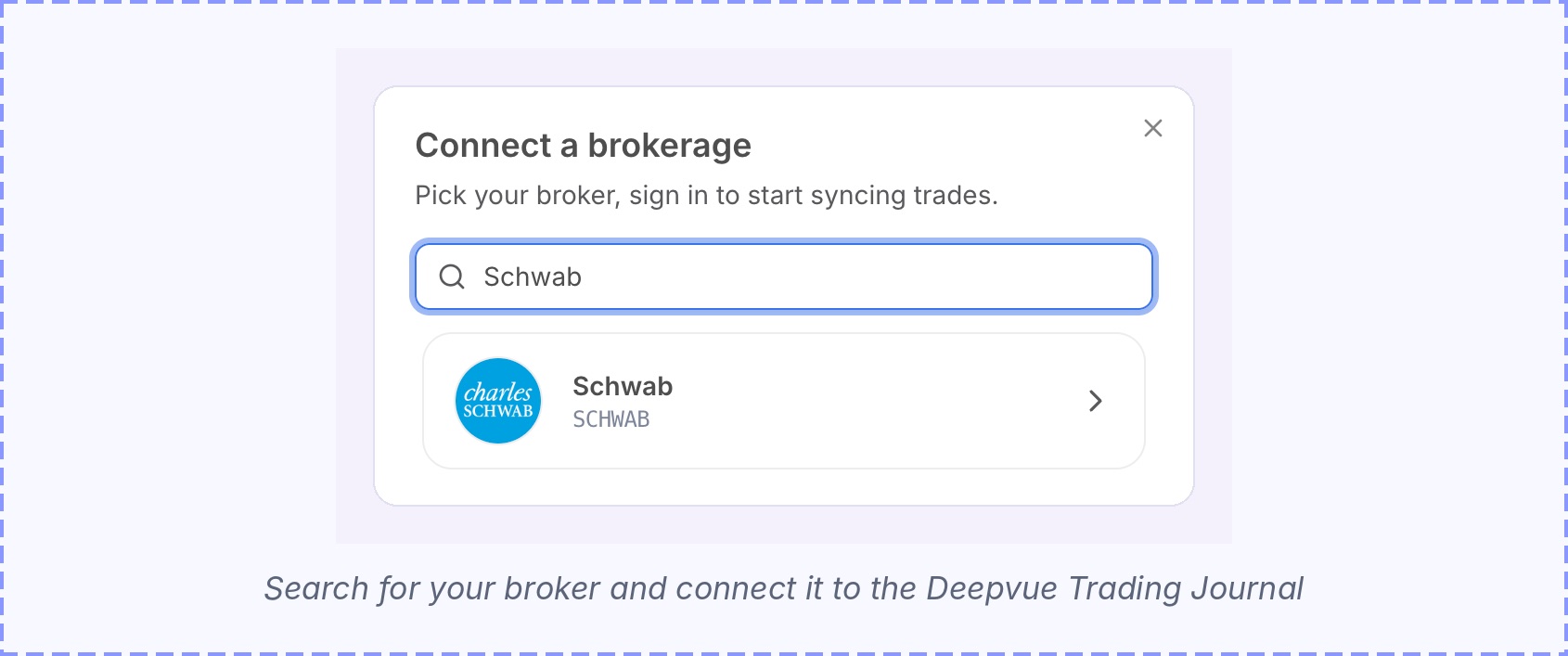
Deepvue connects your broker for auto sync, takes a broker export or any CSV through a four step import, and accepts manual entries for anything left over.
Both competitors advertise long broker lists, yet few listed platforms sync on their own. Tradervue’s help center marks 5 of its 82 supported platforms as automated, so most Tradervue trading journal users upload files after each session.
TraderSync claims over 700 brokers and platforms. Its own list marks 194 of 503 for autosync, and only 31 of the 200 stock platforms on it.
File uploads get old fast when activity picks up. Citadel Securities reported that retail cash equity volume in May and June ran 65% above the year before, and each extra fill is one more row to import by hand.
In Deepvue, open All Accounts, choose Connect Account and approve the link on your broker’s own site. The broker sync list includes Charles Schwab, Fidelity, Interactive Brokers, Questrade, Robinhood, tastytrade and Webull, and most brokers finish syncing inside 24 hours.
Reports and Exit Analysis
Deepvue builds its reports as apps on the journal Dashboard: Equity Curve, Trading Edge, Win / Loss Profile, Risk & Consistency and Advanced Metrics, which tracks MFE, MAE and exit efficiency.
Reporting is Tradervue’s strongest suit. Both paid plans carry more than 100 advanced reports along with MFE/MAE stats. TraderSync includes analytics on every plan and adds a Strategy Checker, capped at 5 strategies on Pro and unlimited on Premium and Elite.
Log a stop on any trade and Deepvue assigns it an R value, open or closed, so your risk reward ratio runs through every report. The Open Risk and Near Stops apps then show what you could hand back across the positions you still hold.
AI: Cypher vs the Journal Agent
Deepvue’s Journal Agent coaches you from your own stats and execution data. Ask it about a losing streak or a setup that keeps failing, by typing or by voice, and it answers from your trade record while your notes stay private.
TraderSync’s Cypher Assistant comes with every plan, at 5 messages a day on Pro, 15 on Premium and 60 on Elite. Tradervue lists no AI assistant on its own site.
Plenty of traders already research with AI. In a global survey of 2,808 retail investors, Finimize found 40.9% use AI for research at least once a week.
Market Replay vs Chart Replay
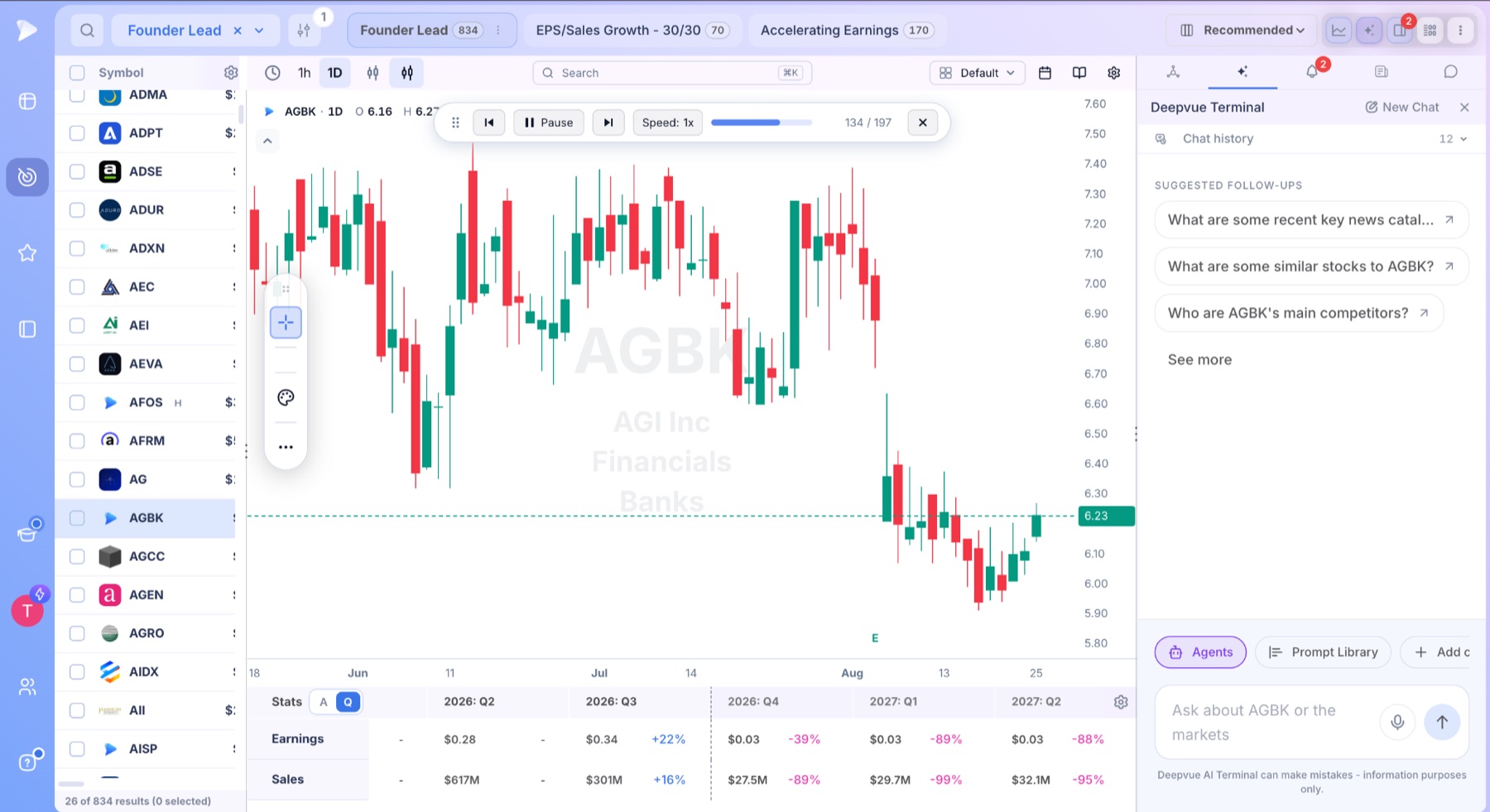
Deepvue’s Chart Replay Mode rewinds a chart to a point you choose, then plays it forward at a set speed or one bar at a time with the arrow keys. Indicators recalculate for the bar on screen, so nothing appears early.
TraderSync’s replay goes the furthest of the three: 1 minute precision on Pro, 1 second on Premium and 250ms with Level II on Elite. Tradervue lists no replay feature.
For a stock trader, replay on Deepvue charts answers a practical question about an old position: what the chart showed on the day you bought, before anyone knew how it would end.
Phone Access
Every Deepvue Trading Journal feature works on desktop and mobile, through native iOS and Android apps.
TraderSync offers apps on its paid plans. Tradervue runs in a browser, with no app in the App Store or Google Play, so logging or checking a trade away from your desk means opening a mobile browser.
Deepvue’s app carries research as well as review, which members notice:
“Absolutely love the new iPhone app screener functionality.”
Iain, in Deepvue’s member reviews
What Deepvue Adds to Your Review
Good post trade analysis asks why a trade worked or failed, and the reason is usually on the chart, in the news or in how the setup formed. Tradervue and TraderSync stop at the journal, so those answers have to come from another tool.
Study A+ Setups in a Model Book
A Deepvue Model Book collects annotated examples of past winners. Preset books from the Deepvue team cover setups such as Base Breakout and High Tight Flag, with each example drawn on, measured and summed up in a sentence or two.
Replay trims a saved chart back to a bar you pick, hiding everything after it, so you study the decision with the information a trader had then. Every saved chart takes tags and notes, and you can measure a move from an entry candle to an exit candle for its percentage gain and length in days.
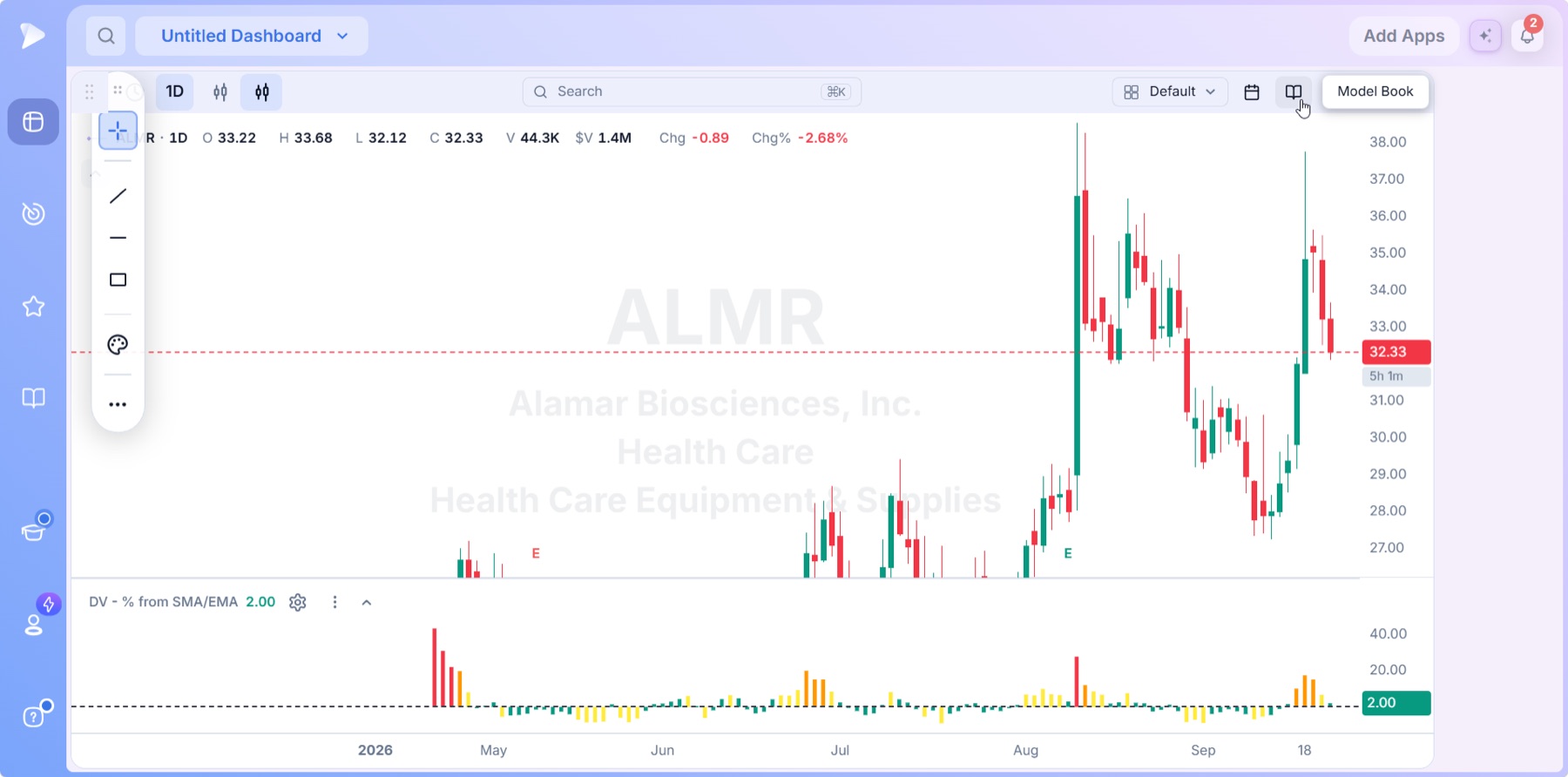
Your own trades belong next to those textbook cases, since Model Books now share a module with the Deepvue Trading Journal. In the clip below, Deepvue walks through studying A+ setups and turning them into a playbook you can trade from.
Watch how to build a model book of A+ setups in Deepvue here.
Right Click a Bar and Ask Why It Moved
Open a past trade’s chart, right click the bar where the stock gapped or reversed, and choose Ask Deepvue AI. The AI Terminal returns the catalyst behind that bar’s move, and it works on historical bars as well as today’s.
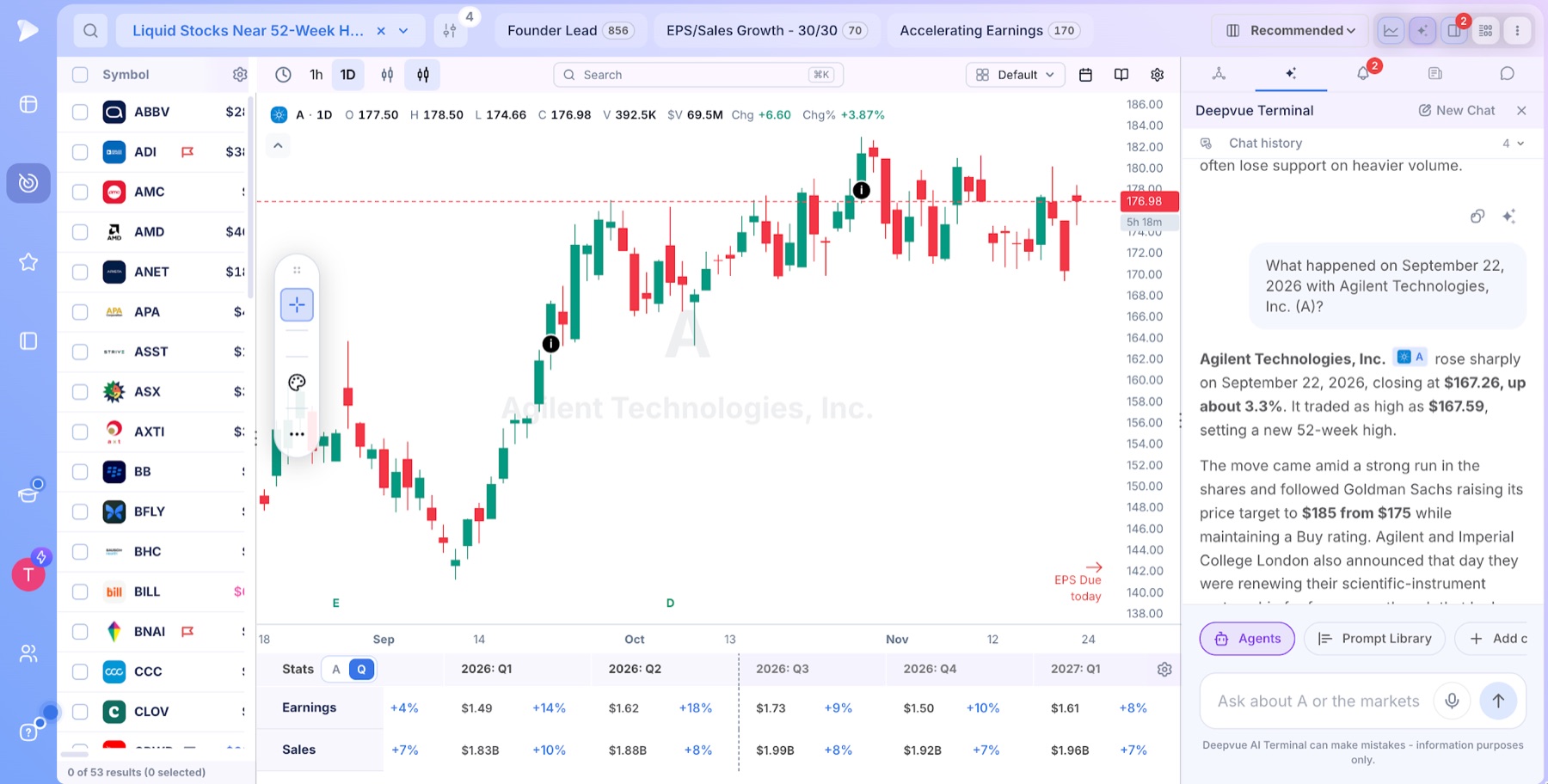
A note such as “dropped two days after entry” becomes a reason you can tag and track. Deepvue is the only platform in its niche with AI right click research, so the explanation comes from the same chart you journaled.
See What Each Emotion Costs You
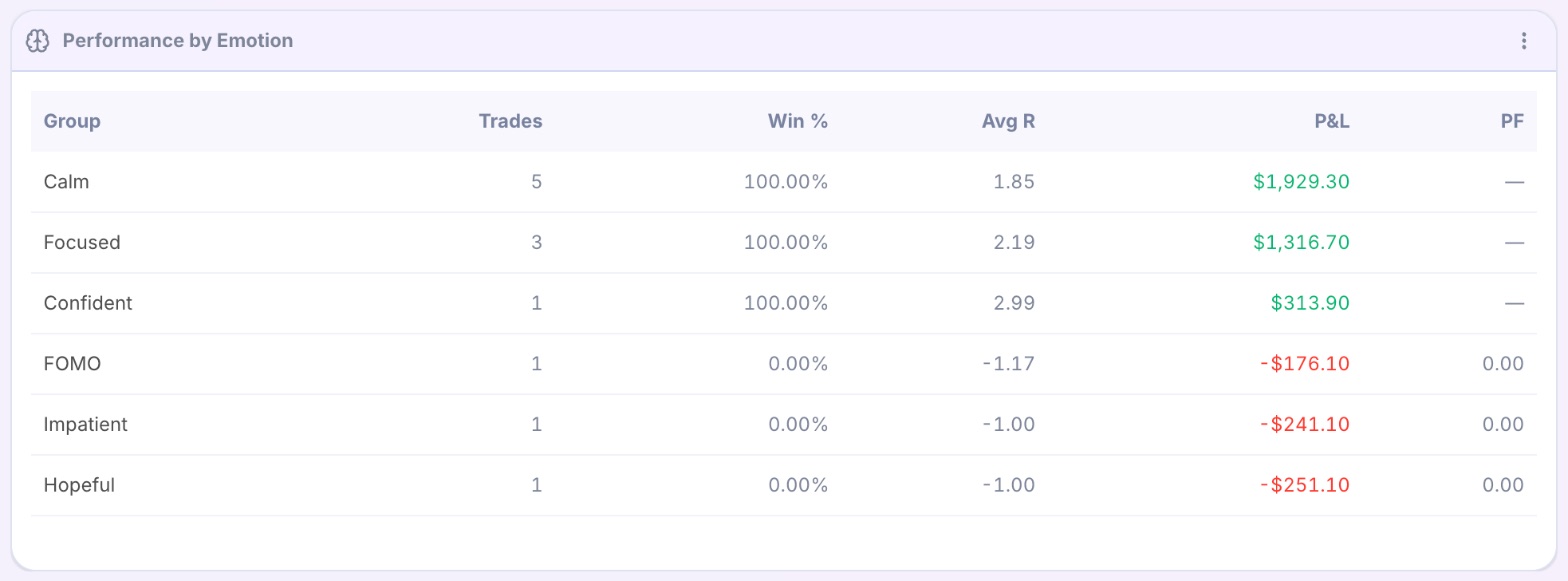
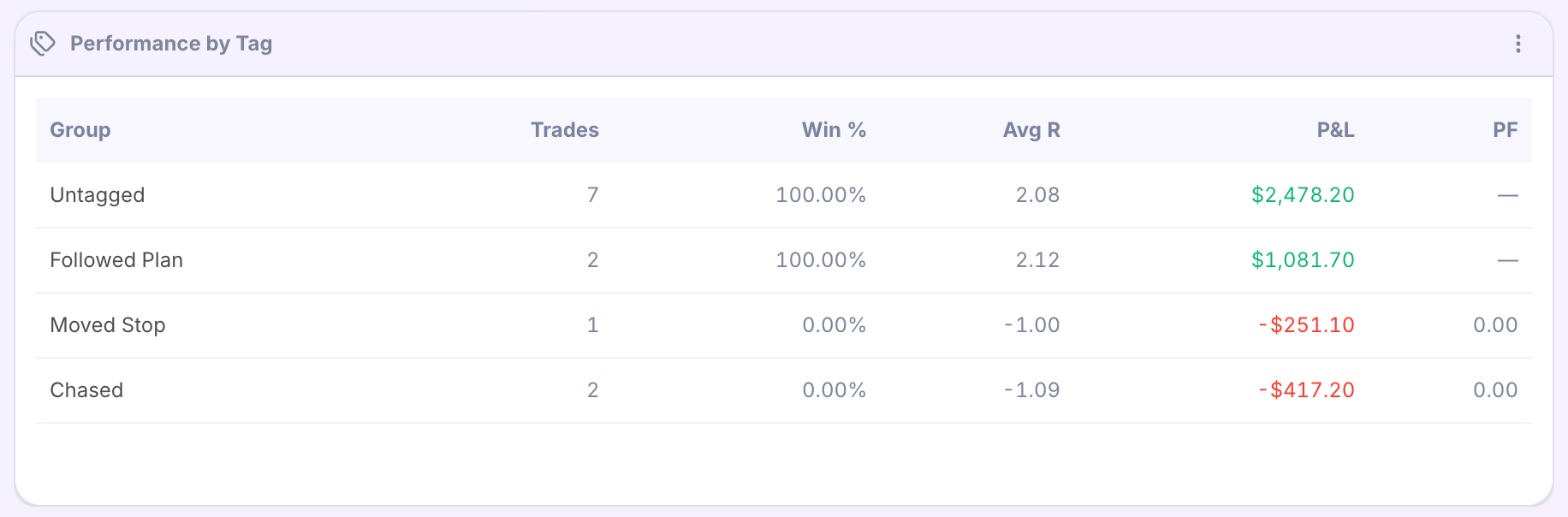
Every trade review in Deepvue carries a setup tag and an emotion. Two Dashboard apps turn those labels into numbers, which puts your trading psychology on the same screen as your P&L.
- 1.Pick an emotion from the dropdown when you review a trade, such as Confident, Neutral or Anxious.
- 2.Add a setup tag and a playbook in the same review, then press Save & next.
- 3.Open the Dashboard and read Performance by Tag beside Performance by Emotion to see how results split across each label.
Pricing: Deepvue vs Tradervue vs TraderSync
Tradervue and TraderSync start below Deepvue on price, and each of their plans pays for a journal alone.
| Plan | Per month | Per year |
|---|---|---|
| Deepvue (journal, screeners, charts, Model Book, AI Terminal) | $99 | $990 |
| Deepvue Black Friday, through December 4 | n/a | $490 |
| Tradervue Free (30 trades a month) | $0 | $0 |
| Tradervue Silver | $29.95 | Not published |
| Tradervue Gold | $49.95 | Not published |
| TraderSync Pro | $29.95 | $269.52 |
| TraderSync Premium | $49.95 | $449.52 |
| TraderSync Elite | $79.95 | $719.52 |
Over twelve months, Tradervue paid monthly comes to $359.40 on Silver or $599.40 on Gold, and TraderSync billed yearly runs $269.52 to $719.52. Each figure buys a journal only, against $990 for Deepvue’s research and journal together. For the head to head on one competitor, see Deepvue vs Tradervue.
BLACK FRIDAY
One Subscription Instead of ThreeScreeners, charts and a trading journal on one Deepvue plan, $490 for the year through December 4. Regularly $99 a month or $990 a year.
Ratings, Reviews and What Reddit Says About Tradervue vs TraderSync
Put the three side by side on review sites and app stores and the gap is wide.
| Platform | App Store | Google Play | Review sites |
|---|---|---|---|
| Deepvue | 4.7 (464 ratings) | 4.7 (272 ratings) | 4.9 out of 5 from 589+ verified reviews on deepvue.com |
| TraderSync | 2.7 (85 ratings) | 3.1 (234 ratings) | 4.3 on Trustpilot from 328 reviews |
| Tradervue | No app | No app | 2.2 on Trustpilot from 11 reviews, unclaimed profile |
On Reddit, traders talk less about features and more about how each journal fits into their routine. Tradervue still has users who rely on it for the numbers:
“I use Tradervue to track monthly performance stats.”
A Reddit user, in a thread on trade journaling
TraderSync gets similar praise for the basics of logging:
“It’s a solid platform to upload your trades and track them.”
A longtime TraderSync user, in a Reddit comment
The sharpest split shows up on broker sync. When traders asked which journals connect to Interactive Brokers, the answers went in opposite directions:
“Tradervue doesn`t auto sync with IBKR.”
A Reddit user, in a thread on journals for Interactive Brokers
“Yes it can automatically sync with IBKR to retrieve the latest trades.”
A TraderSync user, in a separate Reddit thread
Interactive Brokers is also on the list of brokers that sync with the Deepvue Trading Journal, and Deepvue members tend to mention how often the platform keeps improving:
“They are constantly adding new features”
John Dorsey, Deepvue member review
For a closer look at how TraderSync stacks up on its own, read Deepvue vs TraderSync.
Where Tradervue and TraderSync Come Out Ahead
- •Tradervue: the Tradervue trading journal has a free plan for up to 30 trades a month, and its paid plans import futures, forex and options alongside stocks.
- •TraderSync: its market replay is the most detailed of the three, and Elite adds automated backtesting.
- •Deepvue: the Deepvue Trading Journal covers stocks only, so options, futures or forex trades need a separate record.
Stock traders who want to compare more journals can browse our Tradervue alternatives roundup.
Pick by How You Trade
| Trader type | Best fit | Why |
|---|---|---|
| Stock traders holding weeks to months who want research and review in one place | Deepvue | Journal, screeners, charts, Model Book and AI Terminal on one plan, on desktop and mobile |
| Traders who want low cost journaling across several markets | Tradervue | A free plan, plus imports for futures, forex and options |
| Day traders focused on replay and AI | TraderSync | Replay down to 250ms and Cypher on every plan |
How We Tested Tradervue, TraderSync and Deepvue
- •Prices and plan details come from each vendor’s own website.
- •Broker counts come from each vendor’s published broker list and help center.
- •Ratings come from Trustpilot, the App Store and Google Play.
- •Every Deepvue feature described was checked in the live app.
One Plan for the Research and the Review
Tradervue vs TraderSync vs Deepvue comes down to what else you want on the same login. Tradervue and TraderSync stop at the journal. Deepvue gives stock traders the screener, charts, Model Book, AI Terminal and the Deepvue Trading Journal in one subscription, on desktop and mobile.
You find the setup on a screen, plan the entry on the chart and review the exit against the stop you logged, all in one place. Members who make the move tend to comment on the layout:
“So customizable and clean to look at.”
Greg Dorman, Deepvue member review
BLACK FRIDAY DEAL
Deepvue With the Journal Included, Plus 3 Live Bonuses
One annual plan covers the full platform, from screens and charts to the Trading Journal and analytics, plus two VIP Masterclasses and the December Live Bootcamp.
- Deepvue annual planScreener, charts, dashboards, Model Book, Deepvue AI and the Journal with analytics$990/yr
- Momentum Setups Mastery (VIP)3 webinars and a VIP Q&A$297
- Sell Rules Mastery (VIP)3 webinars and a VIP Q&A$297
- December Deepvue Live Bootcamp8 live sessions, December 7 to 14Included
- Total value
$1,584
Your $490 rate stays locked while your subscription is active. Join by December 4, 2026 at 11:59 PM ET.
On your phone? Claim the deal in your phone’s browser, then download the Deepvue app and sign in.
Frequently Asked Questions
Does Deepvue show your entries and exits on a chart like Tradervue?
Yes, Deepvue shows your entries and exits on a chart like Tradervue does. Click any trade in the Deepvue Trading Journal and its review opens on Deepvue’s charts, with buys marked green, sells marked red and each fill listed under the chart. Tradervue shows entries and exits on its price charts on both paid plans.
Does Tradervue have a P&L calendar?
Yes, Tradervue has a P&L calendar. Its Calendar P&L view colors each day by gain or loss and shows that day’s trade count and P&L, according to its help center. Deepvue’s Calendar app does the same job on the journal Dashboard, showing daily P&L in dollars and percent with a weekly total on every row.
Do Tradervue and TraderSync offer free trials?
Yes, Tradervue and TraderSync both offer free trials. Tradervue gives a trial on Silver or Gold at sign up and charges your card when it ends unless you switch to the free plan. TraderSync runs a 7 day trial on every paid plan. Deepvue costs $490 for the year through December 4, regularly $990.
What does Tradervue’s Gold plan add over Silver?
Tradervue’s Gold plan adds risk tracking and reporting, advanced filters, exit analysis, commission and fee support and liquidity reports over Silver, plus 5 GB of image storage in place of 1 GB. In Deepvue, MFE, MAE and exit efficiency come in the single plan, alongside the screener and charts.
Can you share trades with other traders in Tradervue?
Yes, you can share trades with other traders in Tradervue, which includes community sharing and mentoring on both paid plans. Deepvue shares at the setup level: a Model Book goes out as an unlisted link that any signed in Deepvue user with Pro access can add to their own books.
How many accounts can you track in TraderSync and Tradervue?
TraderSync tracks 5 accounts on Pro and unlimited accounts on Premium and Elite, while Tradervue tracks unlimited accounts on Silver and Gold. The Deepvue Trading Journal lists each connected brokerage account under All Accounts, and its stats can run across every account at once or one at a time.