Deepvue Trading Journal Features: Every Tool Behind Your Edge
Trades that sync from your broker. A Dashboard you build app by app. Analytics that rank your setups and an AI agent that reviews your record, on desktop and mobile.
The Deepvue Trading Journal features cover every stage of a trade, from the sync that brings it in to the review that sharpens your next entry. As trading journal software built into Deepvue, the Deepvue Trading Journal brings broker sync, a customizable Dashboard, deep performance analytics, trade review, a Notebook, Model Books and an AI Journal Agent into one module. Every feature runs on desktop and mobile and comes with your Deepvue subscription.
Test every feature before your first sync.
Get 2 months for the price of 1 and explore a journal preloaded with demo trades before you connect a broker.
Deepvue Trading Journal Features at a Glance
Broker sync →
Full trade history from your broker, a CSV or manual entry.
Trading dashboard →
Apps you add with one click and tune to your stats.
Portfolio apps →
Open positions, open risk, stops and streaks.
Trade Tracking Software That Fills Itself In
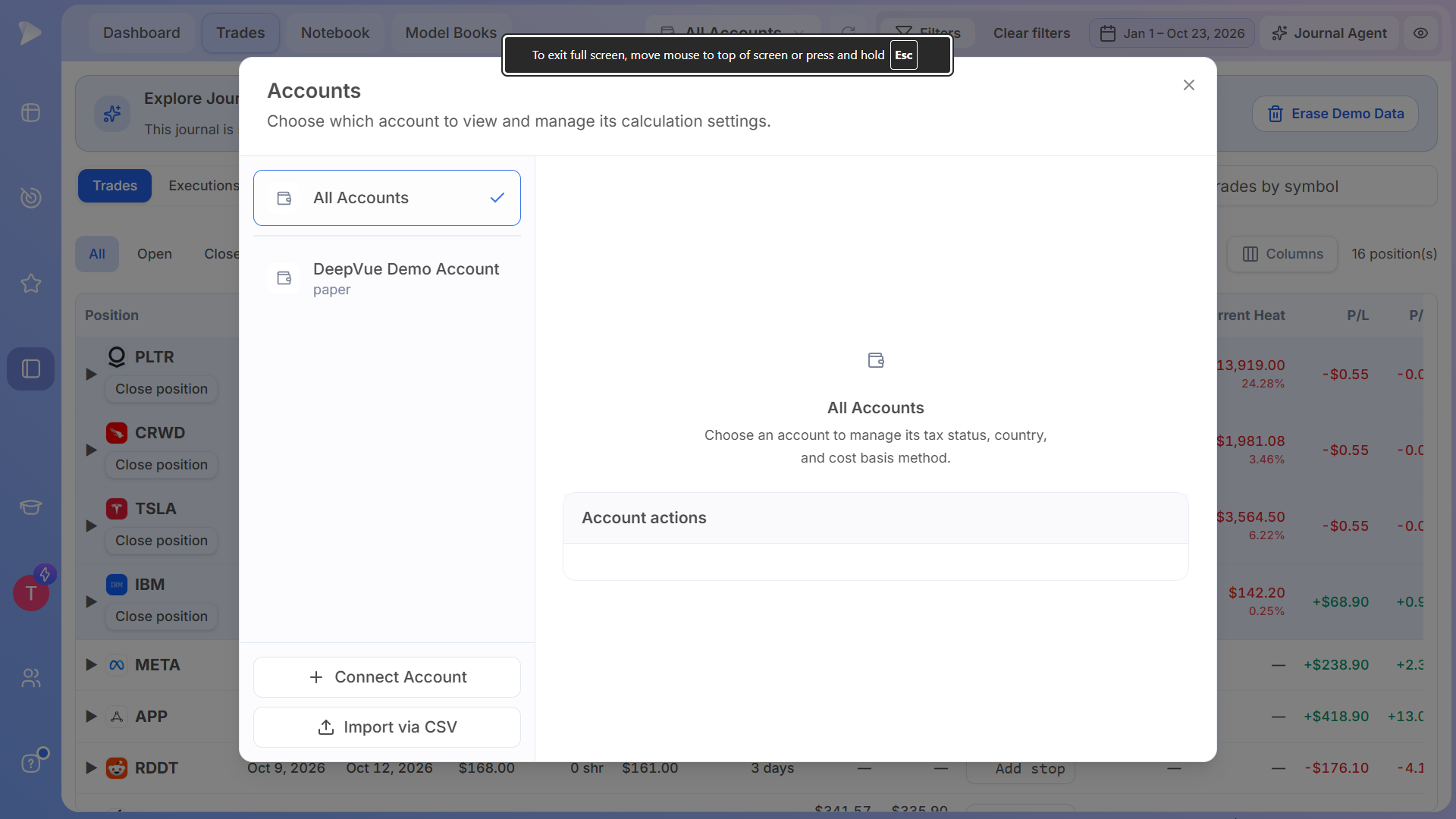
Trade tracking software is only as good as its data, so the Deepvue Trading Journal pulls your full trade history straight from your brokerage account, with most brokers syncing inside 24 hours. Sync covers Robinhood, Fidelity, Charles Schwab, Interactive Brokers, tastytrade, Questrade and Webull, and the list keeps growing.
- •Import CSV. A four step flow (Upload, Mapping, Preview & Select, Done) takes a CSV in any format from any broker and maps it to the account you choose.
- •Add Trade. Log a trade by hand with account, side, date, time and quantity, plus an optional playbook, emotion, tag and notes.
- •All Accounts. Stats calculate across every connected account at once, or for one account at a time.
- •Ledger items. Deposits, withdrawals and interest come across from your broker ledger, so performance reflects your real account.
- •Executions. The full broker ledger behind every stat, with account, date, time, type, symbol, direction, status, quantity, price, net amount, commission, fees, order ID, currency and tags in the columns you pick.
- •Sync issues. Broker activity rows keep their original records, and you can repair any import yourself under Sync issues.
- •Demo data. A new journal opens with demo trades to explore, and Erase Demo Data clears them when your own history arrives.
See every supported broker in Deepvue Trading Journal Broker Integrations.
A Trading Dashboard Built App by App
Your Deepvue Trading Journal Dashboard is a trading dashboard made of apps in three groups: Portfolio, Performance and Analytics. One click in the Add Apps menu adds an app, and each one can be removed just as fast, the same way every customizable dashboard in Deepvue works.
- •App settings. Each app shows the columns and data points you pick, in dollars, percent or both.
- •Definitions on hover. Hovering over any stat explains what it is, how it is calculated and what it is designed to show.
- •Filters. All Accounts, date ranges, tag filters and Clear filters recalculate every app at once.
- •Search and privacy. Global search focuses every stat on one symbol, and the eye icon switches dollar amounts to percentages.
Portfolio Apps: Open Positions, Open Risk and Stops
The Portfolio apps show what your money is doing right now, so every open trade and every stop is in view before the next session.
Open Positions
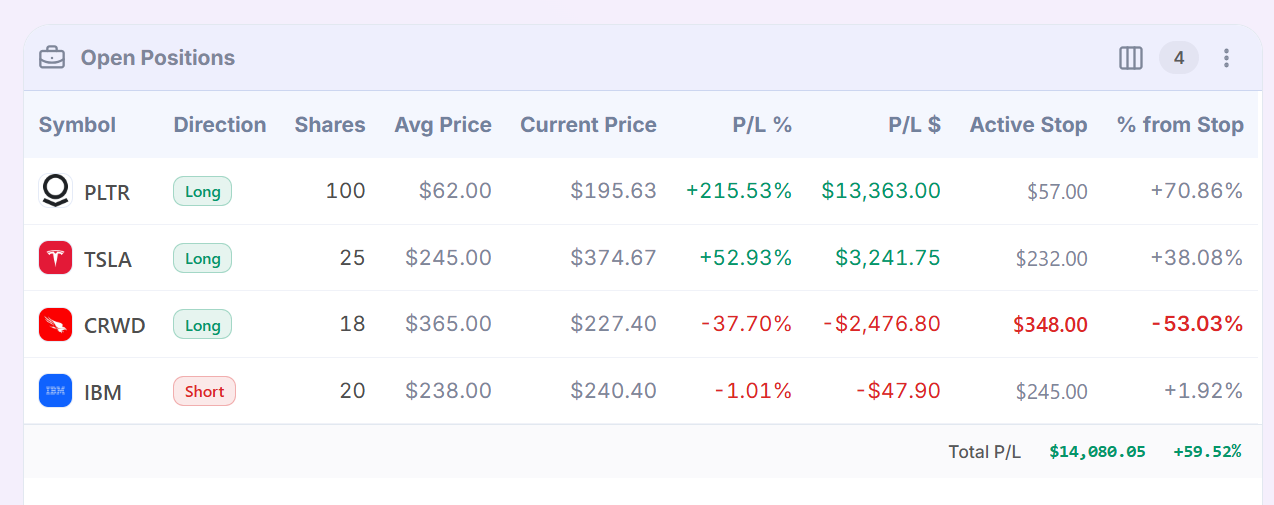
Open Positions lists each holding with direction, shares, average and current price, P/L in dollars and percent, active stop and percent from stop, plus a total P/L row.
Open Risk
Open Risk totals what is at stake if every stop is hit, in dollars and as a percent of equity, with your original heat beside your current heat.
Near Stops
Near Stops sorts open positions by how close price is to each stop, in real time, with an At stop badge when price gets there.
Recent Trades (streak)
The streak view of Recent Trades lays out your last five or ten trades from oldest to latest, with the current streak on top.
Recent Trades (activity)
The activity view of Recent Trades lists your latest buys and sells by date, symbol, type, quantity and net amount.
Trading Performance Tracker: Equity Curve, Trading Edge and Profit Factor
The Performance apps make the Deepvue Trading Journal a trading performance tracker that scores your results in dollars, percent and R. Add a stop to a trade and the journal calculates its R for you, and the Position Size Calculator sizes the next one from the same risk.
Performance Overview
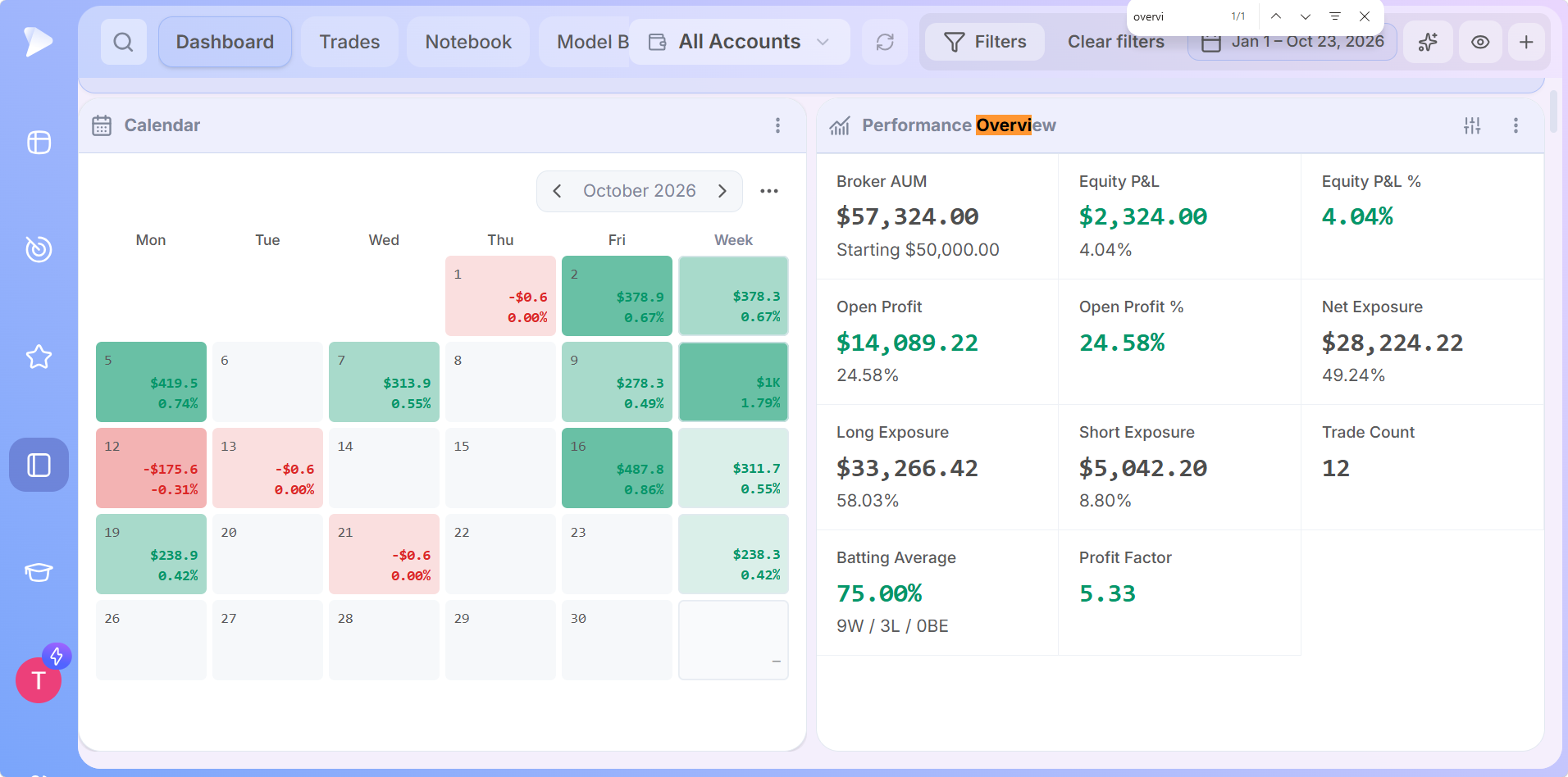
Performance Overview tracks broker AUM against your starting balance, equity P&L, open profit, net, long and short exposure, trade count, profit factor and batting average.
Equity Curve
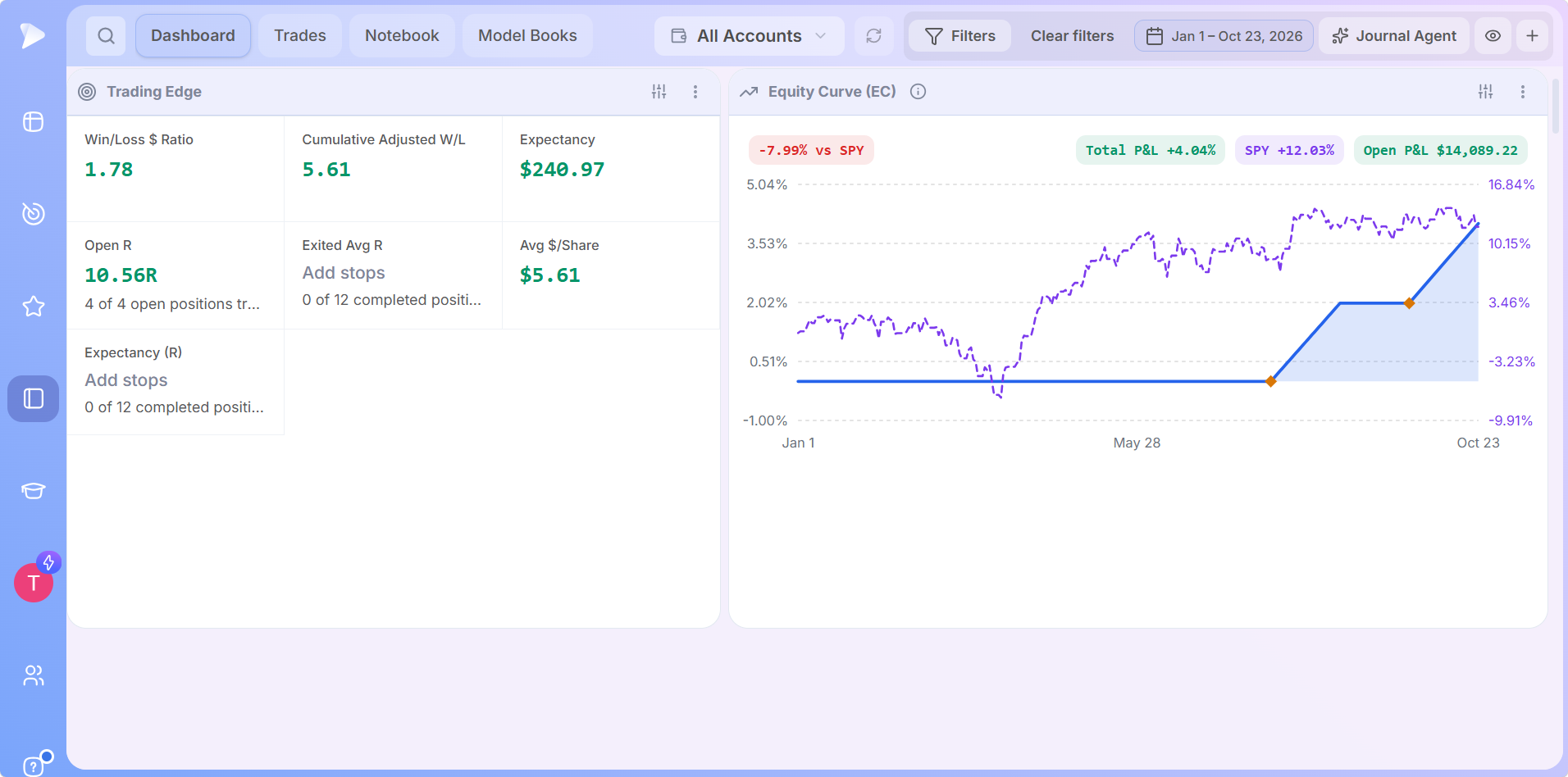
The Equity Curve charts account growth beside a benchmark such as SPY, with open P&L on the chart, so higher lows are easy to spot.
Trading Edge
Trading Edge reports the win/loss dollar ratio, cumulative adjusted win/loss, expectancy in dollars and R, open R, exited average R and average dollars per share.
Win / Loss Profile
Win / Loss Profile compares average win and loss, holding time for winners, losers and breakevens, total profits, fees, average return and your biggest trades.
Risk & Consistency
Risk & Consistency measures max drawdown, streaks, the Sharpe, Sortino and Calmar ratios and annual volatility.
Advanced Metrics
Advanced Metrics covers trade excursion and system quality: sampled MFE and MAE, exit efficiency, MFE captured, Gain-to-Pain, recovery factor, Kelly, SQN, ulcer index and your last 20 trades.
Trading Analytics Software for Every Setup, Tag and Emotion
The Analytics apps turn your tags into answers, which is where trading analytics software earns its place. Each Performance by app breaks out trades, win %, average R, P&L and profit factor for every group.
| Analytics app | What it shows |
|---|---|
| Calendar | Daily P&L in dollars and percent on a monthly calendar, with a weekly total for each row |
| R-Multiple Distribution | How many trades closed at 1R, 2R, 3R and beyond, on both sides of zero |
| Performance by Day of Week | Results for each trading day |
| Performance by Playbook | Results for each playbook, from base breakouts to earnings gaps |
| Performance by Tag | Results for each tag you create, such as relative strength or volume support |
| Performance by Symbol | Results for each ticker you traded |
| Performance by Emotion | Results for each emotion you logged, such as calm, focused or confident |
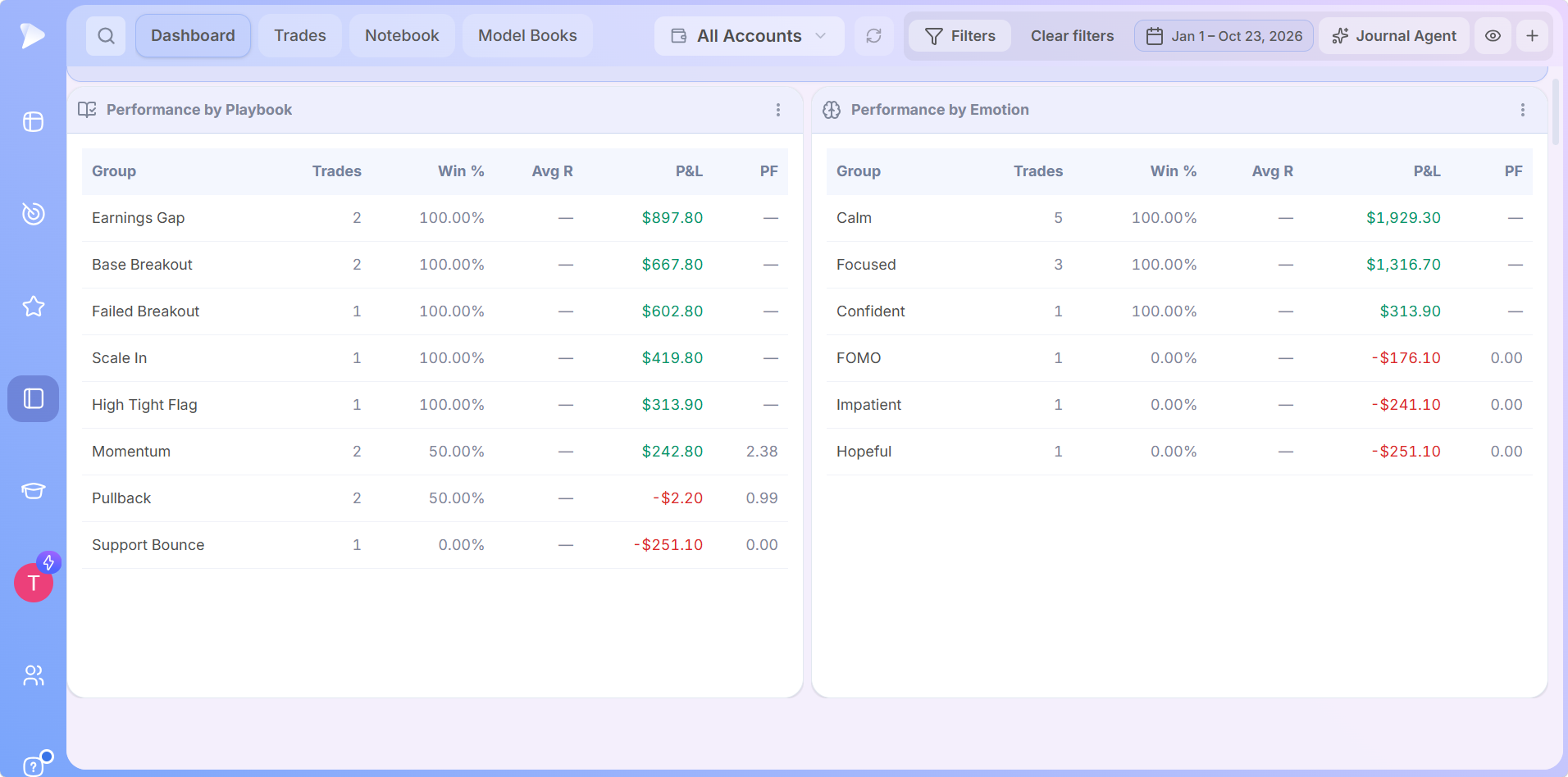
Deepvue’s trading journal compares performance by trading strategy and emotional state, helping traders identify their most profitable setups, recognize emotional trading patterns, and improve decision-making.
Find the setup that carries your year.
Get 2 months for the price of 1, enough time to tag a real stretch of trades and let Performance by Playbook rank them.
The Trades Tab: Trade Journal Software for Every Position
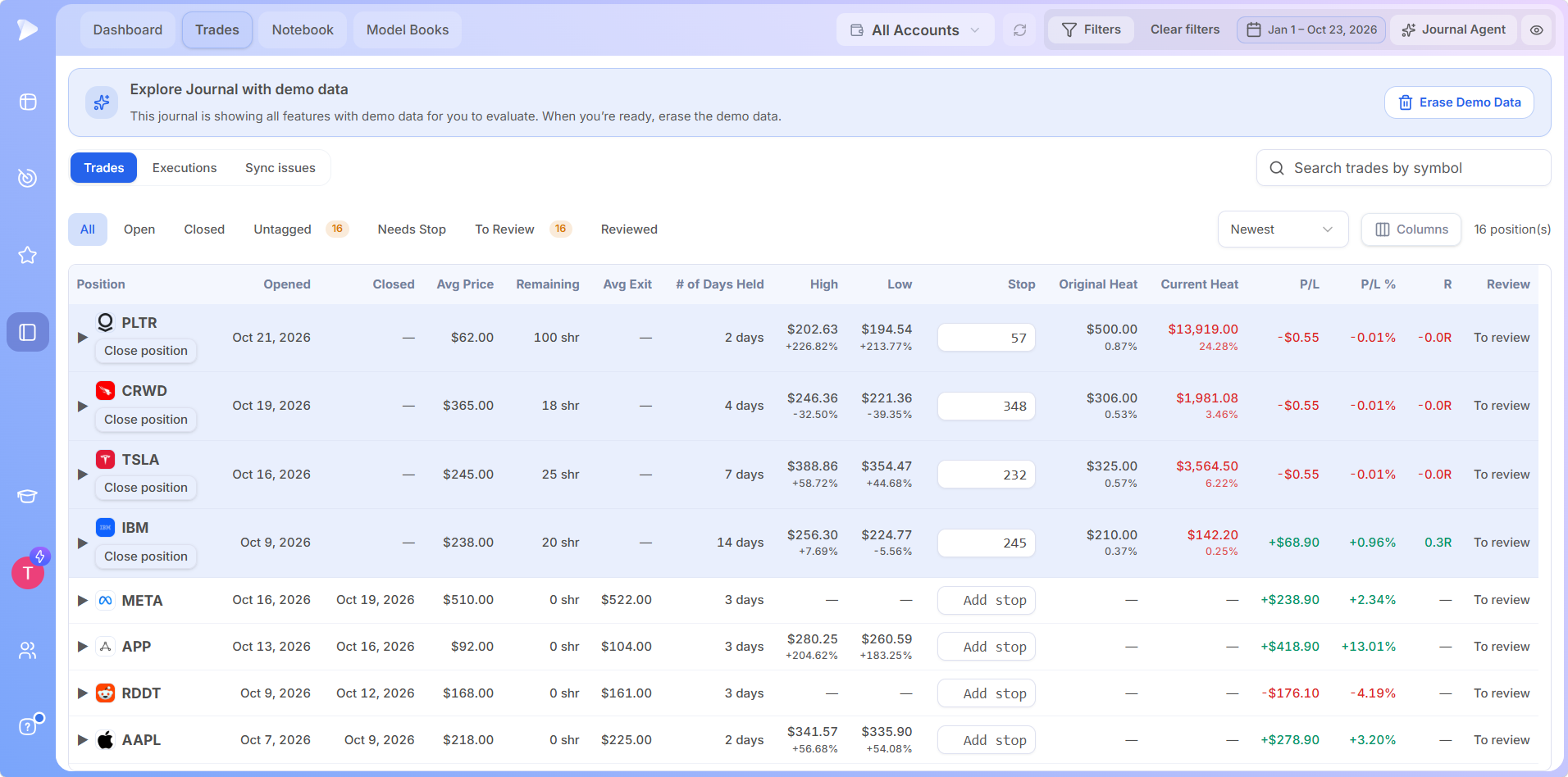
The Trades tab is the trade journal software workspace for every position, with open trades at the top and closed trades below. Filters for All, Open, Closed, Untagged, Needs Stop, To Review and Reviewed sort the list in one click, alongside symbol search and a Columns picker.
Each row carries opened and closed dates, average price, remaining shares, average exit, days held, the high and low, the stop, original and current heat, P/L in dollars and percent, R and review status. Every column sorts, so one click on P/L % surfaces your top performers. Any position without a stop gets an Add stop field right in the row, and its R and heat update as soon as you enter one.
Trade Review With Playbooks, Tags and Emotions
Trade review is where trade journaling software pays off. Clicking any trade opens its review on the Deepvue charts workspace you choose, with buys marked green and sells marked red, and each marker shows the account, time, quantity and price.
- •Trade stats. Average price, average exit, P&L and P&L % sit above the review.
- •Executions list. Every fill is listed below the chart, and clicking one jumps to that moment.
- •Notes before and after. Pre trade notes hold the plan and post trade notes hold the lesson.
- •Emotion, playbook and tags. Each one feeds its own Performance by app, from setups to the sell rules you used.
- •Save and next. One click marks the trade reviewed and opens the following one.
Every input is short by design, which keeps trade journaling software quick enough to use after every session.
The Notebook and Model Books: Plans, Routines and Chart Snapshots
The Deepvue Notebook keeps premarket plans, daily reviews and weekend routines next to your trades. Notes sort into All notes, Favorites, Templates and your own folders, with search, tags, rich text styles and a Make template button. Typing /chart drops in a snapshot of any symbol, on the timeframe and workspace you pick.
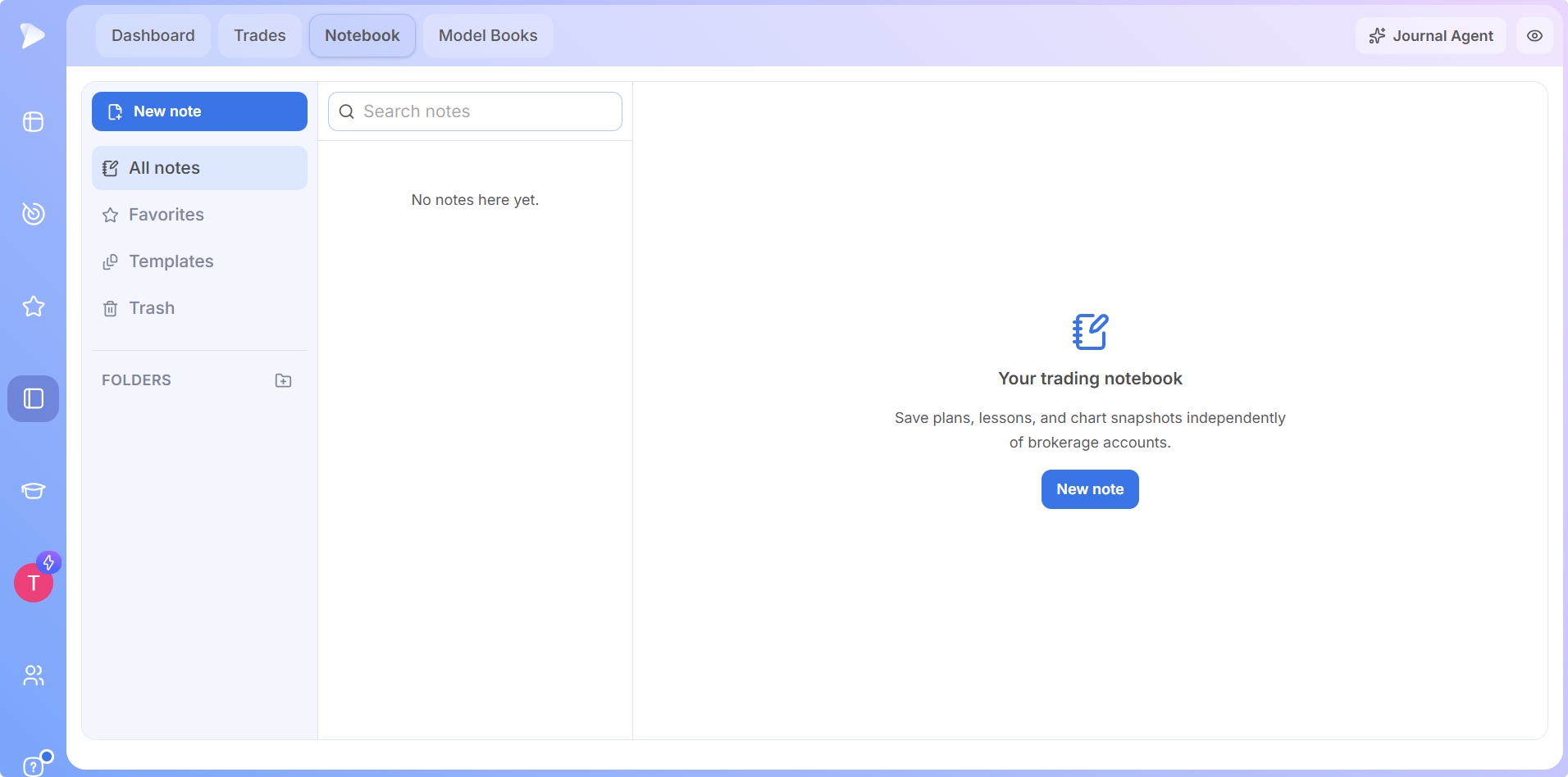
Model Books moved into the Deepvue Trading Journal too, so studied examples and real trades share one module.
Journal Agent: AI Built Into Your Trading Journal Software
The Journal Agent coaches with your trading stats and execution data, and your notes stay private. Suggested prompts such as Review my recent trading performance and Help me improve my trading process start a review in one click, or you can ask your own question, such as which setup is your best, by typing or by voice. Add context, New Chat and Chat history are in the same panel.
Journal Agent answers come back structured: what it observed in your record, the biggest opportunity, and what to test next. Its Prompt Library groups My Prompts, Imported, Market Analysis, Theme Analysis and Stock Analysis, the same research prompts found in the Deepvue AI Terminal.
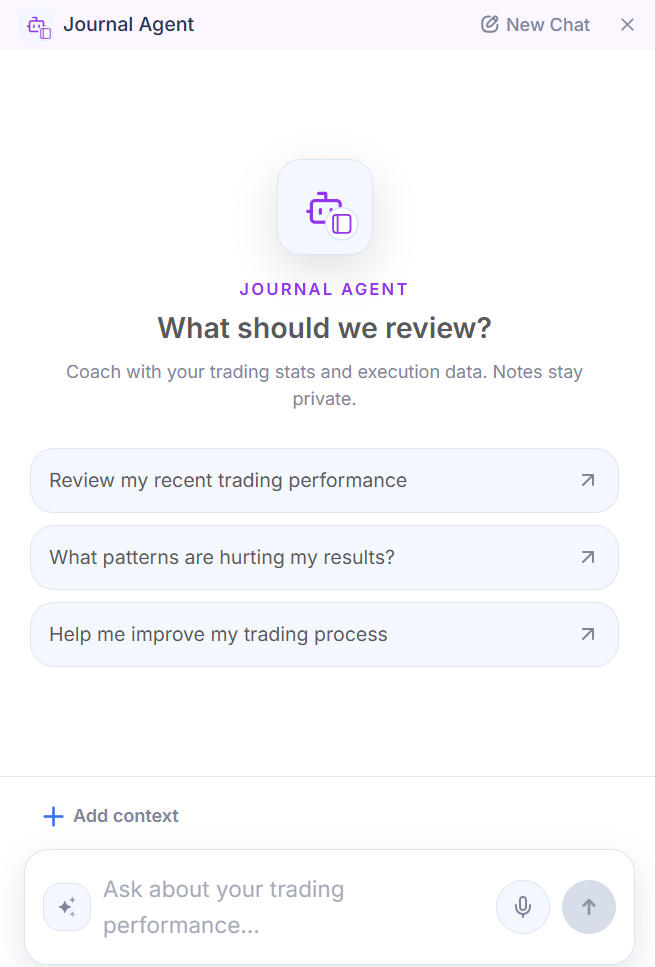
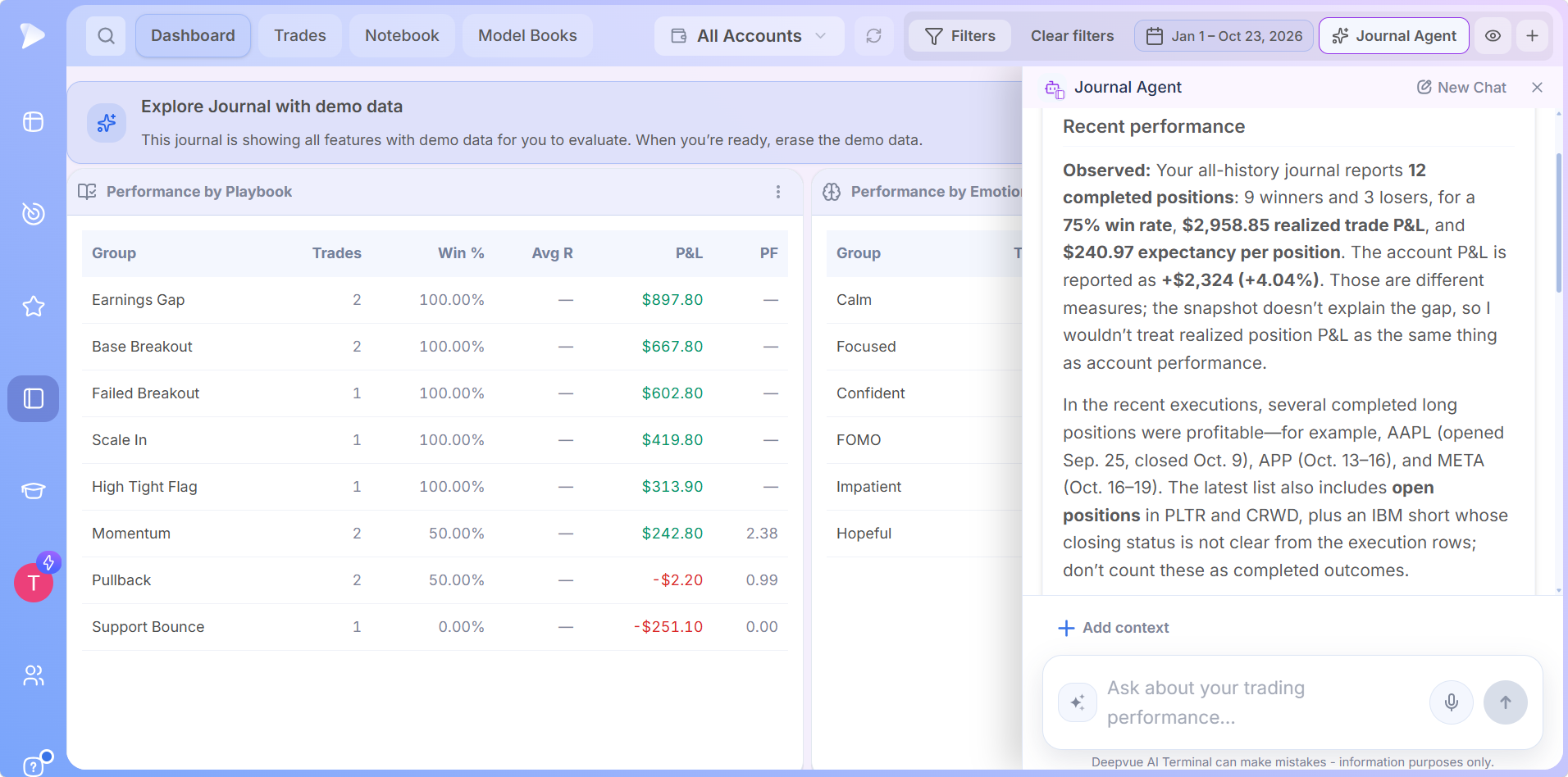
Using the Journal Agent is your choice. It sees numbers and symbols with no name or account details attached, and its AI provider keeps no data under a zero retention policy.
Ask your trades a question.
Get 2 months for the price of 1 and ask the Journal Agent to review your recent performance, on desktop or mobile.
Every Feature on Desktop and Mobile
All Deepvue Trading Journal features are available on desktop and mobile: open the journal in a browser at your desk or in the Deepvue iOS and Android apps on the go. The Journal Agent, the Notebook, trade review and every Dashboard app come along, and everything you enter syncs across devices.
Tag a trade from your phone in seconds, then finish the full review at your desk.
Join Deepvue from your mobile browser to claim 2 months for the price of 1, then download the Deepvue app on iOS or Android and the whole journal is in your pocket.
Security and Privacy Across Every Feature
✓ Login stays with your broker
Broker connections run on your broker’s own website, which keeps your credentials away from Deepvue entirely.
✓ Encrypted data
Your journal data is encrypted in transit and on Deepvue’s servers.
✓ You stay in control
Disconnect an account at any time, and Deepvue wipes its data three days later.
Deepvue accounts also support passkey sign in, and privacy mode keeps dollar amounts off screen.
Stock Trading Journal Software Inside the Full Deepvue Platform
Made for swing and position trading, the Deepvue Trading Journal is stock trading journal software that shares a login with every research tool in Deepvue. The Deepvue features hub maps the whole platform, and each group has its own hub.
Core Features
Charts, the screener, watchlists, alerts and the AI Terminal, on the Core Features hub.
Visualizations
Heatmaps, bubble charts and more ways to see the market, on the Visualizations hub.
Research
Themes, industry ranks and market breadth, on the Research hub.
Tools
The Position Size Calculator, economic and earnings calendars and more, on the Tools hub.
Follow the how to use guide for a step by step setup of every feature.
Every Deepvue Trading Journal Feature in One $49 Plan
New member offer: Two months for the price of one, so $49 covers your first two full months. All Deepvue Trading Journal features come with the single Deepvue plan at $49 a month, with a discounted annual option.
The $49 Deepvue plan covers:
- •The Deepvue Trading Journal, with broker import, every Dashboard app, the Notebook, Model Books and the Journal Agent, on desktop and mobile.
- •The screener, with 1,152 data points and 169 presets.
- •Charts, watchlists and alerts, all of them unrestricted.
- •The AI Terminal, Theme Tracker and Market Brief, with no cap on usage.
New Deepvue subscribers get a one on one onboarding session, an onboarding email series and weekly live webinars that each go deep on one part of the platform.
2 MONTHS FOR THE PRICE OF 1
Put Every Feature to Work on Your Next Trade
Broker sync, a dashboard you build, analytics by setup and the Journal Agent, on desktop and mobile, with 2 months for $49.
Frequently Asked Questions
What are the Deepvue Trading Journal features?
The Deepvue Trading Journal features include broker sync and CSV import, a trading dashboard of Portfolio, Performance and Analytics apps, the Trades tab, trade review with playbooks, tags and emotions, the Notebook, Model Books and the Journal Agent, all available on desktop and mobile.
What features should trading journal software have?
Trading journal software should import trades automatically, measure results in R, track open risk, break out performance by setup and make review fast. The Deepvue Trading Journal covers each of these and adds an AI Journal Agent, with every feature included in the $49 Deepvue plan.
What is a trading dashboard?
A trading dashboard is one screen that shows the stats behind your trading, such as P&L, open risk, win rate and the equity curve. Inside the Deepvue Trading Journal, the Dashboard is a trading dashboard built from apps you add with one click and tune to the stats you track.
What is profit factor in trading?
Profit factor in trading is gross profit divided by gross loss, so a profit factor above 1 means a strategy made money over the period. The Deepvue Trading Journal shows profit factor in Performance Overview and in every Performance by app, so you can compare it setup by setup.
What is an equity curve in trading?
An equity curve in trading is a chart of account value over time that shows how results build trade by trade. In the Deepvue Trading Journal, the Equity Curve app turns the trading performance tracker into a picture, charting your account next to a benchmark such as SPY.
What is expectancy in trading?
Expectancy in trading is the average amount each trade is expected to make, based on win rate, average win and average loss. The Deepvue Trading Journal Trading Edge app reports expectancy in dollars and in R from the closed trades in your record.
What is an R multiple in a trading journal?
An R multiple in a trading journal measures a result in units of initial risk, so a trade that makes twice its planned risk is a 2R trade. The Deepvue Trading Journal calculates R for every trade that has a stop and charts the spread in the R-Multiple Distribution app.
What do MFE and MAE mean in a trading journal?
In a trading journal, MFE (maximum favorable excursion) is the furthest a trade moved in your favor, and MAE (maximum adverse excursion) is the furthest it moved against you. The Deepvue Trading Journal Advanced Metrics app tracks both, along with exit efficiency and MFE captured.
What is the best stock trading journal software?
The best stock trading journal software syncs trades from your broker, scores results in R and breaks out performance by setup, right next to your research. The Deepvue Trading Journal covers every one of those for swing and position traders inside Deepvue, with an AI Journal Agent included in the $49 plan.
Can the Deepvue Trading Journal import trades from any broker?
Yes, the Deepvue Trading Journal imports trades from any broker. Sync covers Robinhood, Fidelity, Charles Schwab, Interactive Brokers, tastytrade, Questrade, Webull and many more, a CSV import maps a file in any format from any other broker, and Add Trade logs trades by hand, which makes it complete trade tracking software.
Are all Deepvue Trading Journal features available on mobile?
Yes, every Deepvue Trading Journal feature is available on mobile as well as desktop. The Deepvue iOS and Android apps carry the Journal Agent, the Notebook, trade review, the Trades tab and every Dashboard app, and everything syncs with the browser version.
What can I ask the Deepvue Journal Agent?
The Deepvue Journal Agent answers questions about your own trades, such as a review of recent performance, your best setup or ways to improve your trading process, by typing or by voice. Its Prompt Library also covers market, theme and stock analysis.
Are the Deepvue Trading Journal features included in my Deepvue plan?
Yes, every Deepvue Trading Journal feature is included in the $49 a month Deepvue plan, alongside the screener, charts, watchlists, alerts, the AI Terminal and Model Books.