Live Stock Screener: Screen the Market as It Moves
A live stock screener tests its conditions against what the market is doing now instead of a stored snapshot. Deepvue works this way throughout, with no separate live mode and no reload button, because every screen in the library reads current values while the session is open. That includes the volume measures, where a stale figure is worth almost nothing. One plan, $99 a month.
Key Takeaways
Most screeners give themselves away with the reload button. If a table has to be refreshed before it shows where a stock trades, you are reading a photograph of the market taken at some unstated moment and dressed up as a feed.
Deepvue’s screening engine inverts that. Values arrive as the market produces them, and your conditions get tested against the market as it stands rather than a cached copy of this morning.
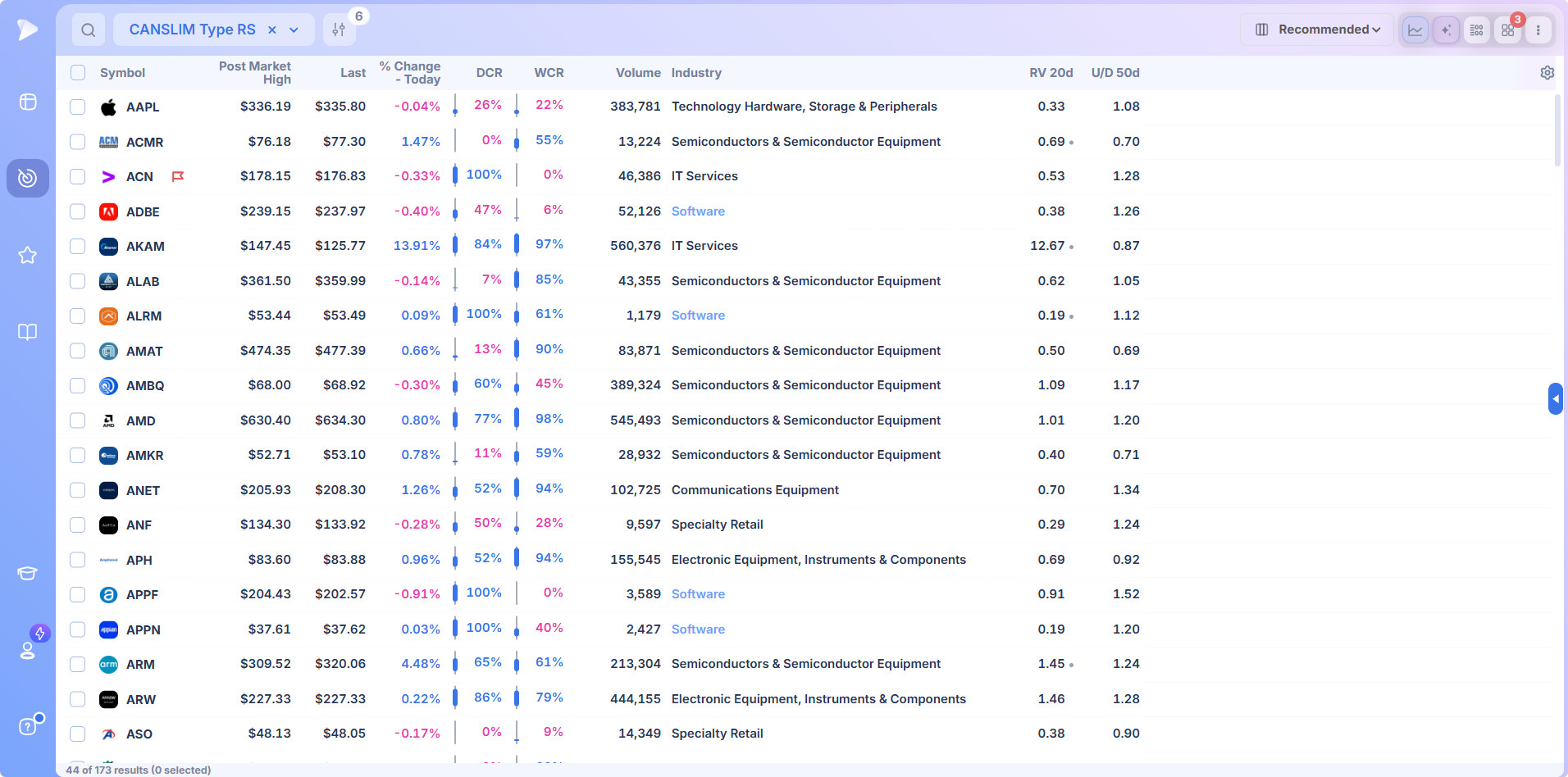
- ✓There is no separate live mode. Every screen reads current values for as long as the market is open
- ✓Nine preset categories span house methodology, technical structure, fundamentals, earnings timing, extended hours and market wide screens
- ✓Volume filters read against a baseline, the only way an intraday volume figure means anything
- ✓Three layouts: columns beside a chart, one name in depth, or dozens of charts at once
- ✓Six columns can drive the sort together, with priority numbered on each one
- ✓Forty nine dollars a month on one plan, where MarketSurge charges $149
What Is a Live Stock Screener?
A live stock screener evaluates its conditions against current prices rather than a saved copy, so the list is what qualifies now. A delayed tool checks the same criteria against prices captured minutes ago, which quietly changes what the output means. A real time stock screener removes that ambiguity.
It matters least on a finished daily candle and most when everything moves at once: the first thirty minutes, the last thirty, and whatever happens when news lands in between.
Scanner or Screener?
The stock scanner vs screener question comes up constantly, and the words have blurred. A scanner traditionally watched the session for events as they happened while a screener filtered a universe against fixed criteria, making a stock scanner an intraday tool and a screener an evening one.
That split stopped meaning much once screeners began reading current data. A real time stock scanner and a real time screener now describe the same capability, which is why no separate live stock scanner hides in another tab here.
Why Deepvue Is the Best Live Stock Screener
There is no button marked live and no preset called Live Screen anywhere in the platform, and the absence is the point. Currency is not a feature standing beside the others. It is how the whole screener behaves, which is what the case for Deepvue as the best live stock screener rests on.
A Preset Library That Cannot Go Stale
Presets sit in nine categories, and each returns whatever qualifies right now rather than a saved result from whenever it last ran.
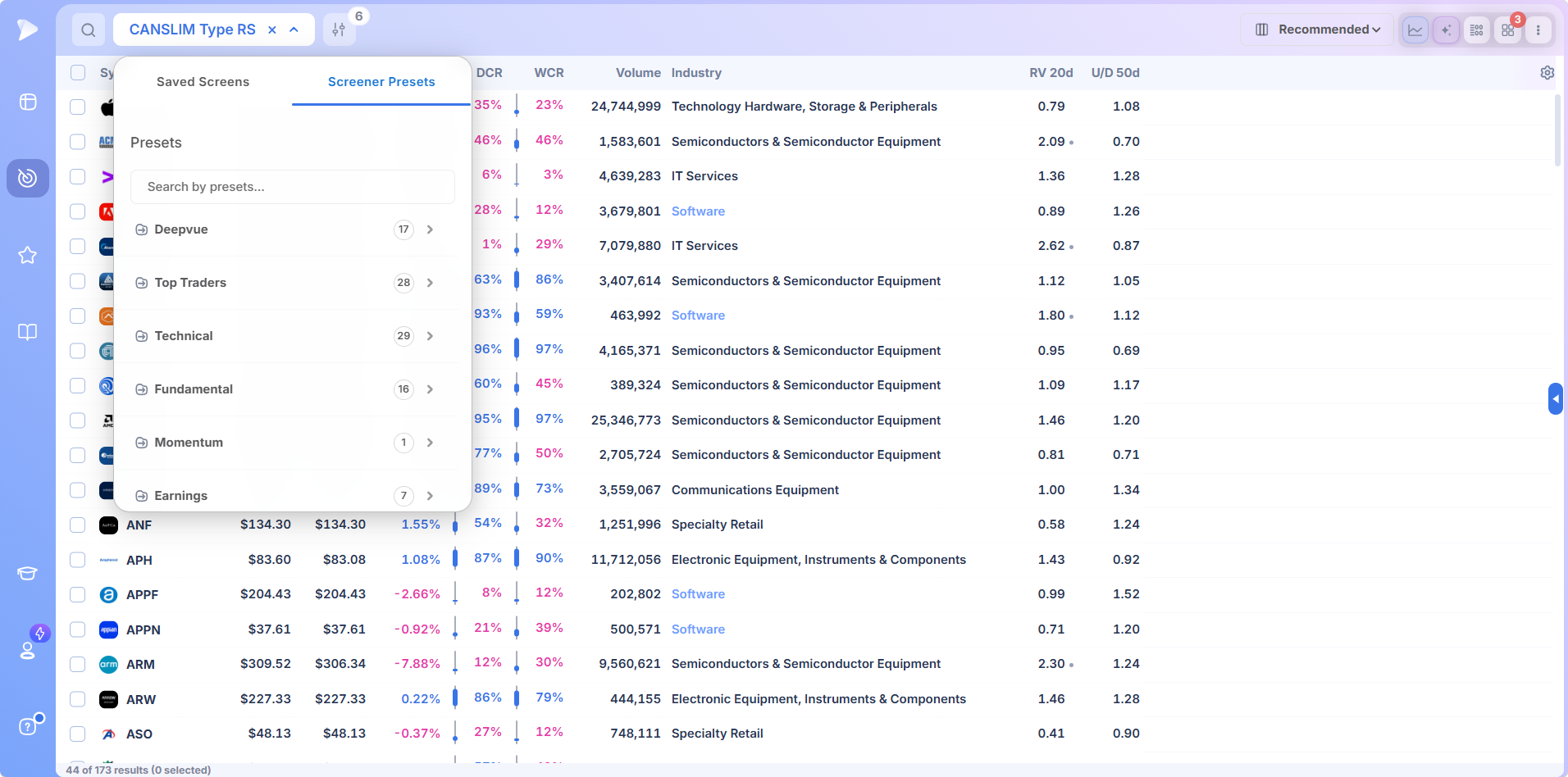
The Deepvue category carries the house screens, including CANSLIM® Type RS, Deepvue Leaders, Deepvue Universe, Character Change and High Volume. Open those first if you want a sensible list without configuring anything.
WatchHow to Find High-Growth Stocks with the Deepvue Leaders ScreenEvery Condition Visible, Every Threshold Yours
Open the filter panel on any preset and the logic is laid out in full: an industry group, a price floor, a dollar volume minimum, then a group set to ANY carrying strength conditions across several windows.
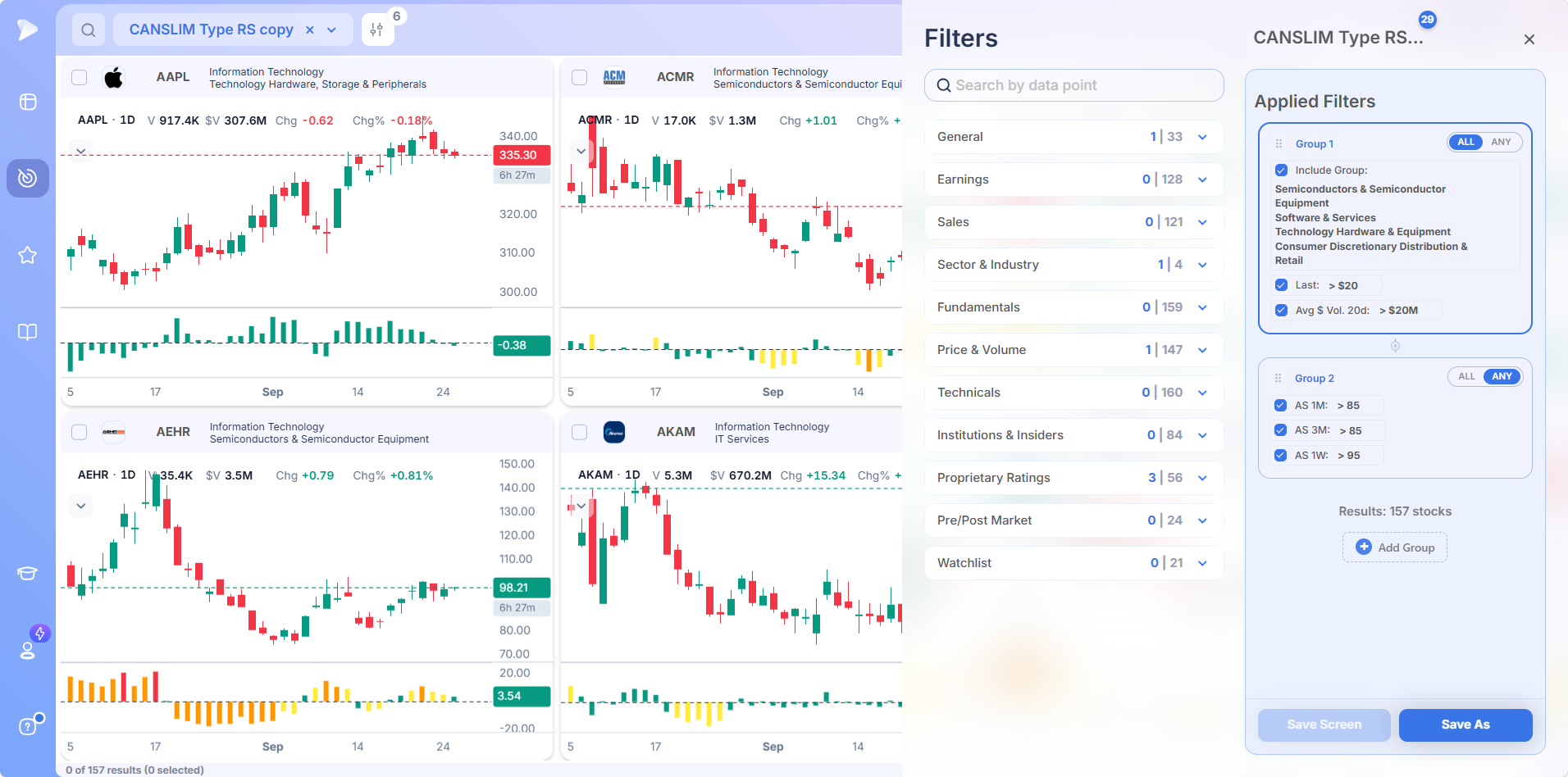
Nothing is hidden. Duplicate the screen and every threshold becomes editable, which is how most traders end up with a version tuned to their own tolerance.
The Live Stock Volume Screener Inside the Table
Volume is where old data does the most damage, because half a stock’s usual daily turnover is extraordinary at eleven in the morning and completely ordinary at the close. A live stock volume screener therefore measures against a baseline rather than counting shares. Relative volume measured against its twenty day average, and the up down ratio, both sit in the table, both filter, and both move with the session.
Three Layouts for Three Different Jobs
How you read a live list depends on what you are doing, so the layout changes with it.
| Layout | What it is for |
|---|---|
| Data view | Columns beside the chart, for stepping through a list and reading the numbers as you go |
| Deep dive | A large chart with the full data table underneath, for working one name properly |
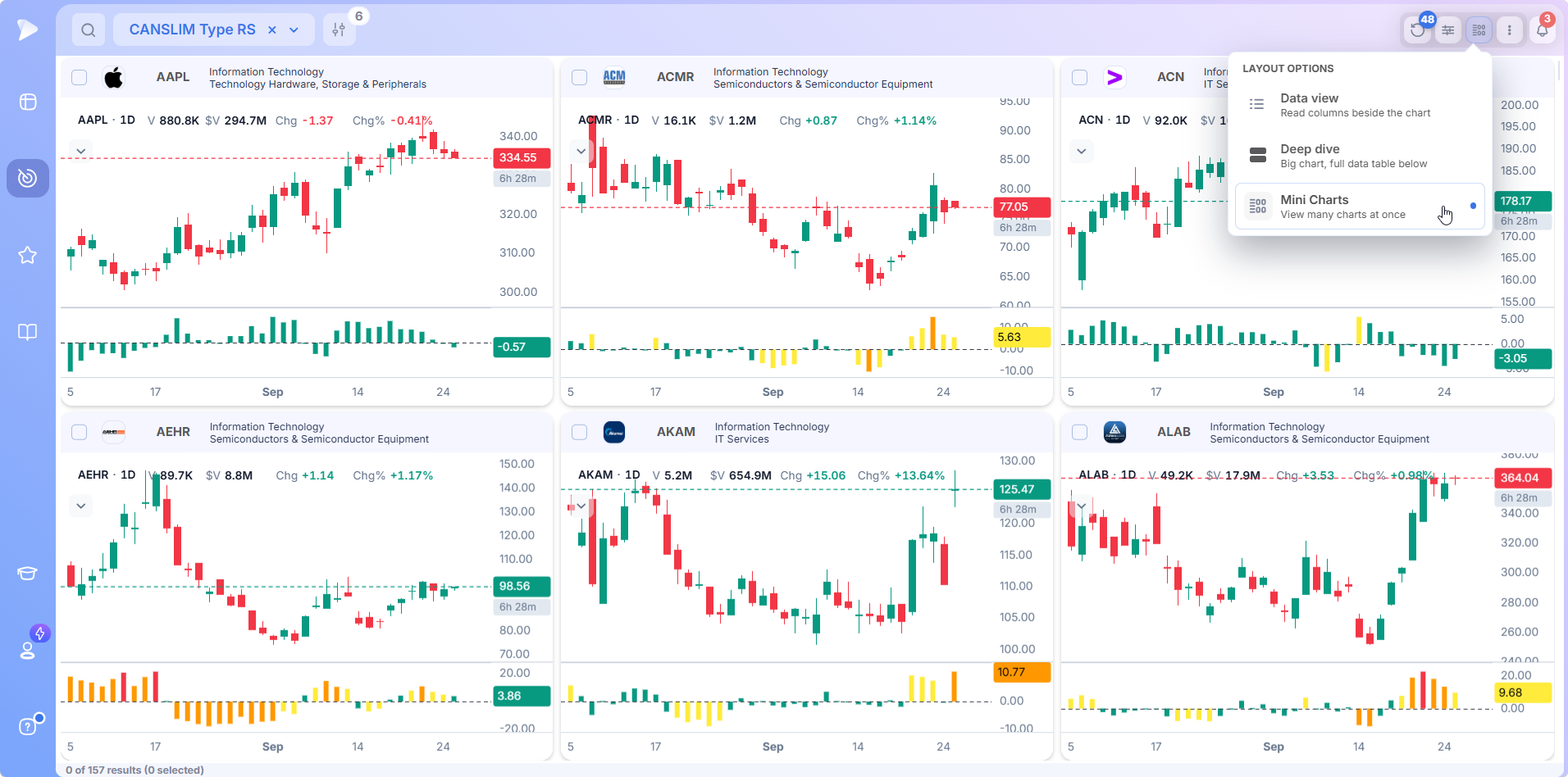
| Mini Charts | Many charts on screen at once, the fastest way to flip through a morning list visually |
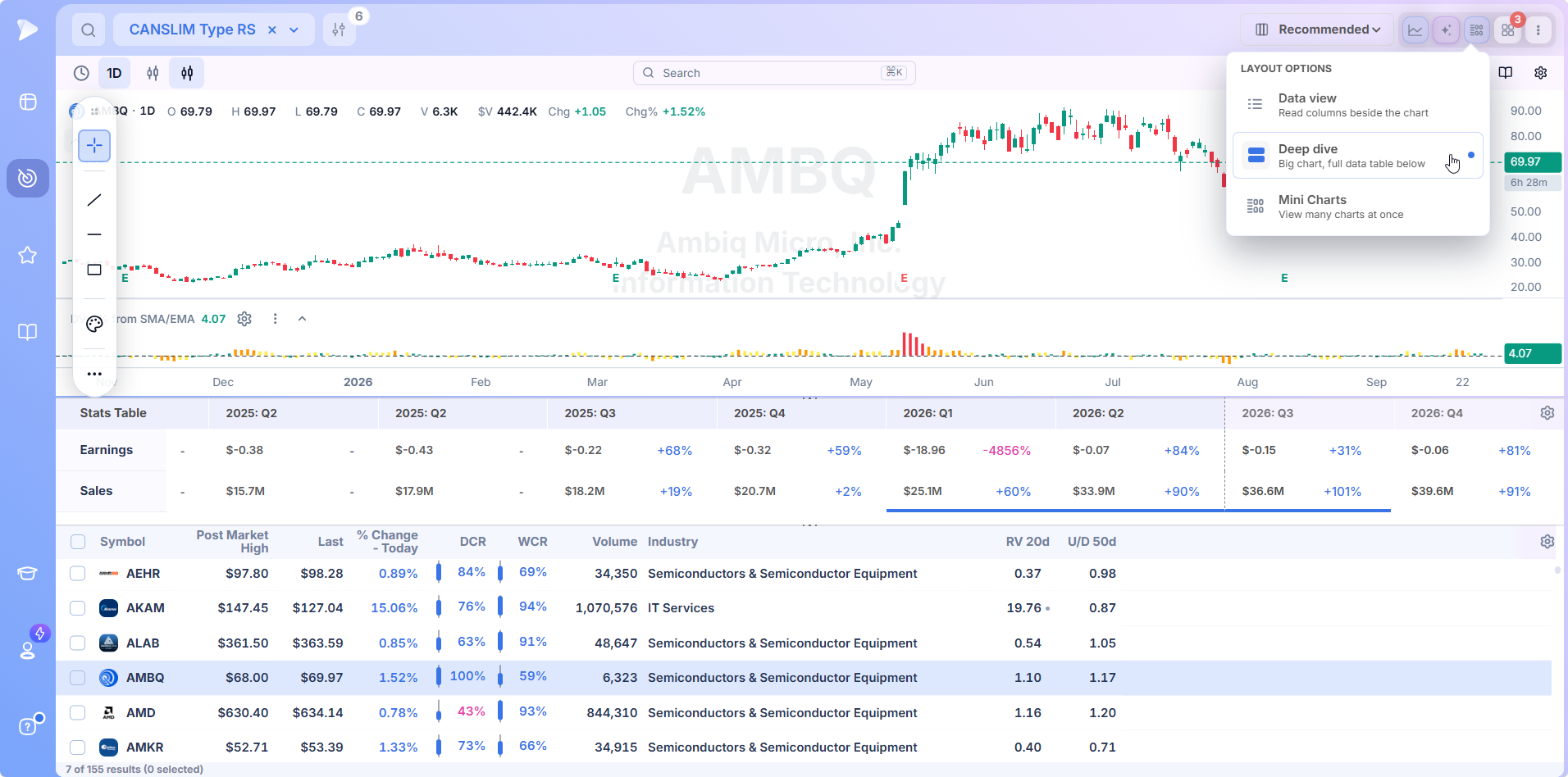
Mini Charts is the one most people underuse. When a screen returns forty names, glancing at forty charts beats reading forty rows, and two thirds get discarded in seconds.
Six Sorts at Once, Each With Its Own Priority
Any intraday stock screener produces more candidates than anyone can read. Sort conditions stack, each takes a numbered priority, and the order rearranges as values change. Six can run together, which sounds excessive until you try to express strongest mover, with genuine relative volume, closing near the high of its range.
Build the Table You Actually Read
Columns come from a categorized library, and the depth is the part worth knowing. Technicals, fundamentals, sales, earnings, ownership and the proprietary ratings each run into the dozens or hundreds of fields.
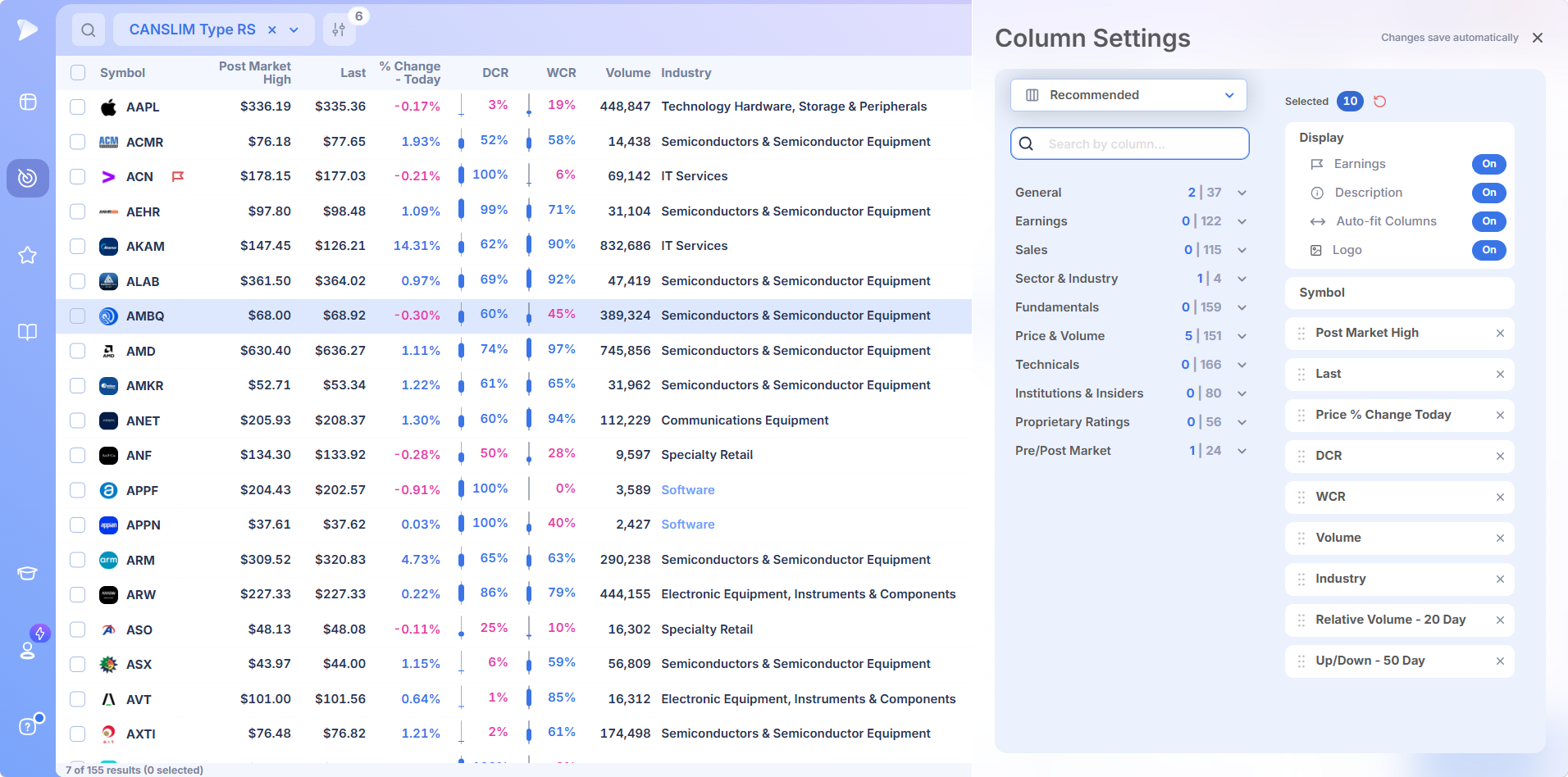
Display switches control whether earnings flags, descriptions and logos appear, which sounds cosmetic until you are scanning a hundred rows and need to spot tonight’s reporters.
Everything About One Name, Beside the Chart
Selecting a row pulls its chart up against the table, and the stats panel underneath carries earnings and sales broken out by quarter with growth percentages attached.
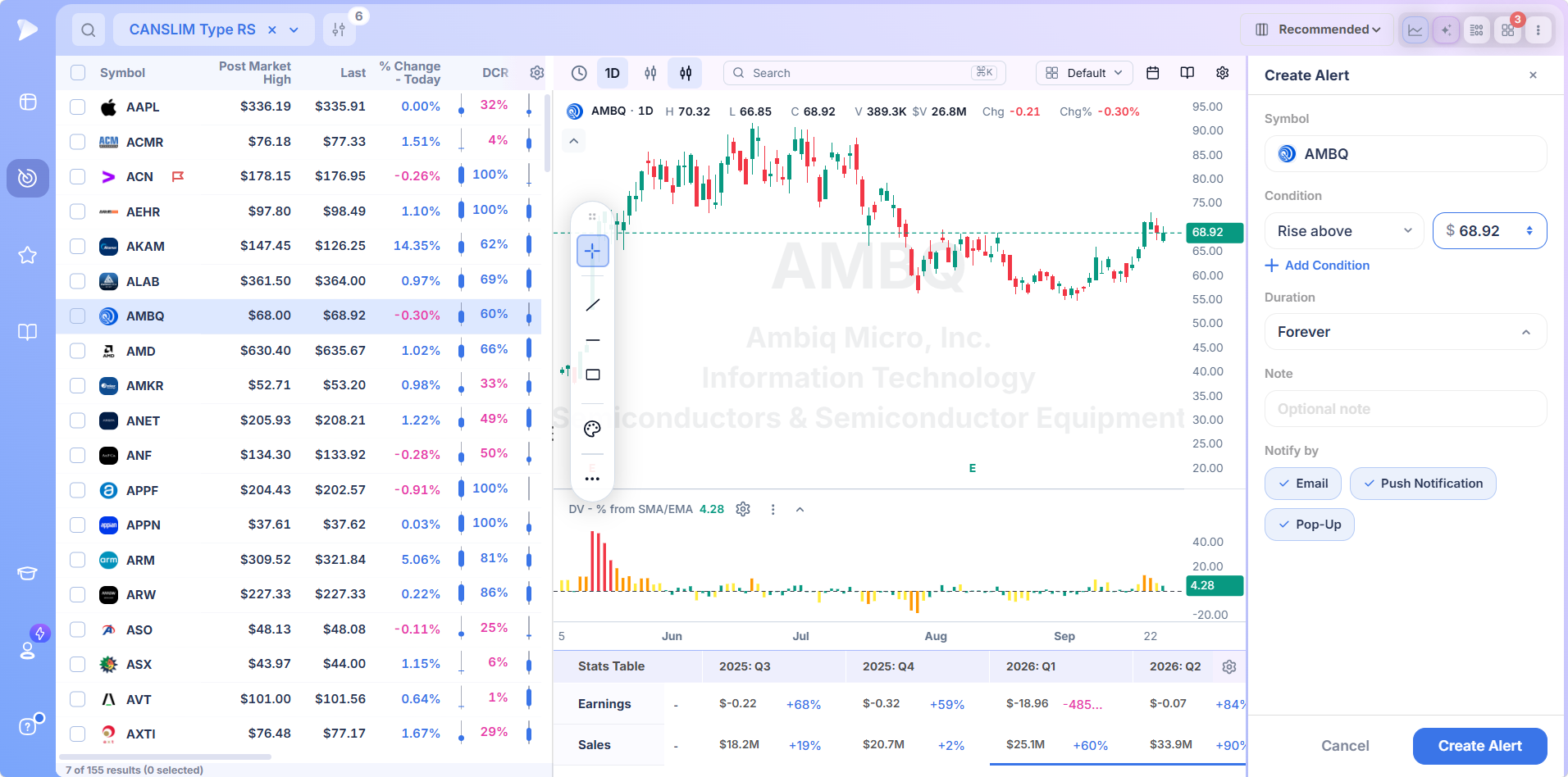
The move is on the chart. The reason it might last is in the table.
From Row to Alert
Right click any row to tag it by color, copy it, or push it into a watchlist. Existing lists appear in the submenu, and a fresh one can be spun up without closing the screen.
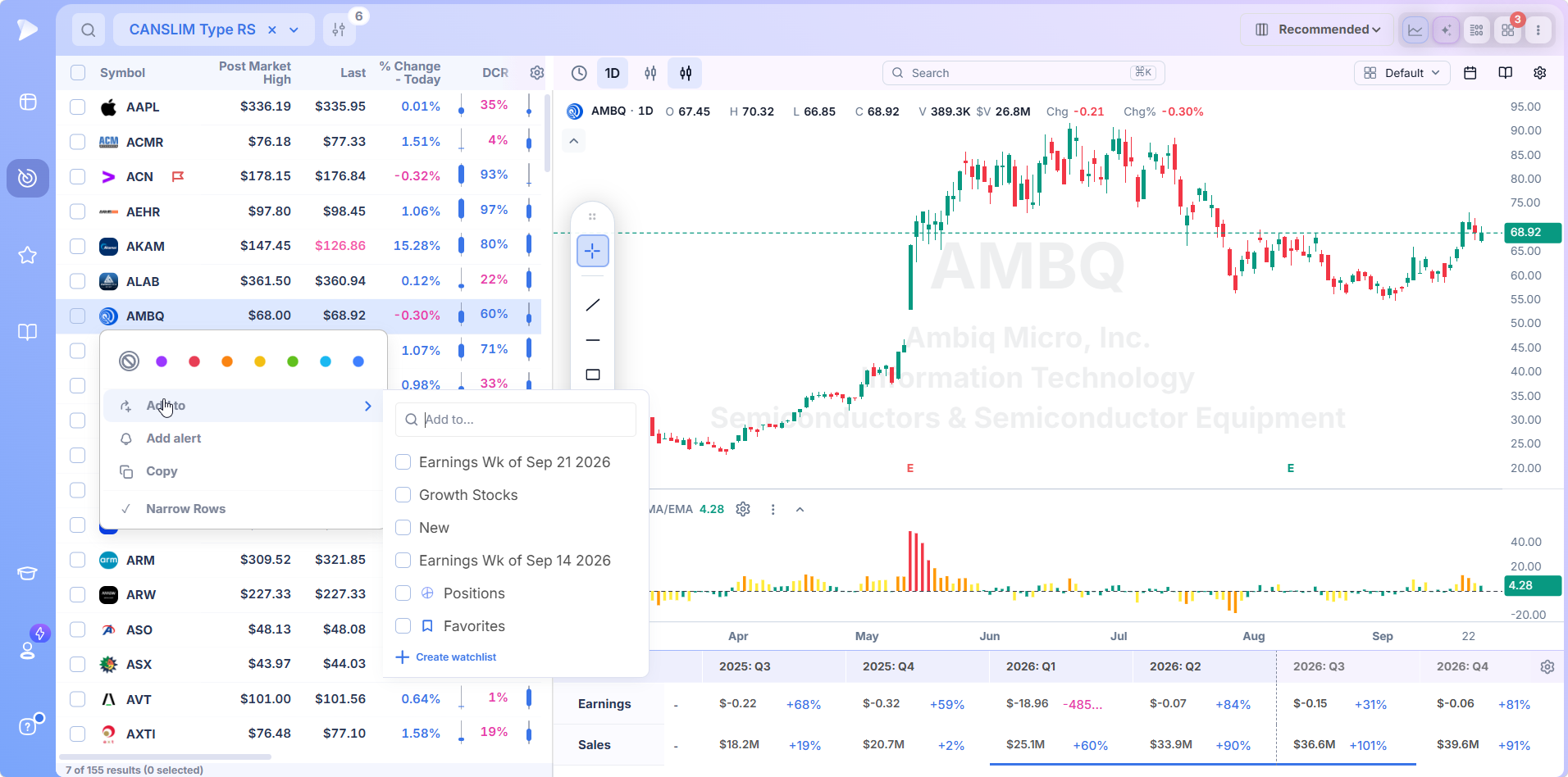
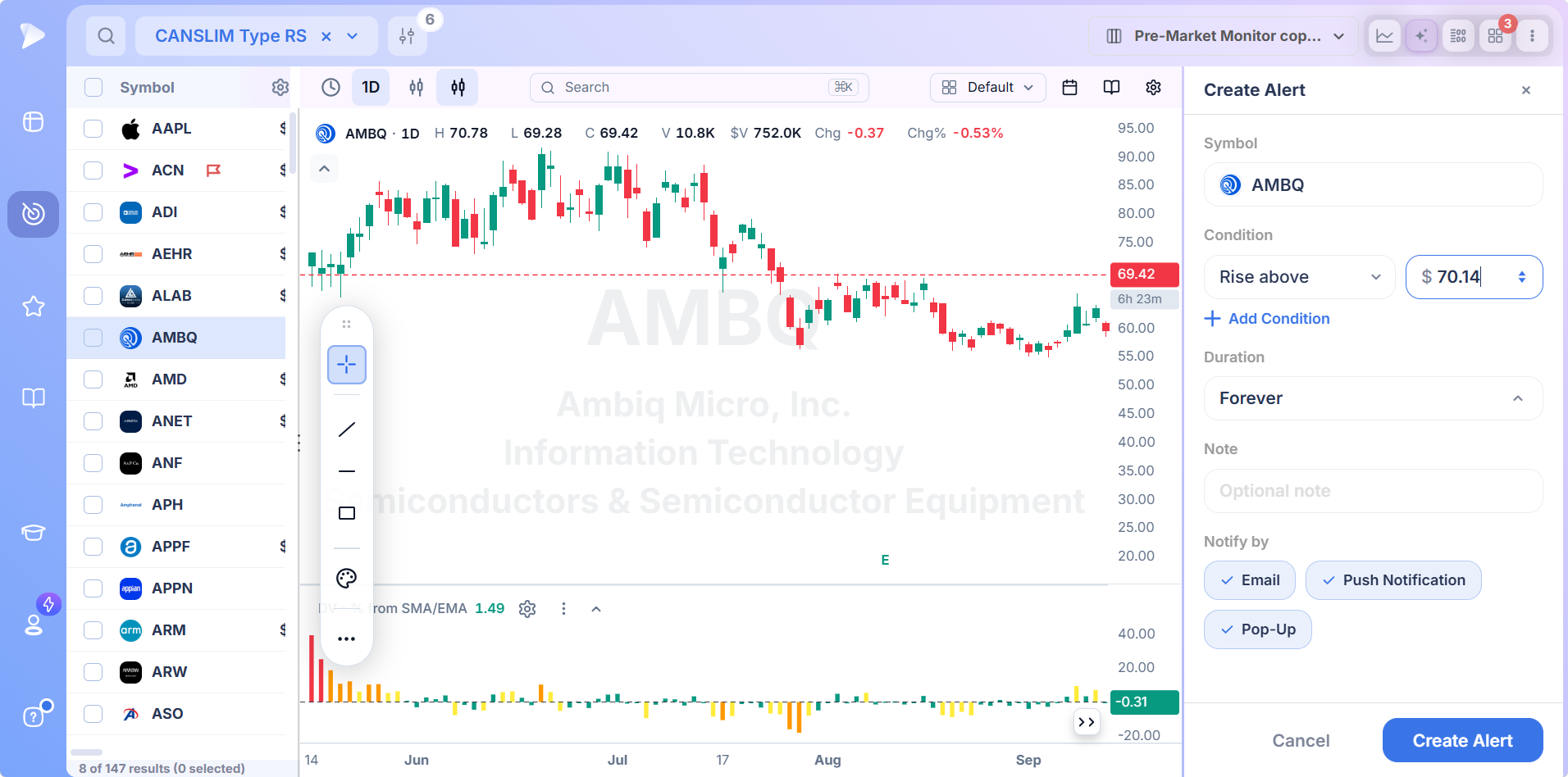
Alerts attach at the price where a name stops being theoretical. Layer on another condition if the idea needs one, decide how long it should stay live, note down the thinking behind the level, and choose the delivery method.
What a Delayed Screener Actually Costs You
Fifteen minutes does not sound like much, and across most of the day it is not. The cost is concentrated, and knowing where beats treating delay as one flat problem.
- ✓The opening range. The first half hour sets levels that shape the day. A delayed table shows it to you once it is over.
- ✓Anything volume based. A relative volume reading is a ratio involving elapsed time. Delay the numerator and the ratio stops describing anything real.
- ✓The moment a level breaks. The value of watching a level is being there when it goes. Arriving fifteen minutes later is reading history with extra steps.
- ✓The close. Where a stock finishes inside its range is one of the day’s more informative facts, and it is decided in the last few minutes.
None of that matters if you screen in the evening on completed data. It matters a great deal if you are asking questions during the session and expecting answers about now.
Which Fields Genuinely Need to Be Live
Not everything on a screener needs to update, and pretending otherwise is marketing rather than analysis.
Quarterly revenue does not change between eleven and noon, and neither does institutional ownership or the shape of a base built over six weeks. A tool making a fuss about refreshing those is pointing at the wrong thing.
What must be current are the session derived fields: price, the day’s range and the stock’s position in it, volume and every ratio built from it, and distance from a moving average. A real-time stock screener earns the label by keeping that group current, not by animating the rest. Get that right and you have the best real time stock screener for the job.
Using a Live Screen Without Staring at It
Live data is often assumed to be for people trading in and out inside the session. For anyone holding weeks to months, the value is not the watching. It is the catching.
Three habits get most of the benefit. Run the screen in the first hour and note what is behaving unusually rather than acting on it. Run it again in the final half hour. In between, push the morning’s names into a list with alerts on the levels that matter.
That last step turns a live stock market screener into something compatible with having a job, and it is where an ai stock screener earns its keep, since describing the screen you want beats assembling it by hand at seven in the morning. The AI Terminal builds the conditions from a sentence.
Who Needs a Live Stock Market Screener
- ✓Traders holding for weeks who want the moment a name enters a setup, not the morning after
- ✓Anyone whose entries depend on volume confirmation, where a delayed reading is actively misleading
- ✓Traders working the first and last half hour of the session around other commitments
- ✓Anyone reconciling a screener in one tab against live quotes in another
- ✓Anyone who wants market breadth and individual candidates answered by the same tool
What Deepvue Users Say
Screening is what people single out most often. One trader on r/CANSLIM put the reason plainly: “screening being the real moat, charting is everywhere now”.
Pricing
Join by November 12 and your $490/year rate stays locked for as long as your subscription is active. Deepvue charges $99 a month, and live data is not an upgrade within it.
- •Every preset and every field in the library, with no tier deciding what you may filter on
- •Current data all session, including the volume ratios and range measures that depend on it
- •Charts, dashboards, lists, alerts and plain English screen building, every one of them reading the same table
- •Saved screens and column layouts, so today’s setup is waiting tomorrow
MarketSurge asks $149 a month.
Everyone joining gets time with the team to get set up, an email series covering how the pieces fit together, and a weekly live webinar on one area at a time.
Stop Screening Yesterday’s Market
The gap between a screener that updates and one that does not is small on a quiet Wednesday and enormous on the four or five days a year that decide your quarter. You cannot schedule those days.
Two sibling screens follow the same principle, dividing the day into sessions rather than setups, and the three of them sit under stock screener by market timing. When the setup matters more than the hour, chart formations are collected in screener by pattern. Scans driven by a signal belong to the screener by indicator category.
↑ Back to contentsFrequently Asked Questions
What is the best real-time stock screener?
The best real-time stock screener updates the fields that genuinely change during a session, filters structure and fundamentals in one query, and holds together when a hundred rows are moving. Deepvue does all three, built for one audience rather than everybody.
Is TradingView stock screener real-time?
The TradingView stock screener is real-time in part, depending on your account and exchange subscriptions. Some markets stream free while others, including certain US feeds, need a paid subscription before quotes stop lagging. With Deepvue, current data through market hours is included in the $99.
Stock scanner versus screener: what is the difference?
The difference between a stock scanner and a screener used to be timing: scanners watched for events live, screeners filtered against set criteria. That faded once screeners began reading current data, so the best stock scanner and the best screener are now usually the same product. Deepvue does both from one table.
How can I see stocks in real-time?
You can see stocks in real-time through a broker platform, a data terminal, or a screener with its own feed. The first two show individual names well and screen badly. Only the third answers what is moving across the whole market at once, which is the job Deepvue was built for.
Is there a good free stock scanner?
There are several good free stock scanner options, useful for learning what filters do. The limits show up fast: delayed quotes, shallow fundamental coverage, no way to stack structure on top of a price move. A free scanner tells you what moved. Deepvue tells you which move was worth anything.
Are stock screeners worth it?
Stock screeners are worth it if you trade a defined strategy, since the alternative is reviewing thousands of charts by hand and quietly skipping most. The caveat is that a screener produces candidates, not decisions. Deepvue cuts the search to minutes and hands you the chart, list and alert in one window.
What does a fifteen minute delay mean on a quote?
A fifteen minute delay on a quote means the price in front of you is where the stock traded fifteen minutes ago. Free sources carry it because exchanges charge for current data. In quiet stretches it costs nothing. At the open, the close or on news it is the difference between information and history.
Do I need live data if I hold for weeks?
You do not need live data for the analysis if you hold for weeks, since that is better done on a finished daily candle. You need it for the entry. Whether the stock just cleared its level on real volume is a question about right now, and Deepvue answers it while the answer still matters.
Is live screening included in the plan?
Yes, live screening is included in the plan. Stock screener real time data is not an add on. One subscription at $99 a month, no premium feed, no upgrade path, no field locked behind a tier, which makes it one of the cheapest routes to a genuine real time stock screener.
CAN SLIM® is a registered trademark of O’Neil Capital Management, Inc. (U.S. Reg. No. 3,081,940). Deepvue is not affiliated with, sponsored by, endorsed by, or licensed by O’Neil Capital Management, Inc., Investor’s Business Daily, MarketSurge, or their affiliates. Any reference to CAN SLIM® is for descriptive purposes only. Deepvue’s scores, ratings, and screeners are independently calculated by Deepvue and are not the proprietary ratings of MarketSurge or IBD.