Deepvue Market Brief: The Daily Stock Market Brief That Replaces Fifty Open Tabs
The Deepvue Market Brief is a dashboard app that condenses the day’s market news into one readable summary, applies an overall market sentiment reading of bullish, bearish or neutral, and lists the headlines that can actually move price with a sentiment tag on each.
It refreshes every 15 minutes through the session and shows a last updated timestamp. Instead of reading 50 articles to work out what is going on, you read one screen in about 90 seconds.
and you can have today’s brief on a dashboard in under a minute.
The Deepvue stock market brief, in numbers:
Key Takeaways
Every trader needs the same thing before the open: a clear read on what happened overnight, what is moving, and whether today is a day to press or a day to sit on your hands.
Almost nobody has a clean way to get it. You scroll a feed built for volume rather than relevance, half watch a news channel, skim social media, and 25 minutes later still cannot say in one sentence what the market is reacting to.
The Market Brief solves that specific problem. It is a stock market brief built for situational awareness rather than coverage: one summary, one sentiment read and a short list of the headlines that matter, on the same dashboard as your charts and screens.
- ✓One 90 second read replaces a news cycle that can run to well over a hundred articles on a busy day.
- ✓Sentiment at two levels: an overall bullish, bearish or neutral label, plus a tag on every individual headline so you can weigh the balance.
- ✓Refreshes every 15 minutes with a visible timestamp, so the brief you read before the open differs from the one you read at the close.
- ✓Deliberately minimal. The goal is to surface only what can move price, not to reproduce a full news feed.
- ✓Macro included, covering bonds, yields, energy, currencies, policy and geopolitics alongside equity news.
- ✓Part of the one plan. Get started with Deepvue here.
Market Brief at a Glance
- Overall sentiment
- A single Bullish, Bearish or Neutral label in the top left
- Timestamp
- Last updated date and time in the top right
- Narrative summary
- Short paragraphs on what is driving the market, why it matters, and what to watch next
- Tagged headlines
- The events that can move price, each with its own sentiment label
- Refresh rate
- Every 15 minutes through the session
- Coverage
- US markets, macro and equity news together
- Where to find it
- Filed under Research in Add Apps
- Cost
- No extra charge on the one Deepvue subscription
What Is the Deepvue Market Brief?
The Deepvue Market Brief is a dashboard app that reads the market’s news for you and hands back a briefing. It aggregates what has happened across the market, summarizes it into a short narrative, applies a sentiment reading to the whole picture, and lists the individual events that can move price with a tag on each.
One of Deepvue’s founders built the first version because he wanted market context without the noise of a rolling news channel or the cost of reading 40 articles to extract five facts. AI does the aggregation in the background, and the output is written to be read rather than skimmed.
What you get is a stock trading market brief in the literal sense: a briefing prepared for someone about to make trading decisions. It is a market news summary focused on what changed and what it means for price, rather than a general news digest.
What Is Inside a Single Market Brief
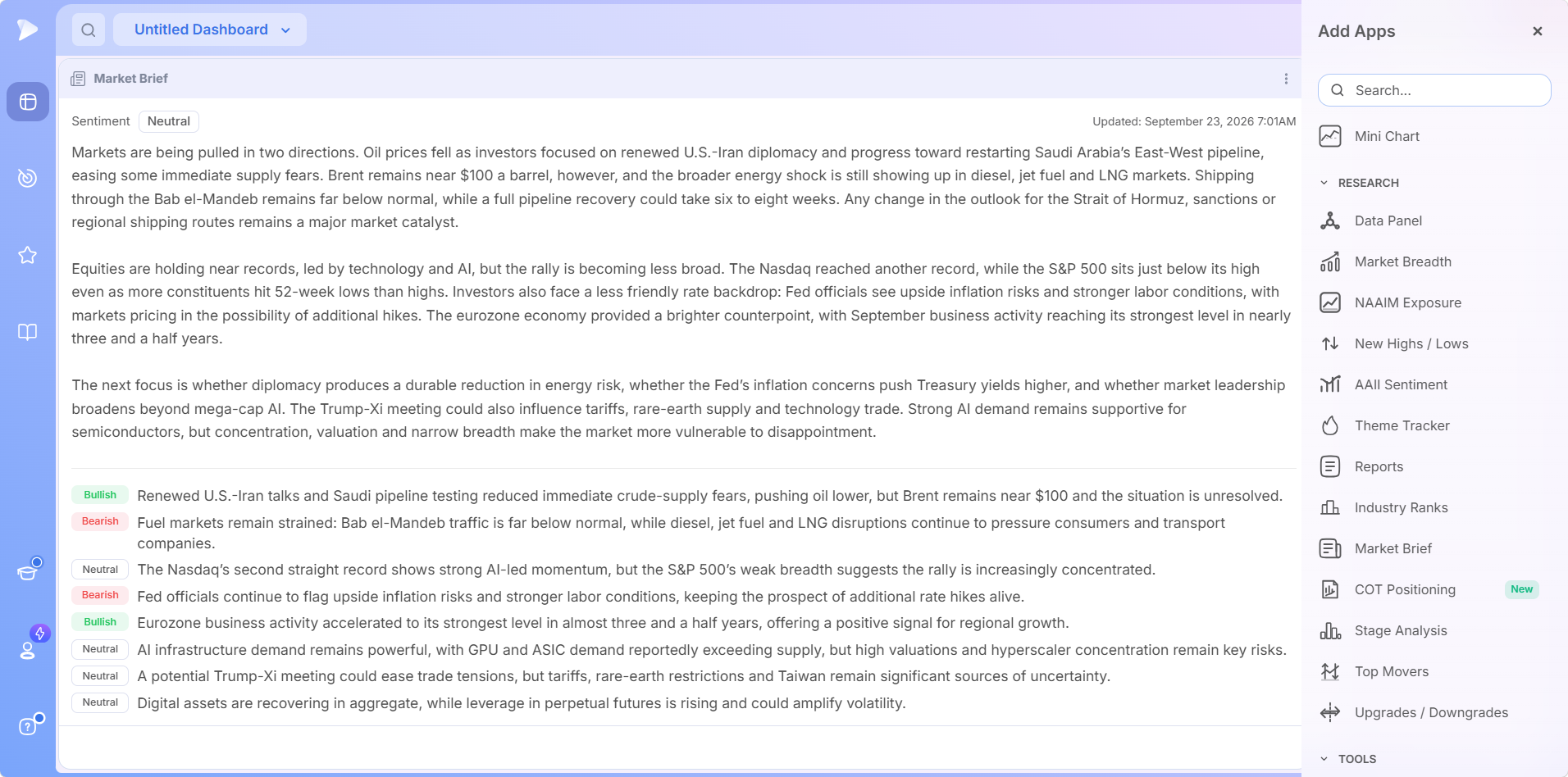
Every Deepvue stock market brief has the same four part structure, which is what makes it fast to read once you know the layout. The headlines, sentiment readings and timestamps in the screenshots come from the sessions they were captured in; they show how a brief is laid out, not what the market is doing today.
| Part | What it gives you | Why it is there |
|---|---|---|
| Overall sentiment | A single Bullish, Bearish or Neutral label, top left | The net read on the environment before you have read a word |
| Last updated timestamp | The exact date and time of the current version, top right | So you always know how fresh the picture is |
| Narrative summary | Short paragraphs on what is driving the market and what to watch next | Answers the question you actually have: what is going on today? |
| Tagged headlines | The individual events that can move price, each labeled | Lets you weigh the balance instead of reading a wall of text |
Who Is the Market Brief For?
It is built for growth stock traders who need market context fast and would rather spend limited screen time on charts than on headlines.
- ✓Swing traders who need to know before the open whether the environment supports pressing breakouts or waiting.
- ✓Position traders tracking the macro backdrop behind holdings measured in months.
- ✓Breakout traders who want to know which macro forces are pushing money between groups.
- ✓Traders with day jobs, for whom a 90 second briefing is the difference between having market context and having none at all.
- ✓Anyone who dislikes financial news television but still wants the perspective it provides, minus the noise and the urgency.
Find the routine that fits your trading style on the Deepvue for hub.
How the Market Brief Differs From a News Feed
The Market Brief is not trying to be your news source and is honest about that. A news feed optimizes for coverage: everything that happened, in order. The Market Brief optimizes for decisions: the handful of things that changed the picture, interpreted, with a sentiment attached.
| Deepvue Market Brief | A standard market news feed | |
|---|---|---|
| Goal | Minimize noise and surface only what can move price | Maximize coverage of everything reported |
| Format | One narrative summary plus a short tagged headline list | A continuous stream of individual articles |
| Interpretation | Explains why it matters and what to watch next | Reports the event and leaves the reading to you |
| Sentiment | An overall label plus a tag on every headline | None, or implied by a headline’s wording |
| Time to read | Roughly 90 seconds | As long as you are willing to keep scrolling |
| Where you read it | A widget beside your charts and screens | A separate site, app or channel |
If you want exhaustive article level coverage, keep your news source. The Market Brief is what you read first to know whether you need it.
What Does the Market Brief Do?
Five things, each one a chunk of manual reading taken off a morning routine.
| Capability | What it handles | Time it saves |
|---|---|---|
| News aggregation | Reads across the market’s news coverage and condenses it into one narrative summary | Reading dozens of articles to extract a handful of relevant facts |
| Overall sentiment read | Labels the current environment bullish, bearish or neutral | Inferring the net tone from a stream of unrelated headlines |
| Tagged headlines | Lists the events that can move price, each with its own sentiment label | Judging every headline’s significance from scratch |
| Interpretation | Explains why each driver matters and what to watch next | Guessing at the second order effects of a macro event |
| 15 minute refresh | Updates through the session with a visible timestamp | Wondering whether what you read two hours ago still holds |
It Condenses the Whole News Cycle Into One Summary
On a busy day the market generates far more coverage than any trader can read, easily over a hundred articles across the major outlets. The Market Brief reads across that coverage and returns the through line: what is driving the market, why, and what would change it. That is the difference between knowing a lot happened and knowing what it means.
It Gives You a Market Sentiment Read Before You Read a Word
The overall sentiment label is deliberately the first thing you see. On a morning when you have three minutes, that single word plus a glance at the headline tags tells you whether the tape is working with you or against you.
It Tags Every Headline So You Can Weigh the Balance
Individual events rarely point the same way. A tightening macro story often arrives alongside a constructive company development, and the useful question is which way the weight falls. Because each headline carries its own tag, you read that balance in a couple of seconds rather than assembling it in your head.
It Refreshes Every 15 Minutes, All Session
The brief is not a static morning email. It evolves with the session, and Deepvue’s tutorial walks through exactly that: weekend geopolitical strikes produced early weakness that indexes recovered from by midday, and the brief reflected each stage as it happened. So read it more than once: before the open for context, and after the close for the postmortem.
It Covers the Macro Picture, Not Just Stocks
Growth stock traders often underweight macro until it is the only thing that matters. The brief covers bonds, yields, energy, currencies, policy and geopolitics alongside equity news, because those are frequently the real drivers behind a rotation in your screens.
Try the Market Brief on Deepvue and see what the tape is reacting to this morning.
Why a Daily Stock Market Brief Improves Your Trading
Context tells you whether a technical setup is likely to work. The same breakout in a calm tape and in a fragile one has very different odds, and the chart alone will not tell you which one you are in.
- ✓Faster mornings. A 90 second read replaces 25 minutes of scrolling, so the routine actually gets done on busy days.
- ✓Better risk calibration. Knowing the environment is fragile before you size a position is worth more than any single trade idea.
- ✓Fewer surprises. When a name in your watchlist gaps on a macro driver, you already know what the driver was.
- ✓Less noise, less anxiety. A minimal briefing removes the urgency of a rolling news channel while keeping the information.
- ✓A better postmortem. Reading the brief after the close explains why the session behaved as it did, which compounds into pattern recognition over months.
- ✓Sharper questions. Once you know the drivers, you know what to ask the AI Terminal next instead of starting from a blank prompt.
How to Add the Market Brief to Your Dashboard
Setup takes well under a minute, and the brief needs no configuration once it lands.
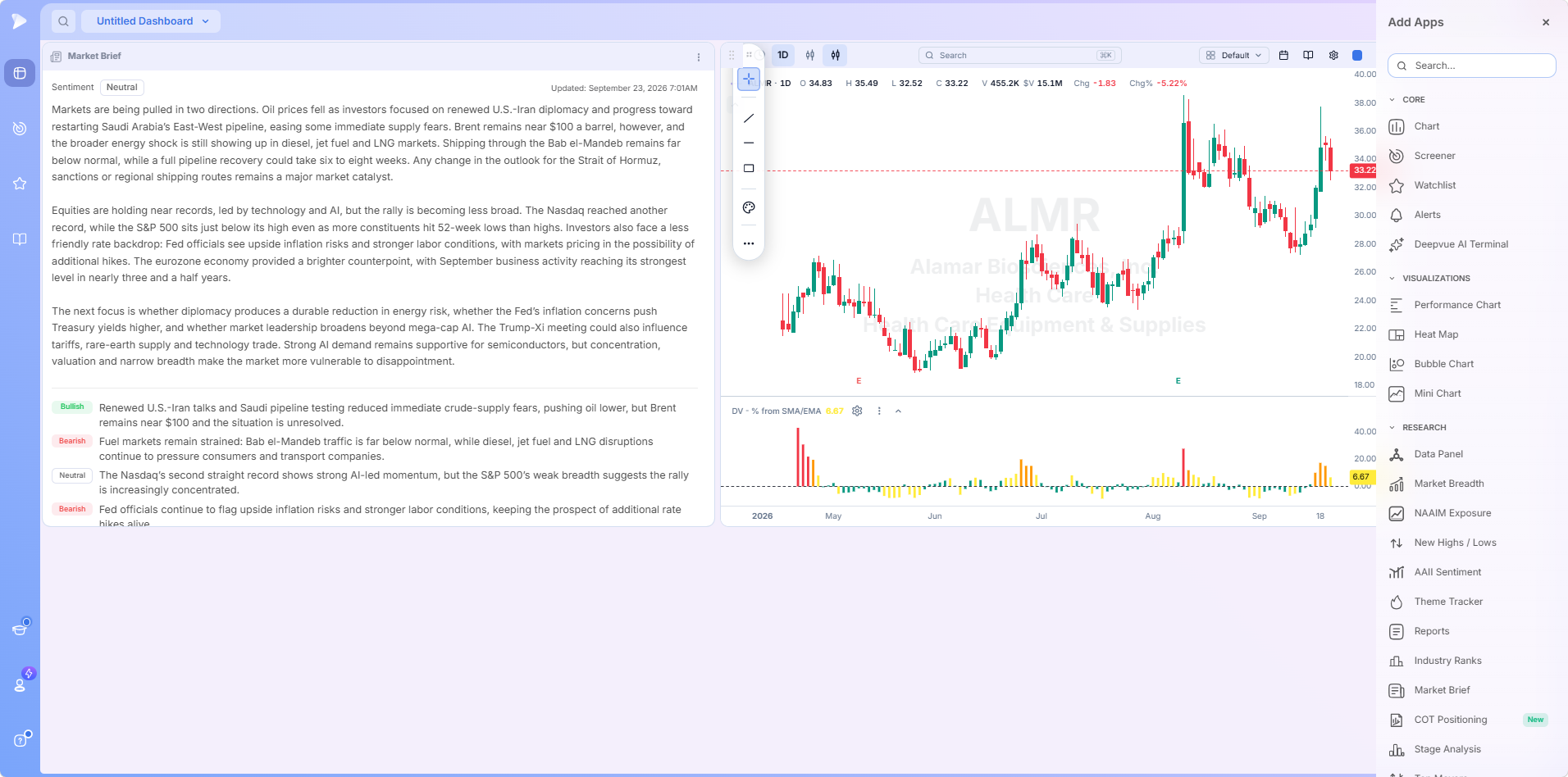
Head to the Dashboard module via the left sidebar, then use the dropdown at the top left to create and name a board. A blank one offers an Add Apps button in the middle of the canvas and another in the top right corner.
Find Market Brief in the Add Apps panel. The panel groups everything into Core, Visualizations, Research and Tools, and Market Brief is filed under Research. The search box at the top finds it instantly if you would rather type than scroll.
Click it to add it, then give it room. It loads with the current briefing already populated. This app rewards width more than most, since the narrative reads better in fewer, longer lines.
Build the rest of the dashboard around it. Add a chart, a screen, an index watchlist or the Theme Tracker and you have a single screen answering both what is happening and what to do about it.
Dashboard Layouts Worth Building Around It
- •The morning briefing dashboard. Market Brief, an index or ETF watchlist and a chart. The first screen you open, answering the whole what is going on question before you touch a screen.
- •Context plus candidates. Market Brief on the left, a chart top right, and your primary screen along the bottom. Read the brief, then work the screen with that context already in your head.
- •Brief plus rotation. Market Brief next to the Theme Tracker. The brief explains the macro drivers; the Theme Tracker shows where money is moving as a result.
- •Brief plus Terminal. Market Brief next to the AI Terminal, so any headline you want to understand better becomes a follow up question without leaving the dashboard.
Setup Tips Worth Knowing
- •Bookmark the dashboard from the dropdown to pin it to the top of the module, so your briefing screen is one click away every morning.
- •Rename it Morning Brief or anything obvious at 6am, since the default is Untitled Dashboard.
- •Assign the chart and any screen or watchlist to the same color group so they stay in sync as you flip through names.
- •Check the timestamp before you read. If it says 6:01am and it is now 10:30am, refresh your view to get the current version.
Start your Deepvue subscription and build the briefing dashboard tonight.
How to Use the Market Brief
Adding it is trivial. Getting value from it comes down to when you read it and what you do with what it says.
WatchDeepvue Market Brief walkthrough: the layout and how the brief evolves through a sessionRead It Before the Open
This is the primary use of any stock market brief and the core of a premarket routine. Open your briefing dashboard, read the sentiment label, read the summary, then scan the tagged headlines. Ninety seconds later you know what happened overnight, what the market is reacting to, and which way the balance of news leans, so you walk into the session with a view.
Overnight developments are the ones you are most likely to have missed and most likely to be caught out by. A gap in a name you hold is much less alarming when you already read why it happened.
Read It Again After the Close
Because the brief updates through the day, the closing version is a different document from the morning one, and reading it is one of the cheapest forms of review available. In Deepvue’s tutorial, the brief that described a lower open in the morning described the recovery by the afternoon.
Sessions where the market shrugs off scary news and sessions where it does not are different environments, and the closing brief teaches you to tell them apart faster than price alone will.
Check It Intraday When Something Moves
If the tape turns abruptly and you cannot see why on a chart, the brief is often the fastest explanation available, since it refreshes every 15 minutes. Rather than opening three news sites, glance at the widget already on your dashboard.
How to Read the Sentiment Labels Properly
The sentiment tags are a summary, not a signal. Used well, they answer three questions quickly.
Which way is the weight falling? Count the tags. A brief with five bearish, two neutral and one bullish headline describes a very different environment from an even split, even when the overall label is the same.
Is the bearish news structural or event driven? Structural pressure such as rising long dated yields tends to persist for weeks. A single event driven headline can reverse in a session.
Does the one bullish item actually matter? The brief often flags a small positive alongside a heavier negative backdrop, and usually says so explicitly. Reading that nuance stops you overweighting a minor data point.
What the labels are not is a trade instruction. A bearish read does not mean sell, and a bullish one does not mean buy. It means adjusting your expectations for how setups are likely to behave, and sizing accordingly.
A Worked Example: Reading a Mixed Tape
Neutral briefs are the hardest to read well, because the label tells you the least. Take a session where the overall sentiment read Neutral and the timestamp confirmed the version was current. The four parts still do different jobs.
The summary names the tension. Its first paragraph describes a market pulled in two directions: energy supply fears easing on diplomacy, while prices and shipping disruptions stay elevated. The second notes equities holding near records, led by a narrow technology and AI group, while breadth weakens and a firmer rate backdrop takes shape.
The last paragraph is the checklist. It names what to watch next: whether the energy risk fades durably, whether inflation concerns push yields higher, and whether leadership broadens beyond mega cap AI. That is a watch list for the coming sessions, not a description.
The tags show the balance. Eight headlines split two bullish, two bearish and four neutral. Paraphrased, they read like this:
| Tag | What the headline covers | What it tells a trader |
|---|---|---|
| Bullish | Diplomacy easing crude supply fears | A risk is fading, but it is unresolved |
| Bearish | Fuel and shipping markets still strained | Cost pressure keeps building beneath the surface |
| Neutral | Index records led by a concentrated AI group | Strength is real but narrow |
| Bearish | Fed officials flagging upside inflation risk | Rate relief is not coming soon |
| Bullish | Stronger overseas business activity | A positive signal outside the US |
| Neutral | AI infrastructure demand against valuation risk | Leadership is strong but priced for it |
| Neutral | Trade talks with tariff uncertainty | A catalyst that can cut either way |
| Neutral | Digital assets recovering with rising leverage | Volatility risk in a speculative corner |
What That Brief Tells You to Do
- •Neutral does not mean calm. The balance is even, but the sources of risk are named, so selectivity matters more than direction.
- •Narrow leadership is the key fact. When a few names carry the indexes, breakouts outside that group face a tougher tape, so smaller size and tighter selection make sense.
- •You have triggers to watch: broadening leadership and fading energy risk would tip the balance constructive; higher yields would tip it the other way.
No chart on its own would have told you any of that, and the whole read took less time than opening a news site.
Turning the Brief Into Action
Turn Any Headline Into a Follow Up Question
The brief tells you what happened. When you want to know what it means for a specific name, the AI Terminal is one click away on the same dashboard. Ask what a bond move means for high multiple growth names, which groups benefit when energy supply tightens, or why a stock gapped this morning. The brief supplies the topic, the Terminal supplies the depth, and usage is unbounded.
Pair It With the Theme Tracker to Turn Macro Into Groups
This is the highest leverage pairing on the platform. The Market Brief tells you the macro drivers; the Theme Tracker ranks curated themes by performance so you can see which groups those drivers are moving money into. When a brief flags tightening energy supply and the Theme Tracker shows oil and gas climbing its daily ranking, you are looking at a macro driver and its market expression at the same time.
Let the Brief Shape Which Screens You Run
A fragile tape and a constructive one call for different screens. When the brief describes elevated volatility and pressure on growth leadership, tighter and more selective screens make more sense than broad breakout scans.
Deepvue’s screener offers 169 presets in nine categories, several of them named screens from well known traders. A preset is locked until you copy it, so changing approach means loading a different screen rather than rebuilding filters. The Ultimate Screening Guide covers how to match a screen to an environment.
A Daily Routine Built Around the Market Brief
Here is how it fits into a premarket routine. Allow roughly ten minutes before the open.
Read the brief. Sentiment label, then the summary, then the tagged headlines. Note the what to watch next items, because those are your checklist for the session.
Check where money is moving. Glance at the Theme Tracker’s one month view for established leadership and its daily view for today’s rotation, and see whether it lines up with the drivers the brief described.
Set your aggression level. Decide explicitly whether this is a press or a wait day, and what position size that implies. Writing it down takes ten seconds and prevents a lot of damage.
Run your screens. Choose a preset that suits the environment rather than defaulting to the same scan every day, and spacebar through the results.
Ask follow ups. Use the Terminal on anything from the brief you did not fully understand, or on any name that gapped, and build the day’s focus watchlist from what survives.
Read the brief again after the close. Compare it to the morning version and note what changed. This is the review step almost everyone skips, and it costs 90 seconds.
None of these steps requires leaving the platform or opening a browser tab, which is why the routine survives contact with a busy week.
What Makes the Deepvue Stock Market Trading Brief Different?
Plenty of products will send you a market summary. What makes the Deepvue stock market brief useful in practice comes down to where it is and what it connects to:
- ✓You read it where you trade. A widget on the same dashboard as your charts, screens and watchlists, not an email you open somewhere else and forget.
- ✓Built for traders, not readers. Written around what moves price, with a sentiment read attached rather than left implied.
- ✓It refreshes all session. Every 15 minutes with a visible timestamp, so it stays relevant after the open rather than expiring at 9:30.
- ✓It connects to the next step. Any headline becomes a Terminal question, any macro driver a Theme Tracker check, any read a screener choice.
- ✓It is included, not extra. Part of the single plan rather than a separate research subscription.
No platform is right for everyone, and the honest way to decide is a proper comparison. Our Deepvue comparisons hub sets Deepvue against MarketSurge, TradingView, TC2000, TrendSpider, and Finviz feature by feature, and the compare category collects every comparison article in one place.
What Traders Say About Deepvue
Outside reviewers on using the platform day to day.
Deepvue’s dashboards are “a lot more helpful than the market overview pages” found elsewhere.
Dave, in his Day Trade Review writeup scoring the platform 4.7. Full writeup
“It’s powerful, simple, and SUPER clean/easy to navigate.”
From a five star G2 review, financial services. Read it on G2
“The interface is very well thought out and highly customizable.”
u/NeosDemocritus, r/CANSLIM discussion thread. Read the replies
“One of the best trading tools out there and I can’t trade without it.”
Joshua Fong, Android review from November 2025. On Google Play
Across the Deepvue reviews wall, the average is 4.8 from more than 220 verified reviews, and 97 percent of reviewers recommend Deepvue.
Where the Market Brief Leads Next
The brief is the top of the funnel in a top down routine. Everything below flows from what it tells you.
- •Charts for judging whether individual leaders are holding up in the environment the brief describes, with the RS Line, stage readings, Enhanced Volume and anchored VWAP.
- •Watchlists for capturing the names that survive your screens, ready to be taken into a Terminal question.
- •Market Breadth and Stage Analysis for confirming the environment the brief describes with participation and condition data.
What the Market Brief Costs
The Market Brief is included in Deepvue’s single plan at $49 per month, with monthly and annual options, and no separate research subscription or add on cost.
That one plan covers:
- •The screener and its 1,152 data points.
- •Charts, watchlists, and alerts, all of them unrestricted.
- •Fully customizable dashboards, with every app in the catalog.
- •The Theme Tracker, Market Brief, and AI Terminal, the last with unbounded usage.
Deepvue has one plan, so there are no tiers to compare. For reference, MarketSurge, the legacy platform in this niche, runs $149 per month.
New subscribers also get a one on one onboarding session with a Deepvue team member, an onboarding email series covering platform features and use cases, and weekly live webinars that each go deep on one part of the platform.
Start Your Morning With the Market Brief
The traders who handle difficult markets best are rarely the ones who read the most news.
They are the ones who know, every morning, what the market is reacting to and what that means for how aggressive to be. A stock trading market brief on the same screen as your charts makes that a 90 second habit instead of a 25 minute chore.
Get started with Deepvue and make the Deepvue stock market trading brief the first thing you read tomorrow.
↑ Back to contentsFrequently Asked Questions
What traders most often ask about the brief and market sentiment.
What is the Deepvue Market Brief?
The Deepvue Market Brief is a dashboard app that aggregates the day’s market news into one summary, applies an overall bullish, bearish or neutral sentiment label, and lists the key headlines that can move price with a sentiment tag on each. It refreshes every 15 minutes and shows the exact time of the current version.
What is market sentiment?
Market sentiment is the collective mood of investors toward the market: bullish when the crowd expects prices to rise, bearish when it expects them to fall. It is driven by news and psychology as much as fundamentals. The Deepvue Market Brief reads that mood off the day’s news and prints it as a single label, with a tag on each headline.
What moved the stock market today?
What moved the stock market today is the question the Deepvue Market Brief answers in one summary. It names the drivers, whether a bond move, an energy shock, a policy decision or an earnings reaction, explains why each matters, and tags each headline to show which way it cuts.
Why does market sentiment matter for trading?
Market sentiment matters for trading because context decides whether a setup works. The same breakout has very different odds in a calm, bullish tape than in a fragile, bearish one, and the chart alone will not tell you which you are in. The Deepvue Market Brief gives you that read in about 90 seconds.
How do I know if the market is bullish or bearish today?
You know whether the market is bullish or bearish today by reading a sentiment label rather than inferring one from headlines. The Deepvue Market Brief prints an overall read at the top and tags each headline, so you can also see whether the label rests on one dominant story or a mix of smaller ones.
What should I check before the market opens?
Before the market opens, you should check what happened overnight, which way news sentiment leans, where money is rotating, and how aggressive to be today. The Deepvue Market Brief handles the first two in about 90 seconds, and pairing it with a rotation tool and your screens covers the rest in ten minutes.
How do I stay updated on the stock market during the day?
You stay updated on the stock market during the day by keeping the Market Brief on your Deepvue dashboard and glancing at it instead of opening news sites. It refreshes every 15 minutes and carries a last updated timestamp, so one look tells you what changed and how current the read is.
Is a market news summary better than reading financial news?
A market news summary is better than reading financial news when you need to decide how to act in the next few hours, though the two do different jobs. A feed maximizes coverage; a summary like the Deepvue Market Brief minimizes noise and interprets, with the feed kept for digging into a specific story.
How often does the Market Brief update?
The Market Brief updates every 15 minutes throughout the session. A last updated timestamp in the top right of the Deepvue app shows exactly how current the version you are reading is, so the brief before the open differs from the one at the close.
How do I add the Market Brief to my dashboard?
You add the Market Brief to your dashboard by opening the Deepvue Dashboard module, creating or opening a dashboard, clicking Add Apps, finding Market Brief in the Research group, and clicking it so it auto-fits into the workspace. It loads with the current briefing already populated.
Is the Market Brief a replacement for a news feed?
No, the Market Brief is not a replacement for a news feed, and it is not designed to be. Deepvue built it to minimize noise rather than maximize coverage, so it surfaces the events that can move price rather than every article published. It is the briefing you read first to decide whether to dig deeper.
What do the bullish, bearish, and neutral labels mean?
The bullish, bearish and neutral labels mean the likely direction of impact of the news environment, both overall and headline by headline. In the Deepvue Market Brief they summarize the news picture rather than signal a trade, so a bearish read is a reason to adjust expectations and size, not an instruction to sell.
Can I filter the Market Brief to specific sectors or topics?
No, you cannot filter the Market Brief to specific sectors or topics. The app gives a single market wide read with minimal noise, and filtering would work against that. For sector level detail, pair it with Deepvue’s Theme Tracker and AI Terminal, both of which go as granular as you like.
Is the Market Brief AI generated?
Yes, the Market Brief is AI generated. AI aggregates the underlying news coverage and produces the summary, sentiment read and tagged headlines in the Deepvue app. As with any AI output, verify anything you plan to act on against the primary source.
When should I read the Market Brief?
You should read the Market Brief before the open for context and again after the close for review. Because the Deepvue brief updates through the session, the closing version explains how the day played out against the morning setup, which makes it a fast daily postmortem.
Does the Market Brief cover macro as well as stocks?
Yes, the Market Brief covers macro as well as stocks. It includes bonds, yields, energy prices, currencies, policy and geopolitical developments alongside equity news, because those are often the actual drivers behind the rotation showing up in your Deepvue screens.
Is the Market Brief useful for day trading?
No, the Market Brief is not meant for day trading. Deepvue serves traders who hold for weeks to months, and the brief is written for that horizon, giving situational awareness for the session rather than intraday timing signals.
Is the Market Brief included in the standard Deepvue plan?
Yes, the Market Brief is included in the standard Deepvue plan. Deepvue has a single plan at $49 per month that covers the Market Brief along with the screener, charts, watchlists, alerts, dashboards, the Theme Tracker, and the AI Terminal.