Premarket Stock Screener: Find the Movers Before 9:30
A premarket stock screener filters the extended hours session, 4:00am to 9:30am Eastern, on live premarket price, volume and gap data instead of yesterday’s close. Deepvue keeps 24 pre and post market fields in the same panel as its technicals, ratings and earnings data, so you can catch the morning’s gappers and test them against real quality conditions in one query. One plan, $49 a month.
Key Takeaways
Earnings landed at 4:30 yesterday. Guidance got picked apart overnight. By 8:15 the day’s real movers are obvious to anyone who looked.
Deepvue’s screening engine makes that lookable. Extended hours price, volume and gap data behave as ordinary filters here, not a read only quote widget, so you surface the morning’s candidates, put them through conditions and rank what survives while most of the market sleeps.
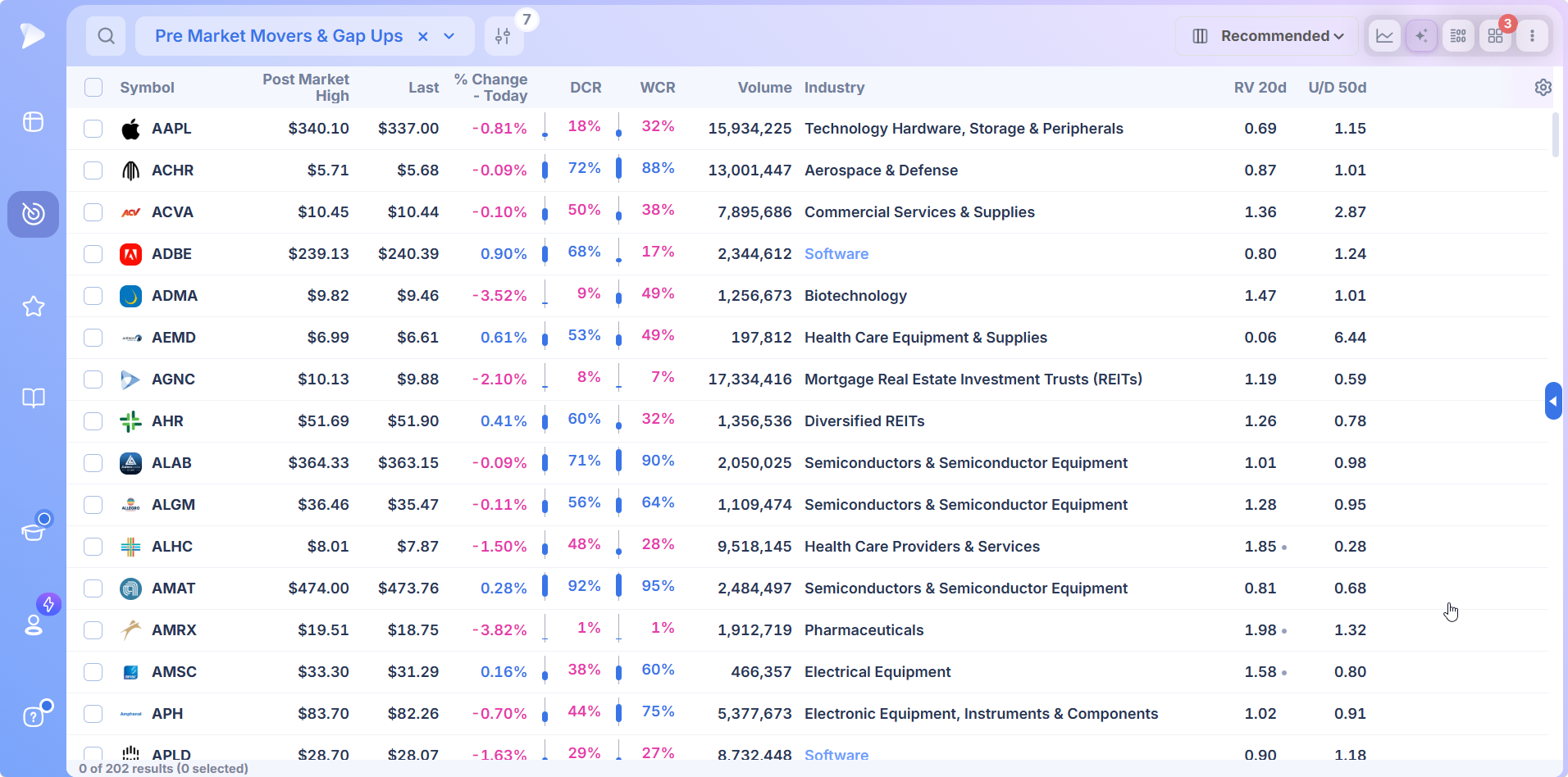
- ✓24 pre and post market fields filter and sort exactly like every other Deepvue data point
- ✓The Pre Market Movers and Gap Ups preset runs the first pass in one click
- ✓Premarket volume measures against average 20 day volume and against float, separating real participation from a handful of shares
- ✓The Pre-Market Monitor column set swaps the table to morning fields, then back at the open
- ✓Charts, news, industry rank, watchlists and alerts share the same window as the list
- ✓$49 a month covers all of it, against $149 for MarketSurge
What Is a Premarket Stock Screener?
A premarket stock screener applies conditions to the session that runs from 4:00am Eastern to the opening bell. Rather than judging the market as of last night’s close, it judges the market on the prices and volume printing while you finish your coffee.
Almost nothing moves in those hours without a reason: a report before the bell or after last night’s close, overnight news, a rating change, an economic print at 8:30.
Movers Lists, Gainers Lists and Screens Are Not the Same Thing
Three different jobs get the same name. A premarket movers list ranks whatever moved. A premarket gainers list ranks only what moved up. A screen decides whether a move deserves attention at all.
Which is why the top premarket gainers rarely trade well. Ranked on percent change alone, the biggest premarket movers are almost always low priced names on a few thousand shares, and a premarket stock gainers table cannot exclude them because ranking is all it does.
A pre-market stock screener sets a bar first, so the untradeable never reaches the list.
Why Deepvue Is the Best Premarket Stock Screener
On most platforms the premarket sits apart from the screening engine. You spot something in one corner of the app, dig into it in another, and the clock runs the whole time.
Deepvue does not split them. Extended hours fields share the filter panel with the technicals, the proprietary ratings and the earnings data. So the question stops being which stocks moved overnight and becomes which overnight movers were already worth owning.
Extended Hours Fields That Filter Like Everything Else
The Pre/Post Market category holds 24 fields. No separate module, no different syntax. Pick a group, set a threshold, and they filter alongside everything else in the screen.
| Field | What it answers |
|---|---|
| Pre Market Last | Where the stock is actually trading before the open |
| Pre Market Price % Change | How far it has moved from yesterday’s close into this morning |
| Pre Market Gap % | Whether the move is a true gap in price rather than just a move |
| Pre Market Volume | How many shares have genuinely changed hands so far |
| Pre Market Volume Vs. Average 20 Day Volume | Whether turnover is unusual for the hour, or business as usual |
| Pre Market Volume vs Float | How much of the tradeable supply has already turned over |
| Post Market Price % Change | The move from the close into the evening, for the 4:30 reporters |
| Post Market Volume, High and Gap % | The same picture for the evening, so tonight feeds tomorrow |
The Preset That Opens the Morning
Any premarket scanner is only as good as the conditions behind it, and these come pre built. Pre Market Movers and Gap Ups loads in one click.
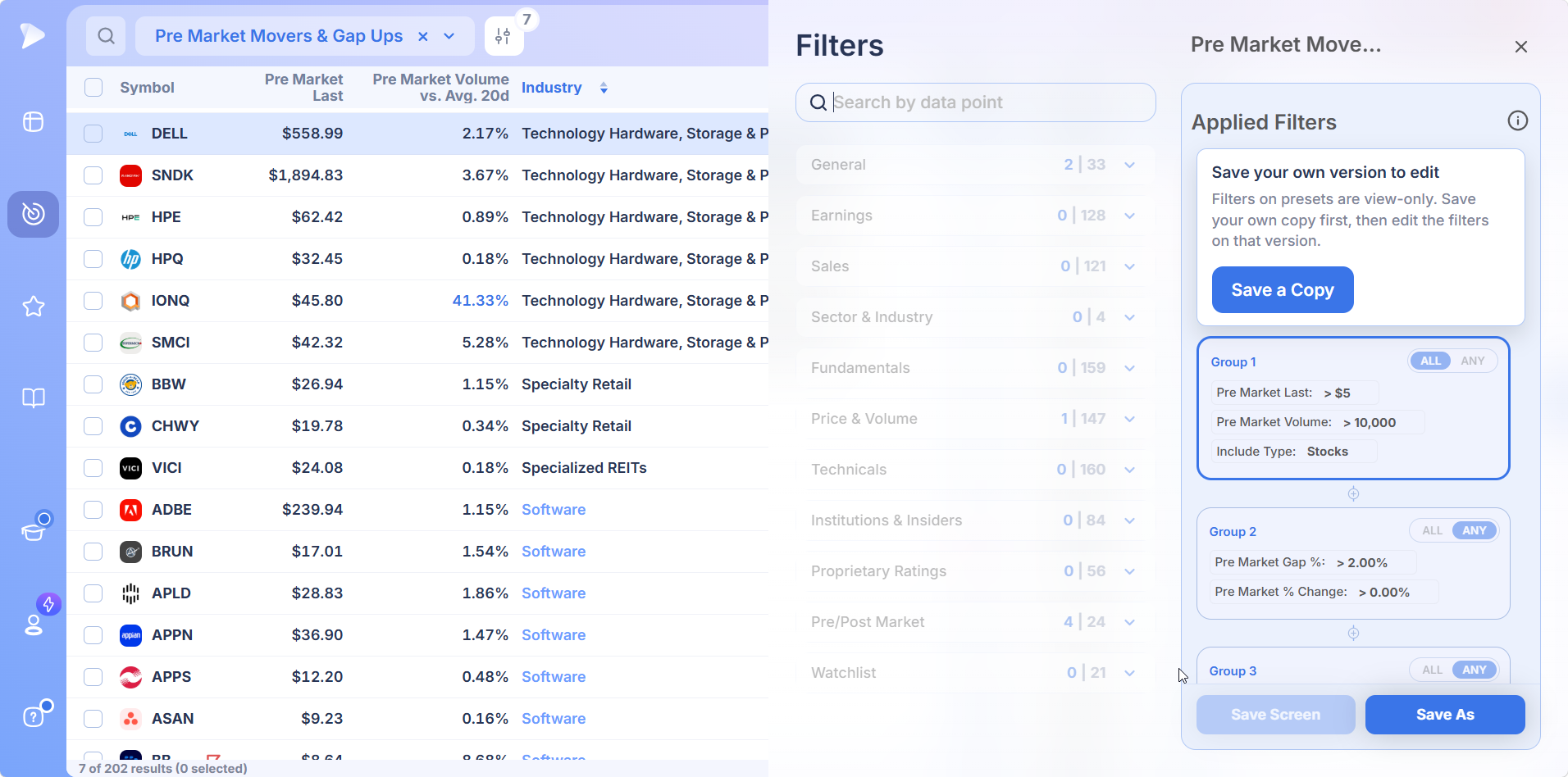
The structure is worth copying even if you never run it as it ships. Group one holds the liquidity floor: a minimum premarket price, a premarket volume minimum, stocks only. Group two, set to ANY, carries the movement test across gap percent and percent change. Group three keeps the list to names of a size and dollar volume worth trading.
Presets are locked on purpose. Save a copy and the edited screen becomes yours.
Gap Percent and Price Percent Change Are Different Filters
This one catches people out. Price percent change picks up any move in the session. A gap filter demands an actual gap in price, which is stricter and a different event.
Most mornings you want percent change. The smarter setup is both, joined with ANY, so a name qualifies if it gapped or if it simply moved far enough to matter.
Volume Measured Against Something
Raw premarket volume barely means anything, since only a sliver of a normal day has elapsed. The useful question is whether turnover is strange for the time of morning.
Deepvue gives you two ways to ask. Premarket volume against average 20 day volume is the run rate, the number that says a stock is trading like it is midday when it is quarter past eight. Volume against float asks how much of the available supply has moved. Institutions leave fingerprints on both.
A Column Set Built for Premarket Hours
A stock screener for pre-market hours is only half a tool if the table still shows yesterday’s columns.
Saved column sets fix that. Pre-Market Monitor carries premarket last, premarket volume, volume against the 20 day average, price percent change, gap percent and industry.
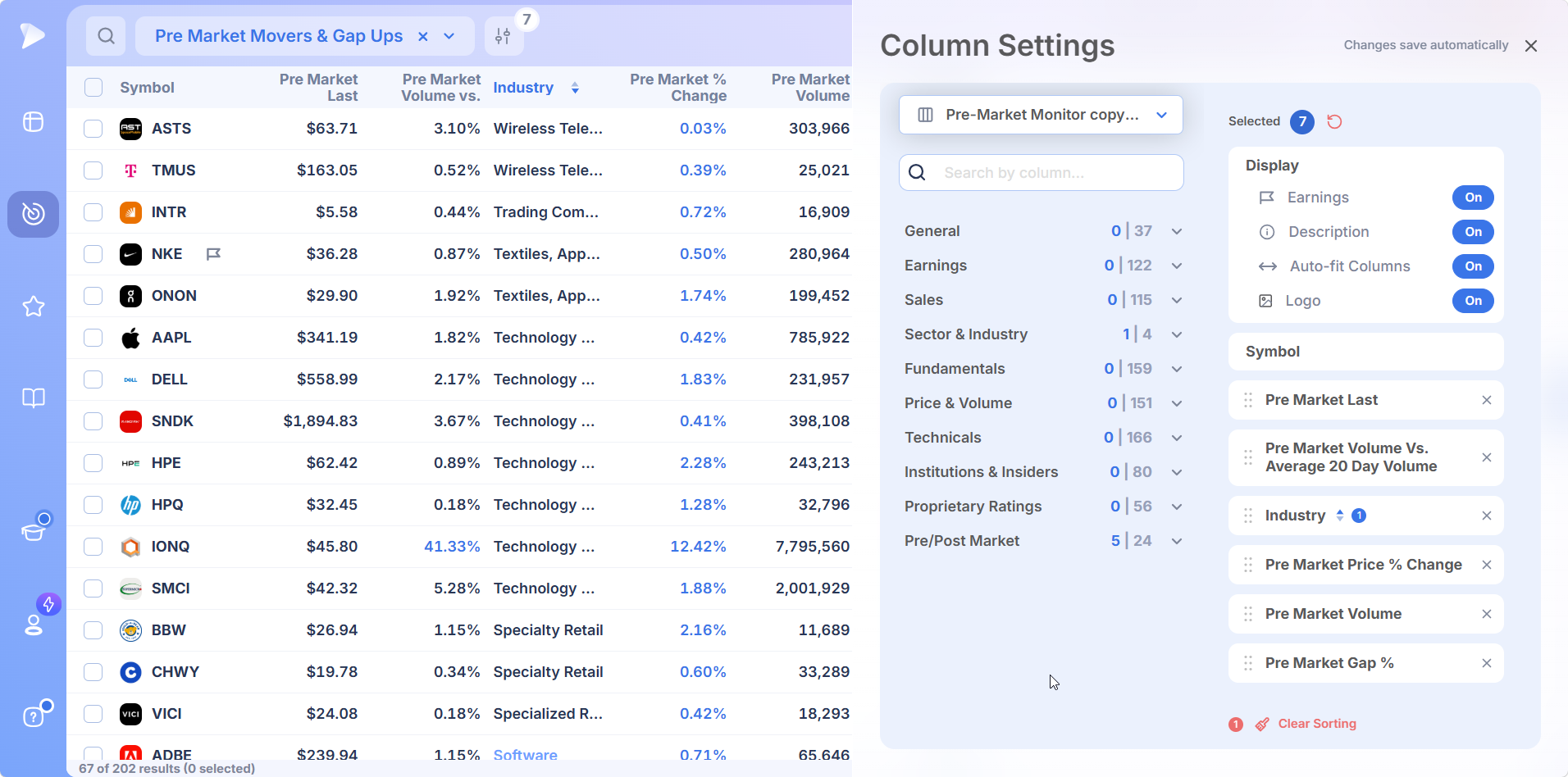
The Pre/Post Market category ships three column sets, including one for the evening session. At 9:30 you switch back to your standard set in a click, which turns the same table into a live view of the open.
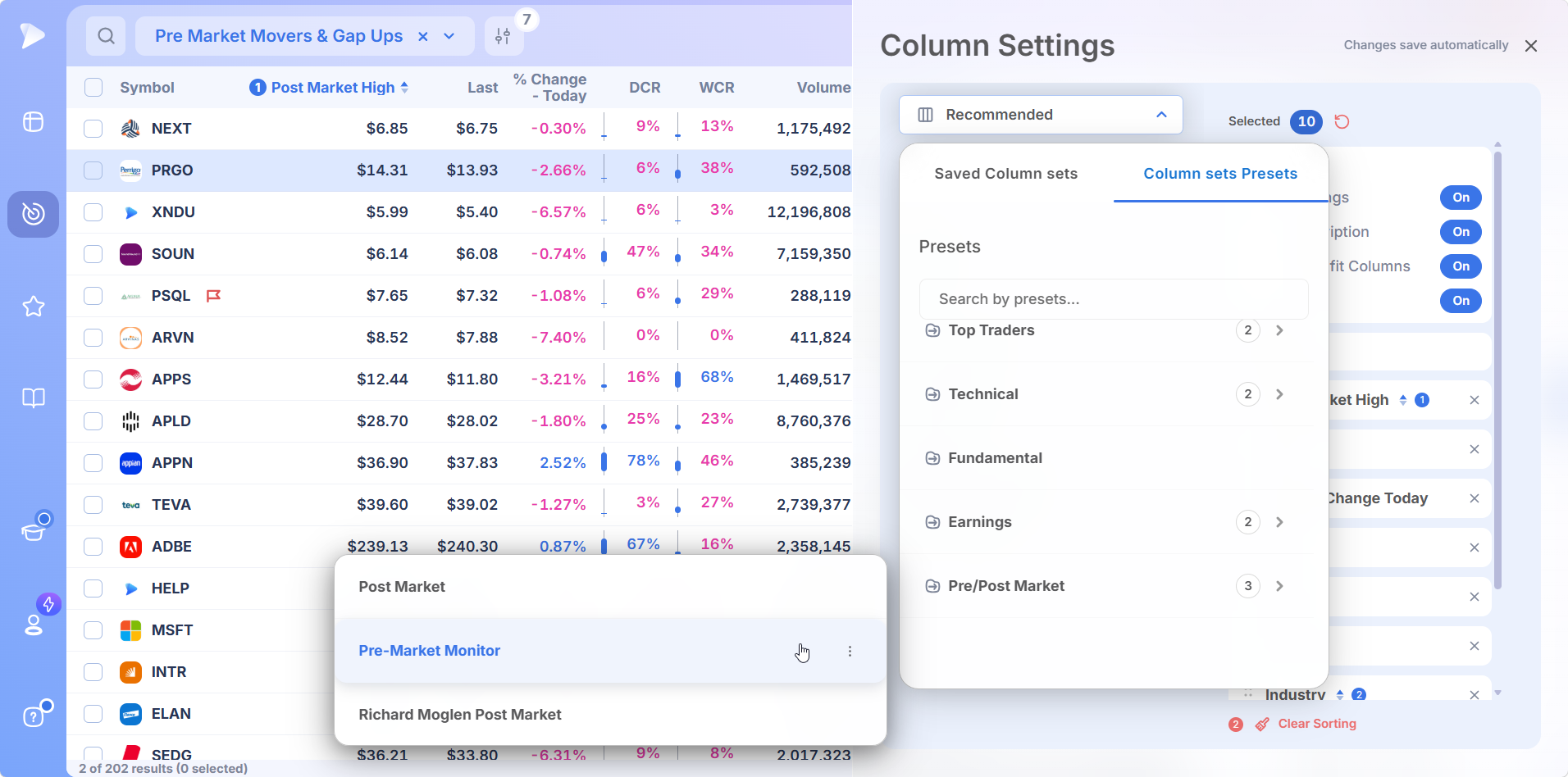
Stack Sorts to Cut Hundreds Down to Six
Sort by premarket percent change and you have the biggest movers. Add a second sort on the volume run rate and the names with real participation rise to the top of that. Deepvue numbers sort priority, so you stack columns instead of choosing between them.
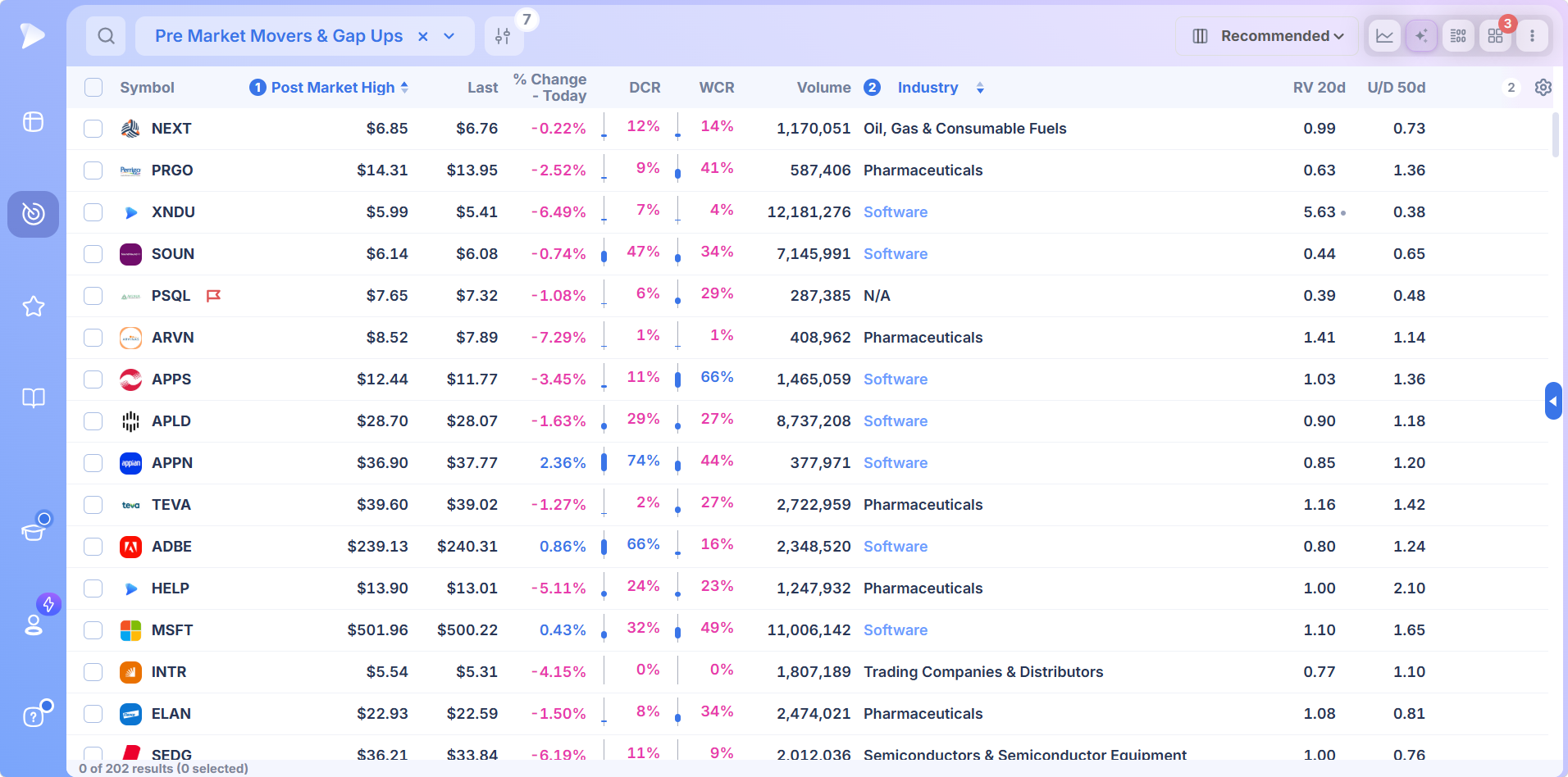
Context Without Leaving the Screen
Select a row and its chart opens beside the table, with the stats table holding quarter by quarter earnings and sales. That is how you tell a gap out of a tight base from a gap off the lows.
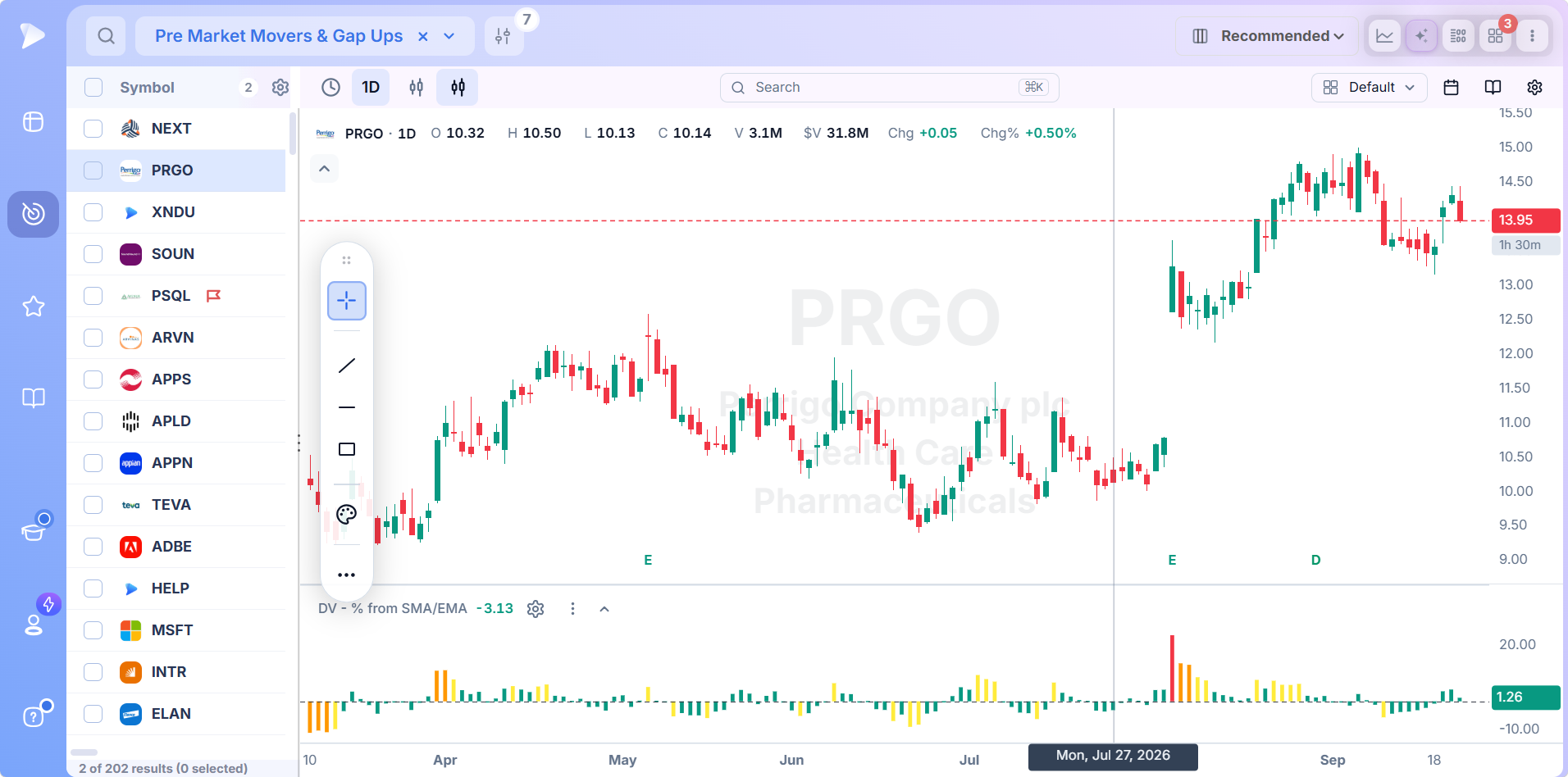
Extended hours prints can be switched on in the charts too, so overnight action lands where you read price.
WatchSetup WalkthroughThe side panel adds news with a sentiment read and individual headlines tagged bullish or bearish, plus industry rank across one week, one month, three month and six month windows. That answers the question deciding how long a move lasts: one stock, or the whole group?
Turn the List Into Alerts
A premarket list is a set of if then statements. If it holds the gap. If it reclaims the level. If volume confirms at the bell.
Push rows into a watchlist together, then pin an alert to the exact price where each name stops being theoretical.
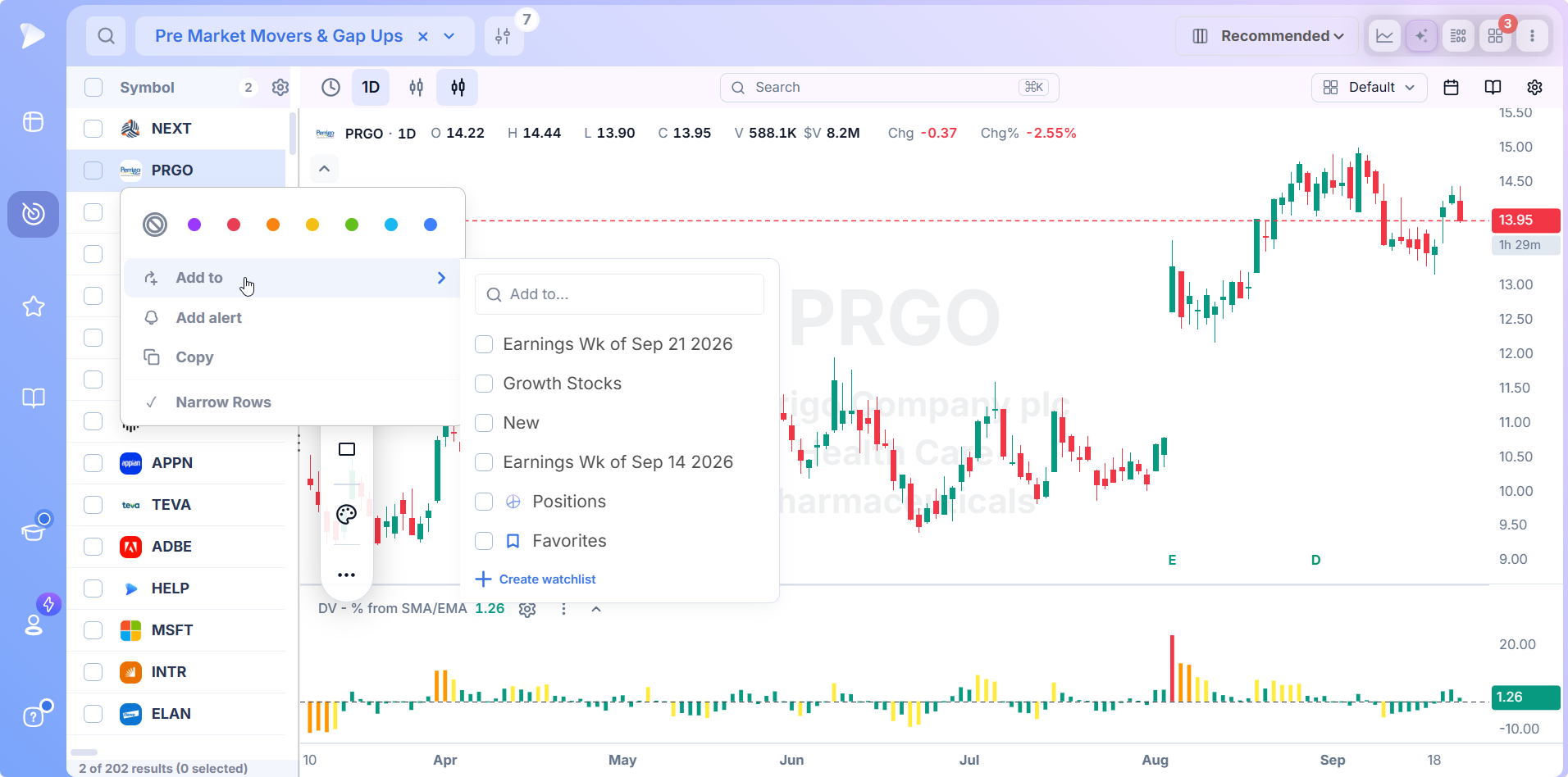
Alerts take a condition, stack more than one if the setup needs it, run for a set duration, carry a note about why the level matters, and reach you by email, push or a pop up in the platform.
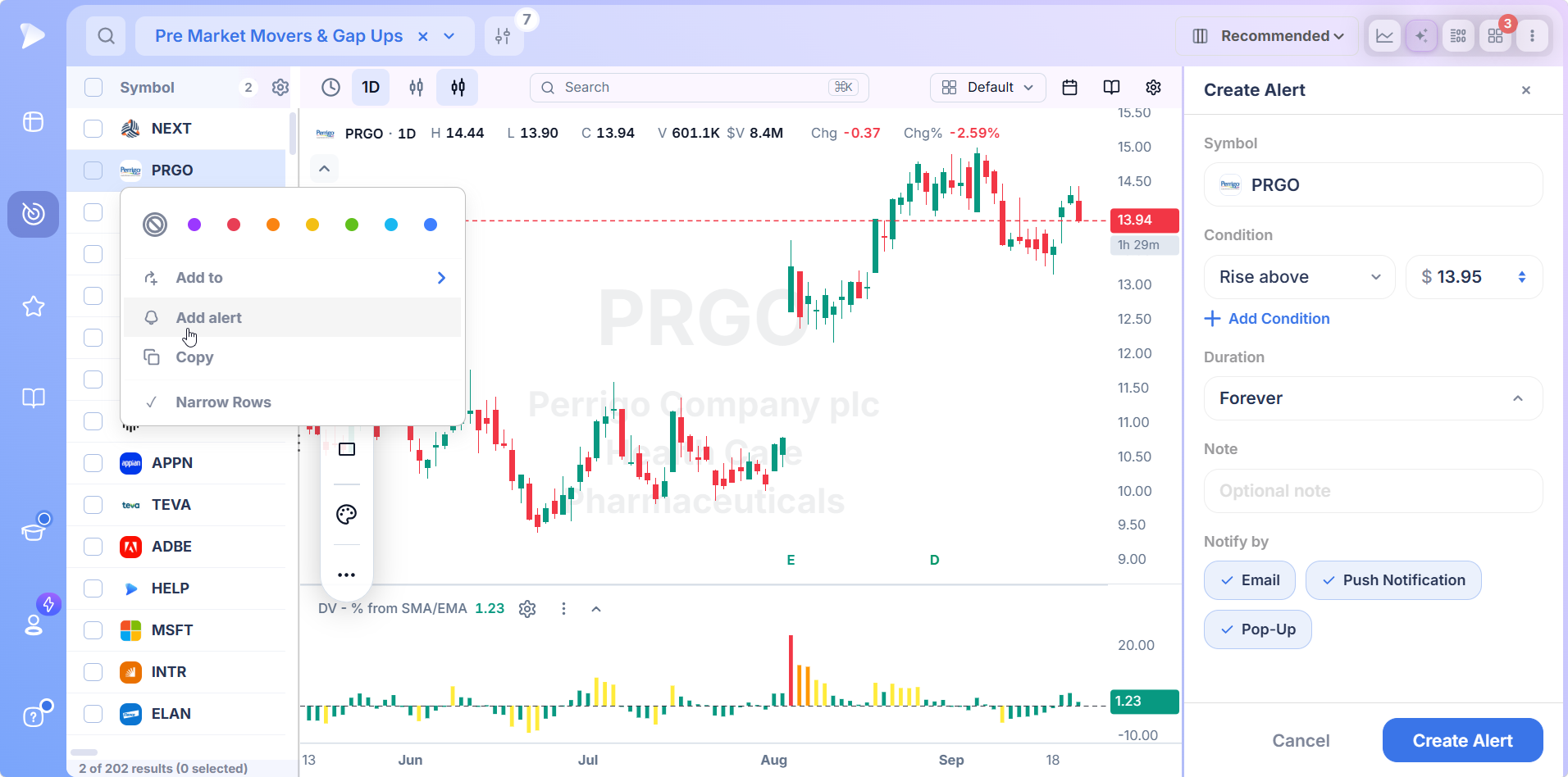
How to Build a Before Hours Stock Screener in Deepvue
A before hours stock screener you built yourself beats a generic one, because the quality conditions on top are the ones you actually trade. Build it once and you have a stock screener for premarket hours matching how you trade rather than how somebody else does, instead of a generic pre market screener built for everybody.
Load Pre Market Movers and Gap Ups, then save a copy so the filters unlock.
Set your liquidity floor: minimum premarket price and a volume minimum that rules out the untradeable.
Add the movement test in a group set to ANY, combining gap percent with premarket percent change.
Layer the quality on. Relative strength, base position, moving average structure, earnings and sales growth all filter in the same screen.
Switch the table to Pre-Market Monitor so you are reading morning numbers.
Sort by percent change, then the volume run rate, and send what survives to a watchlist with alerts.
Faster to describe than build? The AI Terminal turns a plain sentence into the filter stack.
What the Premarket Tells You, and What It Does Not
Handled well, the hours before the open answer four questions.
- •Whether the news actually landed. An earnings release is a document until the market prices it. The reaction is the market grading it, and the grade usually carries more than the numbers did.
- •Whether anybody agrees. A move on a couple of thousand shares represents nearly no one. A move that has churned a real chunk of a normal day’s turnover before 9:00 represents money.
- •One stock or a whole group. A single semiconductor gapping is a company story. Half the group gapping is a group story, and those run longer.
- •Roughly where the bell drops you. Early price discovery is rough, but it frames the opening range and warns anyone holding that today begins badly.
What it will not tell you is what holds once volume arrives. Spreads run several times their usual width, and moves made on almost no participation get erased after the bell more often than anyone admits, because the institutions that set prices wait for the auction.
So a name showing plus six percent on air has not gained anything yet. It has raised its hand.
How Much Premarket Volume Is Actually Enough?
This setting decides whether a premarket screen is useful or entertaining, and most traders never think about it.
A flat share count fails immediately. Fifty thousand shares before the bell is an event in a mid cap that normally turns over two hundred thousand in a day, and background noise in a name trading forty million. The threshold has to scale with the stock.
Use a floor plus a ratio in the same group. The floor removes anything untradeable. The ratio surfaces whatever is behaving strangely for the hour. What comes back is short, which is the entire objective at 8:00 in the morning.
Three Ways a Premarket Screen Goes Wrong
- •Ranking on percent change alone. The top of that list is a low priced name on a handful of shares. A price floor and a volume floor belong underneath every screen you build.
- •Reaching for the gap filter when you meant percent change. A stock that ground higher without gapping never appears, and it is frequently the better setup.
- •Screening the session without screening the structure. A six percent gap out of a tight base and a six percent gap in a broken down laggard are the same number and opposite trades.
Who Needs a Premarket Stock Market Screener
- •Swing and position traders who do the homework the night before and want the session to confirm it
- •Growth traders hunting earnings gaps and episodic pivots, where the reaction beats the report
- •Anyone already in a position who would rather find out about a bad gap at 8:00 than at 9:31
- •Anyone juggling a movers site, an earnings calendar and a screener in three tabs before breakfast
If you hold for weeks rather than minutes, a premarket stock market screener earns its keep as preparation rather than execution.
What Traders Say About Deepvue
The preset library tends to be the first thing people mention. One trader on r/CANSLIM, fresh off starting a trial, put it plainly: “I really liked the deepview pre built screeners!”
Pricing
Deepvue costs $49 a month. One plan, everything inside it.
- •Every data point and every preset screen, extended hours fields and the morning screen included
- •Charting, dashboards and plain language screen building, with research on any ticker from the table
- •Watchlists, alerts and saved column sets, Pre-Market Monitor among them
- •Live data through the session, so the list you built at 8:45 becomes the monitor you watch at 9:30
MarketSurge runs $149 a month.
Everyone who signs up gets a one on one session with the team, an onboarding email sequence, and a live webinar every week taking one part of the platform in depth.
Build Tomorrow’s List Tonight
The traders who look calm at 9:30 are not quicker than anyone else. They did the work at 8:00 and walked in knowing which six names deserved the screen time.
Three screens here are organized around when you are looking rather than what you are looking for, and all of them sit in stock screener by market timing. If you screen by setup instead, formation based scans are gathered under screener by pattern, signal driven ones under screener by indicator, and every one of them is catalogued in screener by strategy.
Start screening the premarket today
↑ Back to contentsFrequently Asked Questions
What time does premarket open?
Premarket opens at 4:00am Eastern and runs until the 9:30am bell, though your broker may offer a narrower window. Volume is thin at four in the morning and builds through the last two hours, heaviest between 8:00am and the open as the morning’s reporters land. Deepvue is live throughout.
When does premarket open for the biggest movers?
Premarket opens at 4:00am for everyone, but the biggest movers usually declare themselves later. Companies reporting before the bell mostly release between 6:00am and 8:00am Eastern. Run a premarket stock scanner once around 8:00am and again near 9:15am to catch both the first reaction and whatever survived it.
What are pre-market movers?
Pre-market movers are stocks trading well above or below yesterday’s close during the extended session, roughly 4:00am to 9:30am Eastern. Almost all move on a nameable cause: earnings, overnight news, an analyst action, a macro release. Deepvue returns them as a filterable list rather than a static page.
Who are the top pre-market movers?
The top pre-market movers change every morning, which is why a screen beats a fixed list. Rank on percent change alone and the top is always cheap, thinly traded names. Deepvue lets you sort premarket percent change and volume against average 20 day volume together, so participation counts too.
What stocks are moving in the pre-market?
The stocks moving in the pre-market are last night’s and this morning’s reporters, anything caught in overnight news, names carrying an upgrade or downgrade, and whichever group is in play. The Pre Market Movers and Gap Ups preset returns them in one click with a liquidity floor applied.
Does pre-market movement mean anything?
Pre-market movement means something within limits. Direction shows how the market graded the news and volume shows how many people agreed. Neither predicts what survives full liquidity. Deepvue puts the move, the volume ratio and the structure underneath in one row, so you can tell a real repricing from a thin one.
Can I buy and sell during premarket?
You can buy and sell during premarket at most brokerages, though windows vary and nearly all restrict you to limit orders. Permission is rarely the problem, conditions are: thin books mean fills land nowhere near the price you watched. Deepvue is built to prepare in these hours rather than execute.
How do market movers affect stock prices?
Market movers affect stock prices by dragging their index and usually their whole group along with them when the name is heavily weighted. Deepvue shows industry rank over one week, one month, three month and six month windows beside the mover, so you can separate a group rotation from one loud stock.
What is the most successful stock screener?
No screener predicts anything, so the most successful one is whichever fits your method. The best stock screener for pre-market hours carries extended hours fields as genuine filters, measures volume against a meaningful baseline, and stacks quality conditions in the same query. Deepvue does all three for $49 a month.
Is the premarket screener included in the standard Deepvue plan?
Yes, the premarket screener is included in the standard Deepvue plan. A single $49 a month subscription covers the whole screener, every pre and post market field, every preset, charting, dashboards, watchlists, alerts and plain language screen building. No tiers, no add ons. MarketSurge charges $149 a month.