

Last Updated:
December 12, 2025


Why AI Is Transforming Stock Research
Professional traders spend nearly 73% of their time on research across fragmented tools. Between scanning for new ideas, analyzing fundamentals, reviewing technical patterns, and tracking sector rotation, the research phase can consume hours of your day.
With the Deepvue Terminal’s AI Assistant, you can consolidate your stock research workflow in a fraction of the time. Instead of manually cross-referencing multiple data points across different platforms, you can ask direct questions and receive instant, actionable answers.
Traditional catalyst research alone requires you to search headlines and earnings PDFs, read through conference calls, and check analyst upgrades, all before you even look at a chart.
The Deepvue Terminal AI Assistant consolidates all of this into one intelligent interface. It puts institutional-grade research power directly at your fingertips, giving you a conversational way to explore company financials, discover similar stocks, track news events, and uncover new trading opportunities.
10 Powerful Ways to Use the AI Stock Research Assistant
The Deepvue Terminal AI Assistant is designed to help swing traders and position traders work more efficiently. Whether you’re screening for new ideas, diving deep into a specific company, or trying to understand why a stock is moving, here are ten practical applications that will transform your research workflow.
Deep-Dive Fundamental Analysis
Understanding a company’s financial health is critical before entering any position. Instead of manually pulling up financial statements and crunching numbers, ask the AI assistant to summarize what matters most.
Try asking: “What are NVDA’s key fundamentals? Show me EPS growth, revenue trends, and margins over the past 8 quarters.”
The AI will compile quarterly earnings data, highlight acceleration or deceleration patterns, and flag any notable changes in profitability. This gives you the growth-focused analysis you need without toggling between multiple screens.
Find Similar Stocks and Competitors
When you find a winning stock, there are often other names in the same industry or with similar characteristics worth exploring. Nearly 50% of a stock’s price movement can be attributed to its sector and industry group, so finding the leaders within a strong group matters.
Try asking: “List 15 stocks related to PLTR in the AI software space. Include a 3-sentence description for each.”
The AI assistant identifies peer companies based on business model, market cap, growth profile, and sector classification. This helps you build a watchlist of related names that might offer additional opportunities when the theme is running.
Track News Events and Catalyst Gaps
Price moves don’t happen in a vacuum. Earnings reports, product announcements, FDA approvals, and management changes all serve as catalysts that can accelerate a stock’s trajectory. A catalyst gap occurs when a stock jumps significantly due to a news event, and these often precede big institutional buying.
Try asking: “What caused INTC to gap up on September 18, 2025? Summarize the catalyst and whether the move looks sustainable.”
The AI instantly surfaces the news catalyst, whether it’s a major investment, earnings surprise, or partnership announcement, without you digging through cluttered news feeds. This helps you build your model book and review historical trades more efficiently.
Understand Industry and Sector Dynamics
The strongest stocks emerge from the strongest industry groups. Before concentrating on individual names, understanding the broader landscape helps you align your trades with market momentum.
Try asking: “Which semiconductor stocks are showing the strongest relative strength right now? What’s driving the sector?”
The AI provides context on sector performance, identifies the leaders within the group, and explains the fundamental drivers behind the trend, whether it’s AI infrastructure spending, data center demand, or supply chain dynamics.
Analyze Institutional Activity
Institutional sponsorship is a key pillar of successful growth investing. Stocks with increasing ownership from top-performing mutual funds and hedge funds have the buying power to sustain major price advances.
Try asking: “What’s the institutional ownership trend for CRWD? Are top funds buying or selling?”
The AI assistant aggregates ownership data and highlights whether smart money is accumulating or distributing shares. This adds another layer of confirmation to your analysis.
Compare Multiple Stocks Side-by-Side
When choosing between several potential trades, comparison analysis helps you allocate capital to the highest-probability setups. Instead of opening multiple tabs and manually comparing metrics, let AI do the heavy lifting.
Try asking: “Compare AMD, NVDA, and AVGO on earnings growth, P/E ratio, and relative strength. Which one looks strongest for a swing trade?”
The AI presents a structured comparison across your chosen metrics, making it easy to identify which stock offers the best risk-reward profile for your strategy.
Get Quick Education on Trading Concepts
Even experienced traders encounter unfamiliar terms or want to refresh their understanding of specific patterns and indicators. The AI assistant serves as an on-demand educational resource fully integrated into the Deepvue knowledge base.
Try asking: “What is an Oops Reversal pattern and how do I trade it?”
Whether you’re learning about volatility contraction patterns, RS ratings, or Stage Analysis, the AI provides clear explanations with context and examples tailored to your level of experience.
Pre-Market Situational Awareness
Before the market opens, you need to know how aggressive or defensive your trading approach should be. The AI assistant can act as your “situational awareness coach,” evaluating market conditions and helping you prepare for the session ahead.
Try asking: “Act as my situational awareness coach. Based on recent price action, macro data, and leading themes, should I lean into breakouts today or stay defensive?”
The AI evaluates breakout and pullback probabilities, leadership trends, risk exposure recommendations, and macro trends, all in one response. This saves time and gives you a clear game plan before the opening bell.
Deep Earnings Analysis
Earnings season can be overwhelming with dozens of reports to process. The AI assistant breaks down earnings with detailed summaries and supporting insights so you can quickly assess whether a stock deserves further attention.
Try asking: “For TSLA’s latest earnings, give me a 2-sentence TL;DR (Too Long; Didn’t Read). Then break down revenue, margins, guidance, new products, and conference call highlights in bullet points.”
The AI formats results exactly as you specify—bullets, tables, or summaries—making post-earnings research far less overwhelming. You can quickly scan multiple earnings reports and focus your attention on the stocks with the strongest results.
Discover and Explore Leading Market Themes
Strong market themes often drive the biggest stock moves. Even weaker stocks can rally when supported by a powerful theme. The AI assistant helps you identify which themes are leading and surface the best opportunities within them.
Try asking: “What are today’s leading market themes? Which sectors are showing the most strength: AI, clean energy, data centers, or biotech?”
You’ll instantly get a high-level market scan across Bitcoin miners, oil and gas, solar, genomics, biotech, social media, and other sectors. Use this to confirm your actionable setups, or discover entirely new areas of opportunity.
The Clickable Ticker Advantage: From Research to Watchlist in Seconds
One of the most powerful features of the Deepvue Terminal AI Assistant is the clickable ticker functionality. When the AI returns stock recommendations or mentions specific symbols in its response, each ticker is interactive, allowing you to take immediate action.
How Clickable Tickers Streamline Your Process
Every ticker symbol returned by the AI assistant is clickable. This means you can instantly:
- View the full chart – Jump directly to the stock’s technical chart with all your preferred indicators and timeframes
- Add to your watchlist – Quickly add new names to your Universe, Focus, or Ready Lists with a single click
- Access detailed data – Pull up the complete fundamental panel, ratings, and screening data
- Set alerts – Configure price or technical alerts without leaving your research flow
This seamless integration eliminates the friction between discovery and action. When you ask the AI to find stocks meeting specific criteria like, “Show me tech stocks with EPS growth above 40% that are near their 52-week highs,” you can instantly add any interesting names to your watchlist without typing a single ticker manually.
Powerful Queries to Try Today
To help you get started, here are research queries organized by trading objective. Copy these directly into the Deepvue Terminal AI assistant and customize them for your specific needs.
For Fundamental Research
- What are the key fundamentals for [TICKER]? Include EPS growth, sales growth, and margins.
- Has [TICKER] beaten earnings estimates in the last 4 quarters? By how much?
- Show me [TICKER]’s revenue growth trend over the past 2 years.
- What’s [TICKER]’s debt situation? Is the balance sheet healthy?
- For [TICKER], give me a TL;DR, then break down earnings growth, sales growth, margins, new products, and guidance with 4 bullets each.
For Finding New Ideas
- What stocks are similar to [TICKER] that I should research?
- List 15 stocks related to [TICKER] in the [THEME] space. Include a 3-sentence description for each.
- Which stocks in the [SECTOR] sector have the highest relative strength?
- Find me stocks with accelerating earnings growth in the software industry.
- What are the top-performing IPOs from the last 2 years that are still leading?
For Understanding Price Action
- Why is [TICKER] moving today? Any recent news or catalysts?
- What caused [TICKER] to gap up on [DATE]? Is the move sustainable?
- What drove [TICKER]’s earnings reaction last quarter?
- Is there any insider buying or selling activity in [TICKER] recently?
- What analyst upgrades or downgrades has [TICKER] received lately?
For Market Context and Themes
- What are today’s leading market themes?
- Which market themes are showing the strongest momentum right now?
- What’s driving the AI infrastructure trade? Give me a summary.
- How is the semiconductor sector performing relative to the broader market?
- Are growth stocks outperforming value stocks in the current environment?
For Pre-Market Preparation
- Act as my situational awareness coach. Based on recent price action and leading themes, should I lean into breakouts today or be more cautious?
- What stocks are gapping up pre-market on significant volume?
- Summarize overnight news that could impact tech stocks today.
- Which earnings releases from last night showed the strongest reactions?
- What’s the current market environment? Should I be aggressive or defensive?
Pro Tip: Chain your AI prompt queries together. Start with “What sectors are leading the market?” Then follow up with “Show me the top 5 stocks in that sector.” Finally, dive deep with “Give me a full fundamental breakdown of the leader.” This mimics the top-down research approach used by professional traders.
Maximize Your AI Research Edge
The AI stock research assistant is most powerful when integrated into a consistent workflow.
Start Broad, Then Narrow Down
Begin with sector and theme-level questions to understand where market strength is concentrated. Once you identify leading groups, drill into specific stocks within those themes.
This top-down approach keeps you aligned with institutional money flow.
Use AI for Context, Not Just Data
The real power of AI research isn’t just pulling numbers – Learn to synthesize context. Ask “why” questions to understand the story behind a stock’s move.
This helps you distinguish between temporary spikes and sustainable trends.
Combine AI Research with Price Action
Strong catalysts and fundamentals matter, but they’re only half the battle. You still need price action confirmation, whether it’s VWAP reclaims, breakouts, or pullback entries.
Use AI to surface the strongest candidates, then apply your technical criteria to time entries.
Pro Tip: Build Your Prompt Library – As you discover queries that consistently deliver useful results, save them for repeated use. The Deepvue team is building a prompt library feature that will let you save your favorites for one-click access, turning your best research workflows into automated processes.
Using the Deepvue Terminal AI Assistant
In the top right of your Watchlist or Screener, click the AI Assistant to open the Deepvue Terminal.
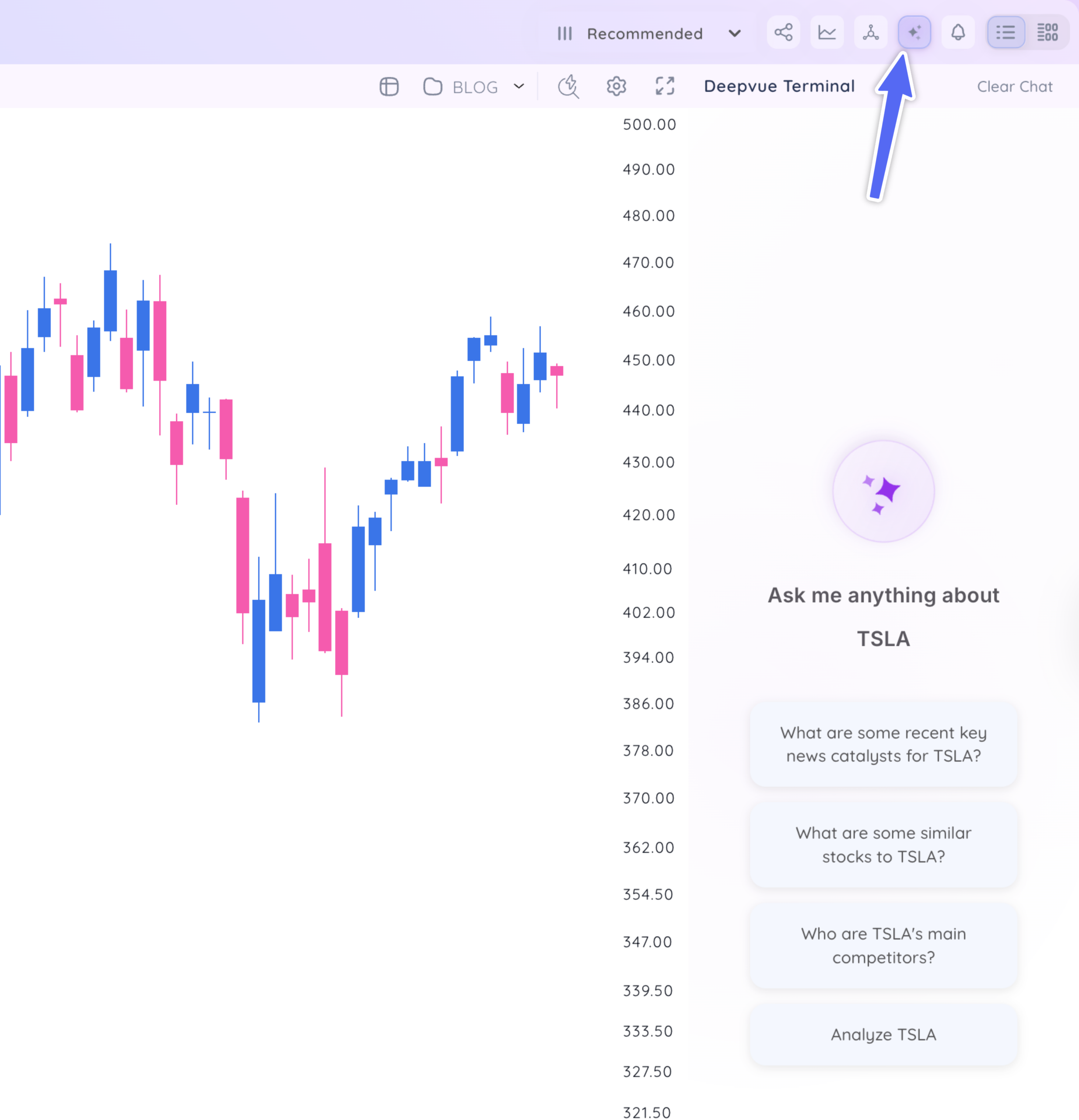
Click any of the recommended search queries, or enter your own unique prompt.
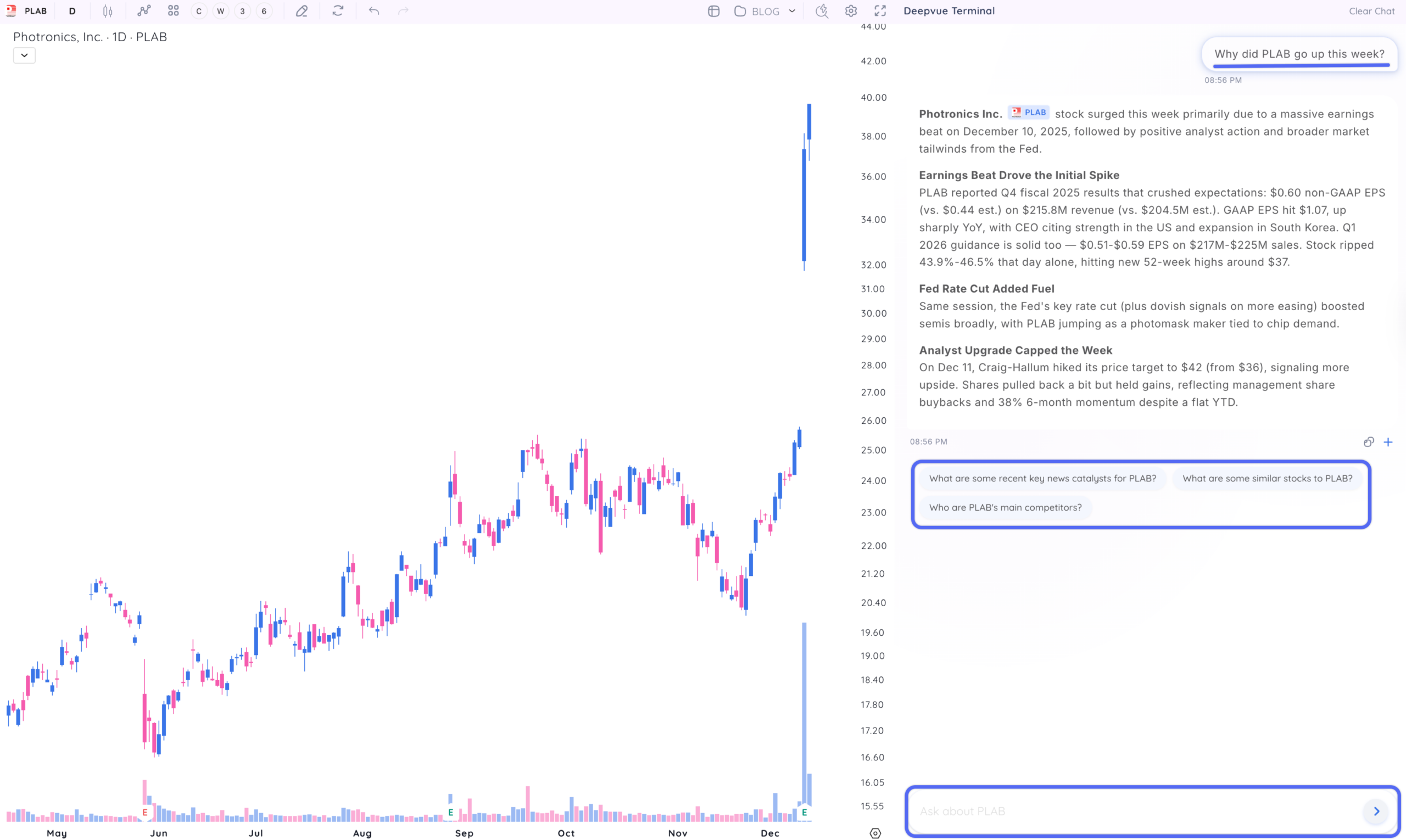
Continue your conversation to look for more trading opportunities.
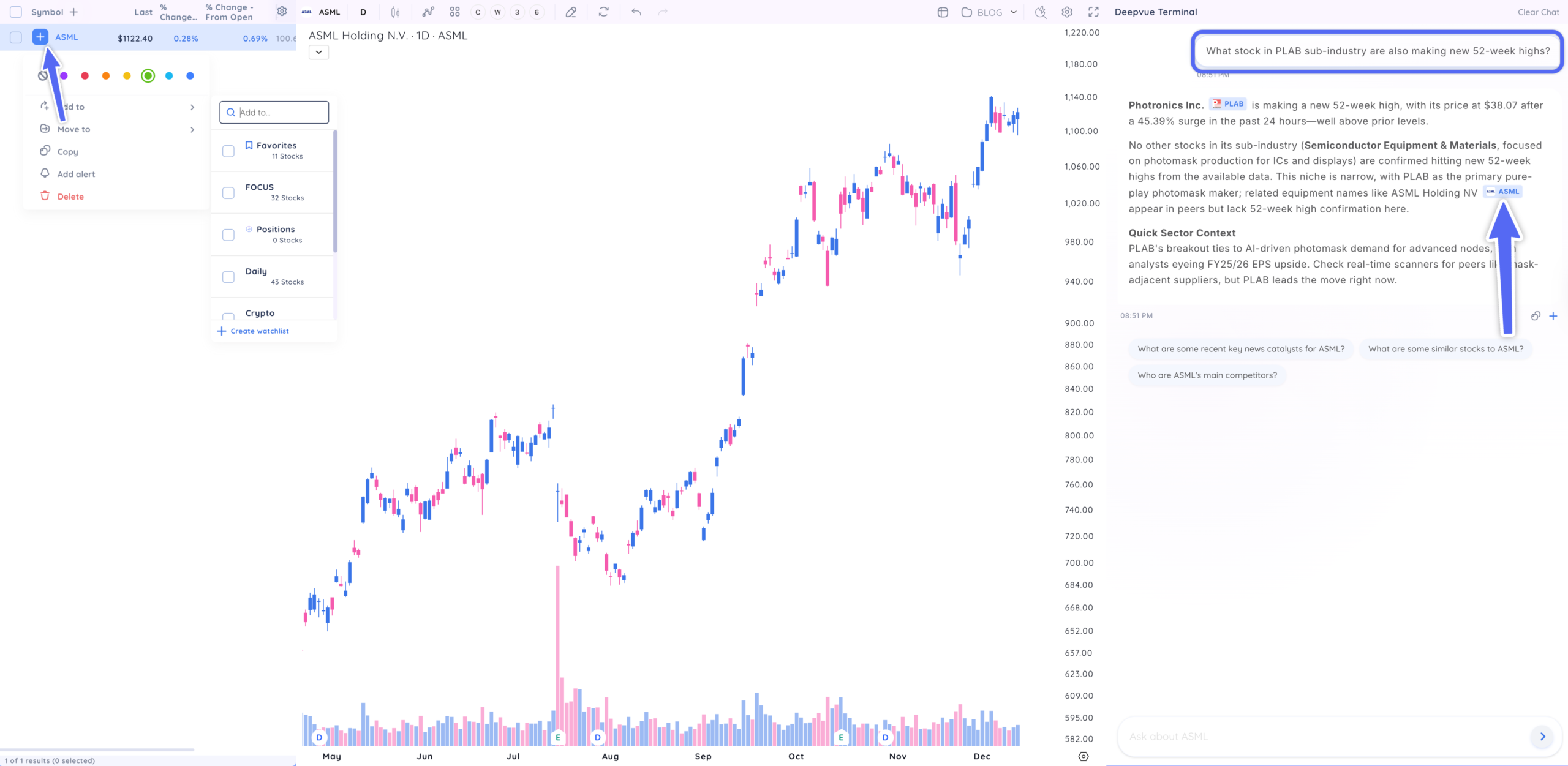
Click on any ticker that appears in the terminal to view the chart and quickly add it to any watchlist.
Key Takeaways: Start Trading Smarter Today
The best traders aren’t necessarily the ones who work the hardest. They’re the ones who work the smartest. By leveraging AI-powered research tools, you can spend less time hunting for information and more time acting on high-quality setups.
The Deepvue Terminal AI assistant puts institutional-grade research capabilities in your hands. Whether you’re a swing trader looking for the next breakout, a position trader building a concentrated portfolio, or an active investor seeking growth leaders, AI-accelerated research helps you stay ahead of the market.
- AI stock research assistants accelerate your workflow by providing instant answers to fundamental, technical, and market questions
- Use AI to deep-dive into financials, find similar stocks, track catalyst gaps, and analyze institutional activity
- Clickable tickers let you instantly add new ideas to your watchlist, view charts, or access detailed data without breaking your research flow
- Build powerful query sequences: start broad with sector and theme analysis, then narrow down to specific stock comparisons
- Use pre-market situational awareness prompts to determine whether to trade aggressively or defensively each session
- Deep earnings analysis with custom formatting makes earnings season far less overwhelming
- Theme discovery helps you ride powerful sector rotations and identify model-book trades
- AI amplifies your ability to find and analyze stocks that meet your criteria
Start with the sample queries above, explore similar stocks to your current winners, and use clickable tickers to build better watchlists faster. With Deepvue AI, you’ll never again be left wondering why a stock gapped or whether it’s likely to hold.
Your research process will never be the same.
Frequently asked questions

Related articles
Explore relevant educational content & features.
-
Discovering Post-Market Movers: Seizing Opportunities After the Closing Bell
October 28, 2025[kt_reading_time] -
Watching Stocks from the Open: A Complete Guide to Capturing the Day’s Momentum
October 6, 2025[kt_reading_time] -
Mastering Pre-Market Analysis: Unlocking a Powerful Early Market Edge
September 29, 2025[kt_reading_time] -
How to Use Deepvue’s Bubble Charts to Spot Trading Opportunities Fast
June 27, 2025[kt_reading_time]